
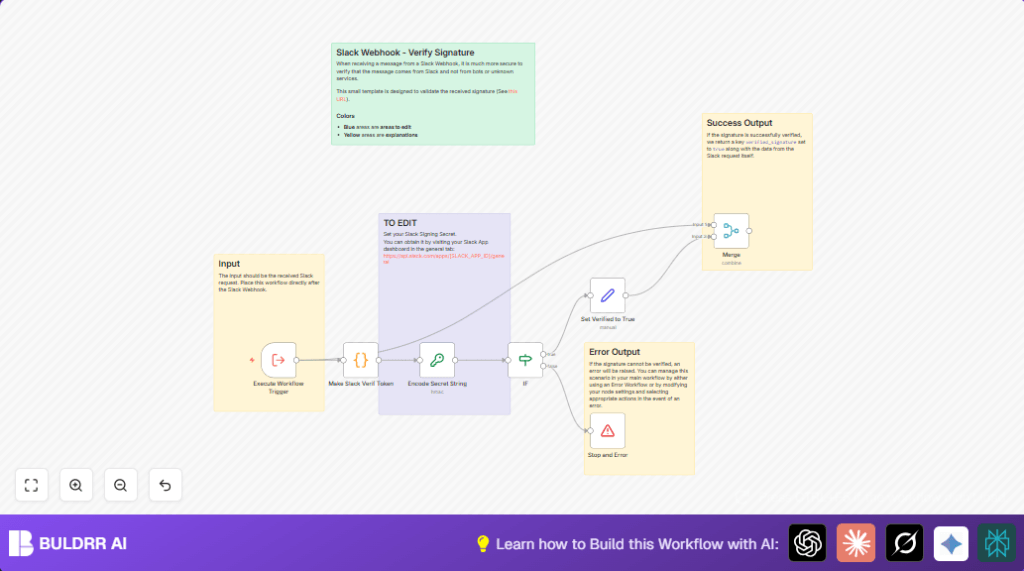

What This Automation Does
This workflow checks if webhook messages come from Slack by verifying their signatures.
It stops fake requests from running and accepts real ones only.
This helps keep automation safe from bad data or attacks.
The workflow gets signature info from incoming requests.
It then recreates the signature using a secret key.
If the new signature matches Slack’s, the workflow continues.
Otherwise, it stops and shows an error.
Beginner Step-by-Step: How to Use This Workflow in n8n
Import and Setup
- Download the workflow file using the Download button on this page.
- Open the n8n editor where you want to add Slack webhook verification.
- Click to import the workflow using “Import from File” option.
- After import, enter your Slack Signing Secret in the Crypto node.
- If the workflow has placeholders for emails, channels, or tables, update them to your own.
- Save the workflow before testing.
Testing and Activation
- Send a real Slack webhook with correct credentials to test the flow.
- Check if the verification passes and actions run.
- If errors appear, confirm your Signing Secret and webhook setup.
- Once verified, activate the workflow by turning it on inside n8n.
- Connect this verification workflow to your main Slack webhook via the Execute Workflow Trigger node.
- Monitor logs to ensure only verified data proceeds.
- If self hosting n8n, use a self-host n8n setup for best control.
Inputs, Process, and Output
Inputs
- The workflow receives incoming Slack webhook requests.
- Requests contain headers with signature and timestamp.
- Body of the request includes event details.
Processing Steps
- The Code node rebuilds Slack’s signature base string using headers and encoded body.
- The Crypto node generates a HMAC SHA256 hash using the Signing Secret.
- An IF node compares Slack’s signature to the computed one.
- If they match, the workflow sets a verification flag true.
- If they do not match, the workflow stops with an error.
- Merges verification data with the original request for downstream use.
Output
- On success, data flows forward with signature_verified set to true.
- On failure, the workflow stops and notifies about invalid signature.
Who Should Use This Workflow
This workflow is made for automation users who get Slack webhook calls.
It protects apps and automations from false or harmful requests.
Anyone managing Slack integrations and wants better trust in data, especially users new to security skips.
Tools and Services Used
- Slack Webhook: Sends signed messages to your workflow.
- Slack Signing Secret: Secret key to verify message authenticity.
- n8n Execute Workflow Trigger node: Connects main flow to verification.
- n8n Code node: Rebuilds the signature string.
- n8n Crypto node: Creates HMAC SHA256 hash.
- n8n IF node: Checks signature match.
- n8n Stop and Error node: Stops invalid requests.
- n8n Set and Merge nodes: Mark verified data and combine outputs.
Customization Ideas
- Change Signing Secret anytime in the Crypto node.
- Send alerts on verification failure using emails or Slack channels.
- Log verified webhook events to a database or Google Sheets.
- Extend flow to handle different Slack event types after verification.
- Modify the Code node if Slack sends raw JSON instead of form data.
Troubleshooting
- Issue: Signature mismatch errors keep happening.
Cause: Request body encoding is different from Slack’s or wrong Signing Secret.
Fix: Double-check encoding steps in Code node and correct Slack Signing Secret in Crypto node. - Issue: IF node always fails verification.
Cause: Missing “v0=” prefix in candidate signature comparison.
Fix: Make sure IF node checks match format exactly, prefix included. - Issue: Stop and Error node does not halt workflow.
Cause: Incorrect node connections or setup.
Fix: Confirm false branch links to Stop node and error message is set.
Summary
✓ Workflow verifies Slack webhook signatures to block fake requests.
✓ Only valid Slack data moves forward in automation.
✓ Stops workflow immediately if verification fails.
✓ Protects sensitive actions from spoofed webhooks.
✓ Simple to add and test in n8n with step-by-step instructions.
Code Snippet Used in the ‘Make Slack Verif Token’ Code Node
This JavaScript creates the signature base string Slack requires.
It encodes form data and adds timestamp and version.
function encodeFormData(data) {
  const encodedData = Object.keys(data)
    .map(key => encodeURIComponent(key) + '=' + encodeURIComponent(data[key]))
    .join('&')
    .replaceAll("%20", "+")
    .replaceAll("*", "%2A")
    .replaceAll("~", "%7E");
  return encodedData;
}
function buildSigBaseString(requestJson) {
  const version = "v0";
  const timestamp = requestJson.headers["x-slack-request-timestamp"];
  const body = requestJson.body;
  const encodedBody = encodeFormData(body);
  const sigBaseString = `${version}:${timestamp}:${encodedBody}`;
  return sigBaseString;
}
const requestJson = $input.first().json;
const sigBaseString = buildSigBaseString(requestJson);
const requestSignature = requestJson.headers["x-slack-signature"];
return {
  json: {
    sigBaseString,
    requestSignature
  }
};
Copy this code directly into the Code node to recreate signatures accurately.
