
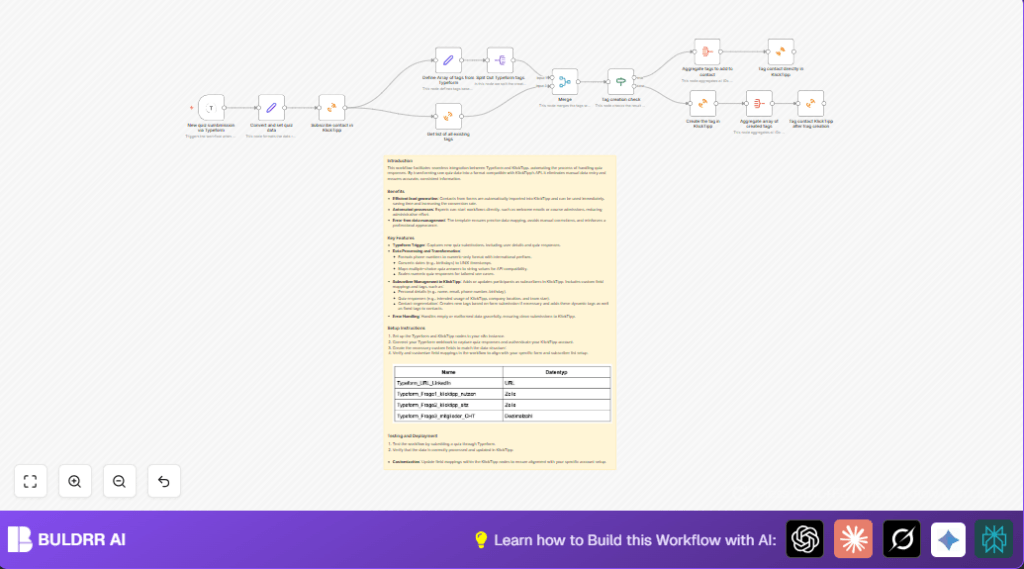

What this workflow does
This workflow connects quiz answers from Typeform directly to KlickTipp. It sends contact details and quiz results automatically. It handles phone number formatting, converts birthdays to UNIX timestamps, and sets tags based on quiz answers. It creates new tags if they do not exist, then assigns all correct tags to each subscriber. This saves most manual steps and gets leads ready for marketing fast.
Who should use this workflow
This is useful for marketing teams running quizzes to collect new contacts.
Users who want to stop copying and pasting answers manually will benefit.
It helps avoid errors in subscriber data by automating updates.
Tools and services used
- n8n: Automates workflow steps.
- Typeform: Collects quiz answers.
- KlickTipp: Email marketing platform for subscriber management.
How this workflow works: Inputs, steps, and output
Inputs
- New quiz submissions from Typeform with contact info and answers.
Processing Steps
- Trigger: Starts when a new Typeform response arrives for your quiz.
- Set node: Cleans phone numbers, converts birthdates, and combines multiple-choice answers.
- KlickTipp Subscriber node: Adds or updates the contact in KlickTipp with mapped fields.
- Tag extraction: Gathers tag names from quiz answers into an array.
- Split Array: Splits tags into single items for checking.
- Fetch existing tags: Gets current tags from KlickTipp to find matches.
- Compare tags: Runs a SQL join to see if each tag exists and fetch tag IDs.
- If node: Decides if new tags need to be created or existing tags assigned.
- Create missing tags: Adds any new tags in KlickTipp.
- Aggregate tags: Collects all tag IDs (existing and new) into arrays.
- Apply tags: Tags the subscriber with all relevant tags.
Output
- KlickTipp subscriber updated with clean data and accurate tagging.
- Manual work cut by hours and fewer mistakes happen.
Beginner step-by-step: How to use this workflow in n8n
Importing the workflow
- Click the Download button on this page.
- Open n8n editor.
- Use the menu option “Import from File” to upload the workflow file.
Configuring credentials and IDs
- Set Typeform API Key credentials in the Typeform Trigger node.
- Set KlickTipp API Key credentials in all KlickTipp nodes.
- Update quiz form ID in the Typeform Trigger.
- Check the quiz question names in the Set nodes to match your Typeform field names.
Testing and activating
- Run a test quiz submission on the linked Typeform.
- Check if contact saved correctly in KlickTipp with right data and tags.
- If all works, toggle workflow status to ON in n8n.
If self hosting n8n or running on your own server, refer to self-host n8n resources for setup details.
Customizations and adjustments
- Add more quiz questions to map in the Set node by adding new field assignments.
- Change tag sources by editing the tag array in the “Define Array of tags from Typeform” node.
- Edit phone number formatting JavaScript in the Set node for other countries.
- Add extra steps like email notification nodes after subscription.
- Insert logging or error tracking nodes to handle workflow errors.
Common issues and troubleshooting
- API authentication error: Confirm all API keys and permissions in n8n credentials.
- Duplicate tag creation error: Check SQL Join keys and tag name cases in the Merge node.
- Data mapping errors: Make sure Typeform quiz question names match exactly in Set node.
- Workflow does not trigger: Ensure webhook URL is registered and active in Typeform settings.
Pre-production checklist
- Verify correct Typeform quiz form ID.
- Verify KlickTipp API keys and required custom fields exist.
- Test with different quiz answers including empty optional fields.
- Test tag creation flow with tags that exist and new ones.
- Back up the workflow and credentials before deploying.
Summary of workflow results
✓ Automates subscriber creation and updates from quiz data.
✓ Cleans phone numbers and changes birthdates to timestamps.
✓ Dynamically adds missing tags and applies all correct tags.
✓ Saves hours of manual work and errors.
✓ Enables faster, accurate marketing follow-ups.
