
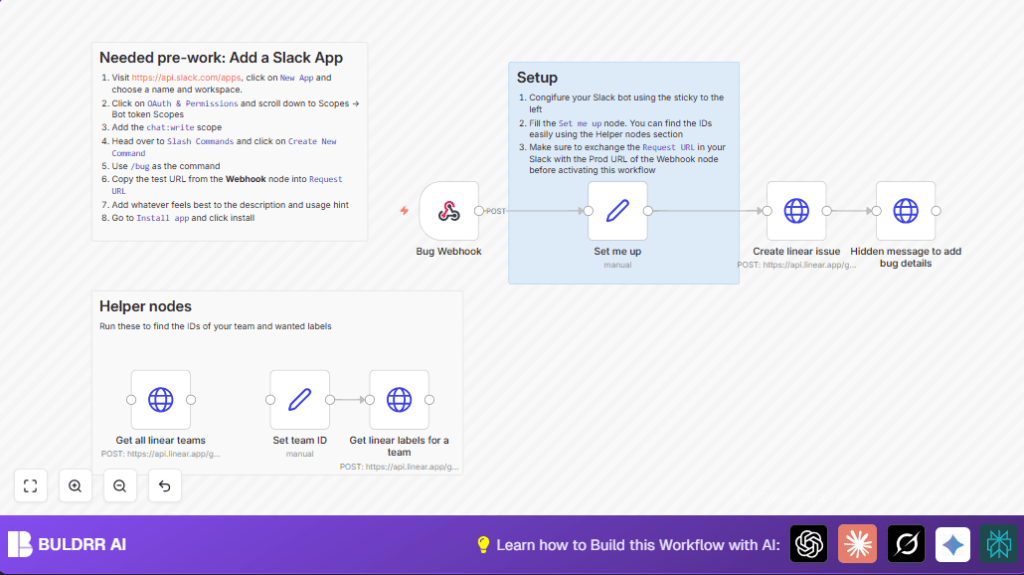

What this workflow does
This workflow takes bug reports sent as Slack slash commands and puts them directly into Linear as new issues.
It saves time by stopping manual entry and makes sure bugs have good details from the start.
The main goal is to help teams track and fix bugs faster and with less mistakes.
Tools and services used
- Slack App with Slash Command: Sends bug reports to n8n.
- n8n Automation Platform: Runs the workflow that connects Slack and Linear.
- Linear API with OAuth2 Authentication: Creates new issues in Linear and fetches team and label IDs.
Inputs, Processing, and Output
Inputs
- A user types /bug command in Slack with a bug description.
- The Slack slash command sends the bug text to the Webhook node in n8n.
Processing Steps
- The workflow cleans the bug text to avoid problems with quotes or formatting.
- It looks up Linear team IDs and label IDs from helper nodes or uses preset values.
- The workflow sends a GraphQL mutation request to Linear to create the issue with title, description, labels, and team info.
- After creating the issue, a Slack message is sent back to the reporter asking for more bug details and linking to the Linear issue.
Output
- A detailed issue created in the Linear project management tool.
- A Slack message prompting the reporter to add reproduction steps, expected and actual behavior.
Beginner step-by-step: How to build this in n8n
Step 1: Import the workflow
- Download the workflow file using the Download button on this page.
- Open your n8n editor (hosted or self-host n8n).
- Click on “Import from File” in n8n and select the downloaded workflow file.
Step 2: Set your credentials and IDs
- Go to Set me up node and enter your Linear teamId and labelIds.
- Use the helper nodes Get all linear teams and Get linear labels for a team to find these IDs if needed.
- Make sure you have valid OAuth2 credentials for Linear API configured in n8n under Settings > Credentials.
- Verify Slack app has correct slash command pointing to the Webhook node URL.
Step 3: Test the workflow
- In Slack, type the slash command with a test bug report, for example: /bug The app crashes on login.
- Watch the workflow run in n8n to make sure no errors happen.
- Check Linear for the new issue and Slack for your reminder message.
Step 4: Activate for production
- Once tests succeed, toggle the workflow active switch in n8n.
- Confirm your Slack slash command URL points to the production Webhook node URL.
- Monitor runs regularly to catch any failures.
Customization ideas
- Add more labels in the Set me up node to tag bugs by priority.
- Modify the issue description template in the Create linear issue node to add or reorder info.
- Send a summary message to a Slack channel after issue creation with an extra HTTP Request node.
- Change the slash command name in Slack and update the Webhook node path accordingly in n8n.
Troubleshooting common problems
- Invalid OAuth token error: Your Linear OAuth login expired or is wrong. Reconnect it in n8n Credentials settings.
- Slash command triggers but no issue shows in Linear: Check Slack slash command URL matches your Webhook node URL and your GraphQL mutation is correct.
- No follow-up Slack message: Ensure the webhook payload includes the response_url and the HTTP request node uses it properly.
Pre-production checklist
- Verify OAuth2 credentials for Linear API are working and active.
- Confirm Slack slash command is installed with correct scopes and URL.
- Test webhook in n8n by sending sample bug reports through Slack.
- Double-check team ID and label IDs using helper nodes or official Linear UI.
- Make sure issues created show correct details and description in Linear.
Deployment guide
- Update Slack slash command to use n8n production webhook URL.
- Activate the workflow in n8n UI.
- Watch execution logs to catch any errors or dropped events.
- Consider adding alerting nodes to email or other channels on failures.
Summary
✓ Save many hours by automating bug report creation from Slack to Linear.
✓ Catch more bug details early, improving team’s fix speed.
→ New issues appear in Linear with structured, clean data.
→ Slack prompts reporters to add important reproduction and behavior info.
Example GraphQL mutation code for creating Linear issue
This code sends the bug title and description with team and label IDs. Replace placeholders with your actual IDs or variables.
{
  "query": "mutation IssueCreate($input: IssueCreateInput!) {issueCreate(input: $input) {issue {id title url}}}",
  "variables": {
    "input": {
      "title": "{{ $json[\"body\"][\"text\"].replaceAll('"',"'") }}",
      "teamId": "YOUR_TEAM_ID",
      "description": "## Description  \n [Add a description here] ...\n Created by: {{ $json[\"body\"][\"user_name\"].toSentenceCase() }}",
      "labelIds": ["YOUR_LABEL_ID"]
    }
  }
}
Sample payload format from Slack slash command webhook
The webhook payload contains user info and bug text that the workflow uses.
{
 "body": {
   "text": "App crashes when saving form",
   "user_id": "U123ABC45",
   "user_name": "janedoe",
   "response_url": "https://hooks.slack.com/commands/XYZ/abc123"
 }
}
