

What this workflow does
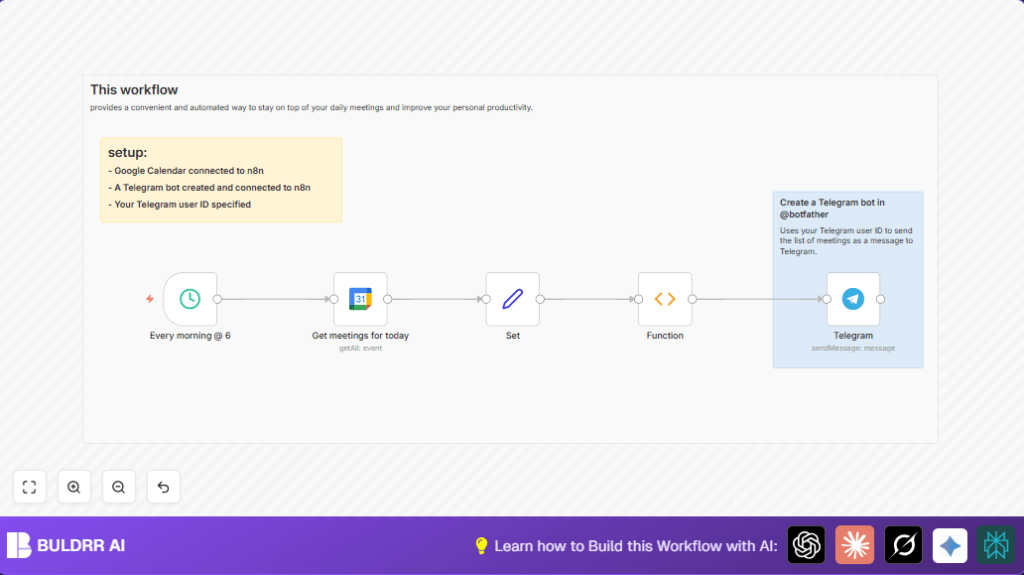
This workflow gets the meetings scheduled for the day from Google Calendar. It collects meeting names, times, and guest details. Then it makes a clear summary message showing this info with local Iran time. After that, it sends this message by Telegram bot to your Telegram account every morning at 6 AM.
This helps users avoid checking calendars and messages separately. It saves about 30 minutes every morning and prevents missed or forgotten meetings.
Who should use this workflow
People who have many daily meetings and use Google Calendar can benefit from this. Especially managers or busy team members who want to stay updated without switching apps.
Users who want meeting lists directly in Telegram for fast reading will find this very useful.
Tools and services used
- Google Calendar API: Gets all events for the day with details.
- Telegram Bot API: Sends meeting summary message to a personal Telegram chat.
- n8n automation platform: Runs the workflow and connects nodes.
Inputs, process, and output explained
Inputs
- Your Google Calendar account with daily events.
- Your Telegram bot credentials and personal user chat ID.
- Configured schedule time in n8n, set to 6 AM Asia/Tehran timezone.
Processing steps
- At 6 AM, the Schedule Trigger node starts the workflow.
- Google Calendar node fetches all today’s meetings from the specified calendar, includes recurring events expanded.
- Set node extracts key fields: meeting name, start time, and guest list into simpler fields.
- Function node loops through each meeting, formats the time using the Iran timezone and converts time to a readable form.
- Function node assembles a text message in Markdown showing each meeting with its time and guests or notes if no guests.
- Telegram node sends this text message to the user’s Telegram chat using the bot.
Output
A well-formatted Markdown message in your Telegram inbox listing all meetings for the day with times and guest emails.
Beginner step-by-step: How to use this workflow in n8n
Importing the workflow
- Download the workflow JSON file by clicking the Download button on this page.
- Open the n8n editor where you want to use this workflow.
- Click the menu and select “Import from File” and upload the downloaded JSON workflow.
Configuring after import
- Go to credentials and add your Google Calendar OAuth2 credentials. Make sure the calendar is connected and active.
- Add Telegram bot credentials using the Telegram Bot API token generated from @BotFather.
- Update the Telegram node’s chat ID with your personal Telegram user ID.
- If needed, update the Google Calendar node’s calendar ID to match your specific calendar email.
Testing and activation
- Run the workflow manually inside n8n editor to check if it fetches meetings and sends a Telegram message correctly.
- If the test works fine, activate the workflow by toggling the switch in n8n. The workflow will then run daily at 6 AM automatically.
- If using self hosting n8n, consider visiting self-host n8n for hosting info and setup tips.
Customizations ideas
- You can change displayed meeting times to a different local time by editing the locale code in the Function node.
- Add meeting location or descriptions by including those fields in the Set node and updating the Function node to show them.
- Add more schedule trigger nodes for multiple notifications like midday or evening reminders.
- Change Telegram chat ID to a group chat or channel to send meetings summary to your team instead of individually.
Common problems and solutions
Empty Google Calendar data: Check calendar ID and date range in the Google Calendar node. Make sure there are meetings scheduled for today.
Telegram 401 Unauthorized error: Check Telegram bot API token is correct and active. Confirm the chat ID matches your personal Telegram user ID.
Wrong timing of workflow run: Set your workflow timezone to Asia/Tehran or your actual timezone in workflow settings to fix trigger firing time.
Summary of benefits
✓ Saves about 30 minutes every morning from manual calendar and chat checks.
✓ Delivers meeting lists to Telegram first thing to improve meeting prep.
✓ Prevents missing meetings or scrambling for attendee info.
✓ Runs automatically every day at configured time without user action.
✓ Easy to customize for timezone, extra meeting details, or group notifications.
