
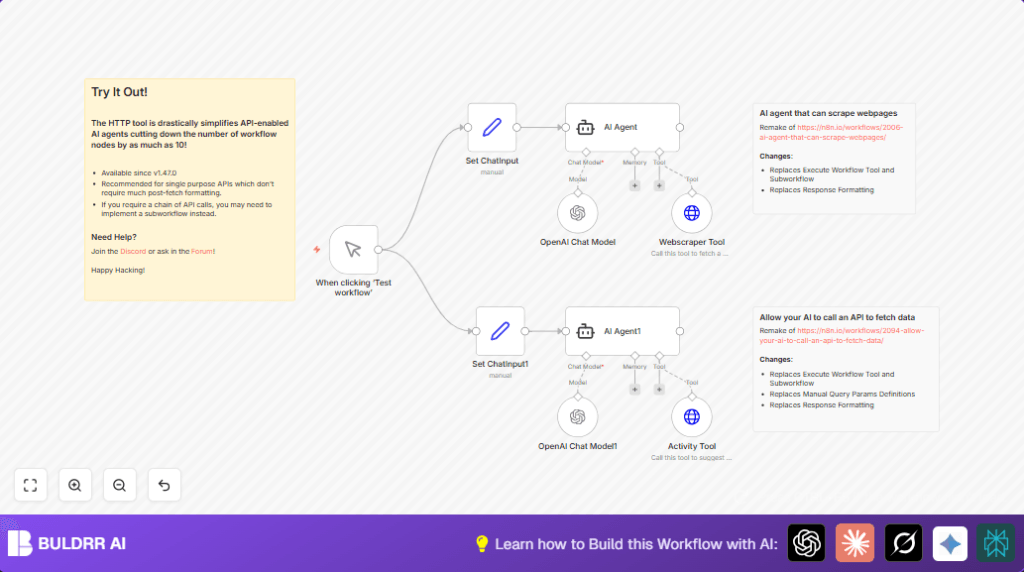

What This Automation Does
This workflow uses AI agents to get data from websites and APIs automatically.
It fetches GitHub issues and suggests activities based on user input.
The result is faster data gathering with fewer errors and simpler n8n workflows.
It works by asking AI to handle web scraping and API calls inside n8n, so no complicated code is needed.
Tools and Services Used
- OpenAI Chat Models: Understands and creates text responses from input prompts.
- Langchain Agent Nodes in n8n: Controls AI prompts and decides how to use tools.
- Firecrawl API: Scrapes webpage content via HTTP POST requests.
- Bored API: Provides activity suggestions by type and participant count.
- n8n Set Nodes: Stores user input prompts for AI processing.
- n8n Manual Trigger Node: Starts workflow manually during tests.
Workflow Input → Processing → Output
Input
- User query for latest GitHub issues or activity suggestions enters the workflow via Set nodes.
- Manual trigger starts the workflow on demand.
Processing Steps
- AI agents receive user text through Langchain Agent nodes.
- Agents call OpenAI Chat Model nodes to interpret prompts and generate commands.
- For GitHub scraping, the web scraper tool calls Firecrawl API with the target URL.
- For activity suggestions, the activity tool accesses Bored API with parameters like type and participants.
- Agents combine AI understanding with API data for output results.
Output
- Latest GitHub issues information scraped and returned.
- Personalized activity ideas based on input preferences.
Who Should Use This Workflow
This is for users who want to get web data and API suggestions using AI but do not want to build big subworkflows.
It helps data analysts, AI users, or automation beginners save time on manual data gathering.
You don’t need deep programming skills, just basic n8n editor knowledge to follow setup and run the workflow.
Beginner Step-by-Step: How To Use This Workflow in n8n
Step 1: Download and Import
- Click the Download button on this page to get the workflow file.
- Open your n8n editor, select Import from File, and upload the downloaded workflow.
Step 2: Configure Credentials
- Add your OpenAI API Key in the credential settings inside n8n.
- Add your Firecrawl API Key for the web scraping node under HTTP Header Auth.
Step 3: Update Inputs If Needed
- Modify the chatInput values in the two Set nodes if you want to change the GitHub URL or activity request details.
- Confirm any other node-specific IDs like emails or folders if your use case requires it.
Step 4: Test the Workflow
- Click Execute Workflow on the Manual Trigger node to run and see outputs from AI Agents and API calls.
- Check the output data in node execution details for correctness.
Step 5: Activate for Production
- Switch the Manual Trigger to an automatic trigger if desired (like webhook or schedule).
- Save and Activate the workflow for regular use.
- Consider self-host n8n for secure and scalable operation.
Customizations ✏️
- Change the URL in the GitHub scraping input Set node to any web page you need scraped.
- Modify query parameters in the Activity Tool node to suggest different types or numbers of participants.
- Switch OpenAI Chat Model node versions, like to GPT-4, by updating API key permissions.
- Add Code nodes after scraping to clean or format data to your liking.
- Include more Langchain Agent nodes with HTTP Request tools for other APIs.
Troubleshooting ????
- Authentication failed for Firecrawl API: Check if the API key is present, not expired, and correctly assigned in HTTP Header Auth.
- OpenAI API request rejected: Validate OpenAI API key, confirm account is active, and watch for usage limits.
- No output from Activity Tool: Ensure query parameters like “type” and “participants” are set correctly.
Pre-Production Checklist ✅
- Confirm valid API keys for Firecrawl and OpenAI credentials are active in n8n.
- Test Manual Trigger runs to verify both scraping and activity suggestion flows work.
- Verify HTTP POST body format in the web scraping node matches Firecrawl API spec.
- Check that AI Agents receive the input correctly and send back valid responses.
- Use Sticky Notes in the workflow to record instructions and node purposes for team clarity.
Deployment Guide
After testing, activate the workflow for automatic or on-demand use.
Watch workflow logs in n8n to find any errors during runs.
For more volume and reliability, run on a server or cloud using self-host n8n.
Summary of Benefits and Outcomes
✓ Saves time by automating web scraping and API calls with AI agents.
✓ Reduces errors by avoiding manual data handling and formatting.
✓ Simplifies n8n workflows by cutting down many nodes into powerful AI-driven steps.
✓ Provides flexible data outputs like GitHub issue lists and personalized activities.
✓ Offers clear instructions to test, modify, and deploy for daily use.
