

What This Lead Generation Workflow Does
This workflow automates the process of getting lead data from websites or LinkedIn profiles.
It fixes the problem of manual data collection by scraping, cleaning, filtering, and saving leads automatically.
Users get a ready-to-use list of leads saved in Airtable for quick outreach.
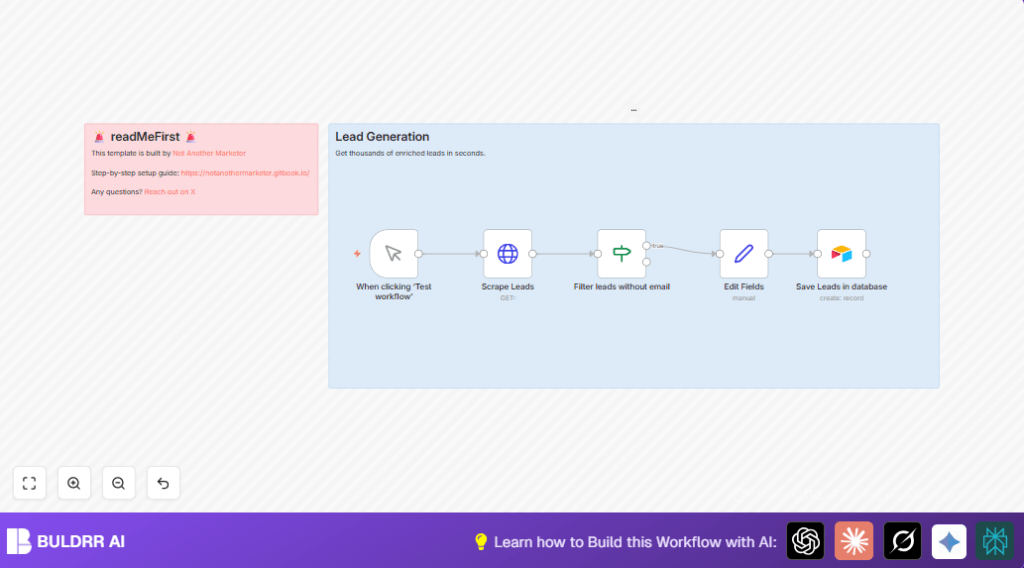
The workflow triggers with a manual start.
It sends an HTTP request to a lead scraping API and gets detailed lead info with emails, job titles, and company details.
Then it filters out leads that don’t have emails.
Next, it edits and formats fields to keep data clear and consistent.
Finally, the clean leads are saved into an Airtable base.
Tools and Services Used
- n8n automation platform: Runs the workflow nodes.
- Lead scraping API: Provides lead data including personal and work emails, LinkedIn URLs, and job data.
- Airtable: Stores the processed lead data in organized bases and tables.
- HTTP Request node: Sends the API call to get leads.
- Manual Trigger node: Starts the workflow when pressed.
- Filter and Set nodes: Used for data clean-up and mapping.
Who Should Use This Workflow
Anyone who needs to gather lead contacts without spending hours doing it manually.
Good for marketing managers, sales teams, and outreach coordinators with little time for data entry.
The workflow works well if a user has basic n8n experience and access to Airtable and a lead scraping API.
Beginner Step-by-Step: How to Use This Workflow in Production
1. Import the Workflow
- Download the workflow file using the Download button on this page.
- Open the n8n editor where you work on workflows.
- Use the “Import from File” option and upload the saved workflow file.
2. Configure Credentials and Settings
- Add your Airtable API Key in the Airtable node credentials.
- Fill in the Base ID and Table name where leads will be saved.
- Update the HTTP Request node, especially the “url” parameter in the JSON body to target the website or domain you want.
3. Test the Workflow
- Run the workflow manually by clicking the Manual Trigger node and then pressing “Execute Node” or “Run Workflow”.
- Watch the data go through each node in the editor panel to make sure leads come through and save properly.
4. Activate for Production
- Once the test works, toggle the workflow’s “Active” switch on.
- You can trigger it manually anytime or attach a Schedule node to automate future runs.
Workflow Inputs, Processing, and Outputs
Inputs
- Trigger fromManual Trigger node starting workflow.
- Target URL or domain set in HTTP request for specific leads.
- Lead scraping API response containing lead contacts.
Processing Steps
- HTTP Request node calls API and gets lead data JSON.
- If node filters out leads missing any email field.
- Set node formats lead data fields, mapping names and emails.
- Airtable node adds cleaned leads to the right base and table.
Outputs
- Airtable base updated with new, valid lead contacts.
- Filtered, clean data ready for email outreach or sales calls.
- Reduced manual effort and better quality data than copying manually.
Customization Ideas
- Add more lead fields like phone numbers or social links in the Set node.
- Change totalRecords in the HTTP node to get more or fewer leads per run.
- Use a different Airtable base or table to organize leads by campaign or region.
- Make the filter stricter by also filtering on job titles or locations.
Troubleshooting
- Problem: No leads saved in Airtable.
Cause: Filter removes all leads or API returns empty.
Fix: Disable filter node and test HTTP Request node output. - Problem: Airtable authentication error.
Cause: Invalid or expired API Key.
Fix: Update Airtable credentials with valid API Key.
Prerequisites and Notes
- n8n account: Cloud or self-host n8n instance to run workflows.
- Airtable account: with API Key, base, and table to save leads.
- Access to HTTP Request node: To call the lead scraping API.
- Some basic skills to import workflows and update settings.
Example Lead Scrape Request JSON
This is the JSON sent to the lead scraping API inside the HTTP Request node.
You can update the “url” value as needed.
{
  "getPersonalEmails": true,
  "getWorkEmails": true,
  "totalRecords": 500,
  "url": ""
}
Example Field Mapping in Set Node
Use expressions to assign the scraped data to clean, correct field names.
Example from the Set node named “Edit Fields”:
{
  "first_name": "={{ $json.first_name }}",
  "last_name": "={{ $json.last_name }}",
  "email": "={{ $json.email }}",
  "headline": "={{ $json.headline }}"
}
Example Airtable Field Mapping
In the Airtable node, map JSON fields to Airtable columns:
{
  "first_name": "={{ $json.first_name }}",
  "email_address": "={{ $json.email }}",
  "organization_name": "={{ $json.organization }}"
}
Summary
✓ Automates collecting, cleansing, and saving lead data.
✓ Gives ready-to-use Airtable contacts for marketing and sales.
✓ Saves users 5+ hours a week by replacing manual work.
✓ Lowers errors by filtering and formatting lead info.
✓ Easy to run on-demand and customize for own needs.
→ Best for teams needing fast, accurate lead lists.
→ Simplifies lead scraping with clear steps and configuration.
→ Helps keep sales pipelines full with valid emails.
