

What This Automation Does
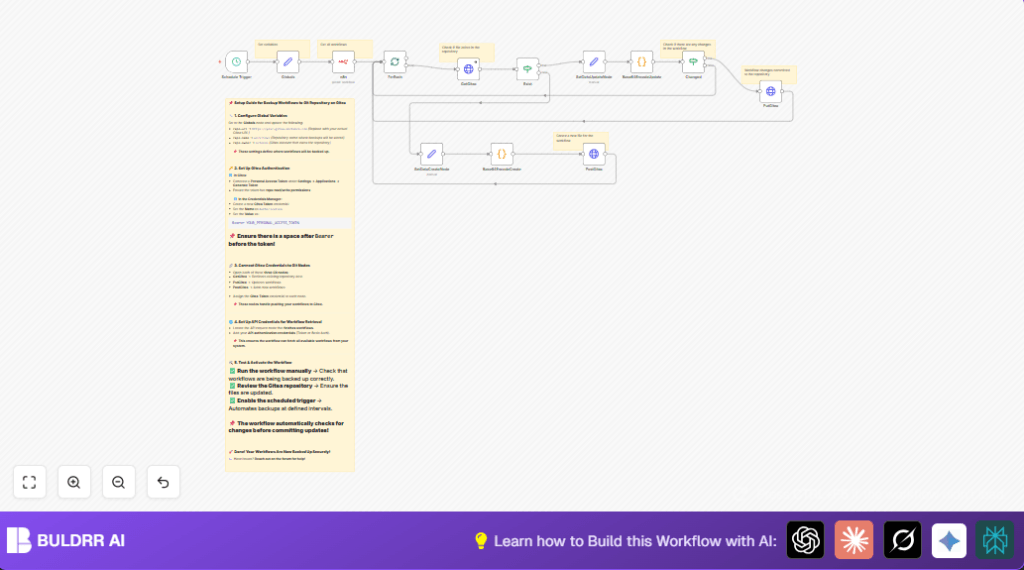
This workflow makes backups of n8n workflows in a Gitea Git repository automatically every 45 minutes.
It solves the problem of manual backup, reducing errors and saving time.
The result is a safe, versioned copy of all workflows with commits only when there are changes.
You don’t have to export manually and you avoid losing work or versions.
Step-by-Step Guide
Beginner Instructions: How To Use This Workflow in n8n
Download and Import
- Download the workflow file using the Download button on this page.
- Open the n8n editor where you manage workflows.
- Use “Import from File” to add the workflow to n8n.
Configure Settings
- Go to the Globals Set node and update your Gitea repo URL, name, and owner to match your repository.
- Add your Gitea API Key (Personal Access Token) in the GetGitea, PostGitea, and PutGitea HTTP Request nodes using the provided credential input.
- Check your n8n API credentials are correct in the n8n node that fetches workflows.
Test and Activate
- Run the workflow manually once to confirm data retrieval and commits work.
- Look for new or updated workflow JSON files in your Gitea repo.
- Activate the Schedule Trigger node to start automatic backups every 45 minutes.
This simple process sets up automated backup without building from scratch.
For help on self hosting n8n safely, see self-host n8n.
Workflow Inputs, Processing, and Outputs
Inputs
- n8n API: Get all workflows as JSON.
- Gitea API: Check if workflow files exist and read their content.
Processing Steps
- Trigger runs every 45 minutes.
- Split workflows into single batches.
- Get file info from the Gitea repo by workflow name.
- Check if file exists or needs to be created.
- Serialize and Base64 encode workflow JSON using Python code.
- Compare new and existing Base64 content to detect changes.
- POST new files or PUT updates to Gitea repo.
- Continue loop for all workflows.
Output
- A Gitea Git repository with workflow JSON files stored and versioned.
- Commits only happen if workflows changed to keep history clean.
Who Should Use This Workflow
This workflow is for anyone running many n8n workflows who wants regular, automatic backups.
It helps teams using self-host n8n or on cloud instances.
Also good if backups and version control of workflows are important but manual exporting is slow or error-prone.
Tools and Services Used
- n8n API: To fetch workflows.
- Gitea API: To read, create, and update files in repository.
- HTTP Request node: For API calls to Gitea.
- Base64 encoding (Python code node): For file content encoding.
- Schedule Trigger node: To run the workflow automatically.
Customizations
- Change backup frequency in the Schedule Trigger node.
- Set multiple repositories by adding more repo info in the Globals Set node and loop through them.
- Add timestamps or folders by editing file names in GetGitea, PostGitea, and PutGitea nodes.
- Add Slack or Email nodes at the end to get notifications.
Common Issues and Fixes
- 404 error checking file: Normal on first backup for new workflows. Workflow logic creates new files.
- No commits on changed workflows: Usually due to Base64 comparison issues. Check JSON formatting.
Pre-Production Checklist
- Check Gitea API URL is correct.
- Confirm Gitea personal access token has write rights.
- Test the workflow manually before activating scheduled runs.
- Make sure Base64 encoding runs without errors.
- Verify the logic correctly checks file existence and changes.
- Watch commit results appear in the Gitea repository.
Deployment Guide
After testing, activate the Schedule Trigger node.
Monitor workflow runs in the n8n UI.
Watch the Gitea repo for updated workflow backups.
Summary and Results
✓ Automates backup of all n8n workflows into Gitea every 45 minutes.
✓ Avoids manual export errors and saves time.
✓ Only commits workflows when content changes.
→ Gives safe, versioned backups and peace of mind for automation users.
