

What This Automation Does
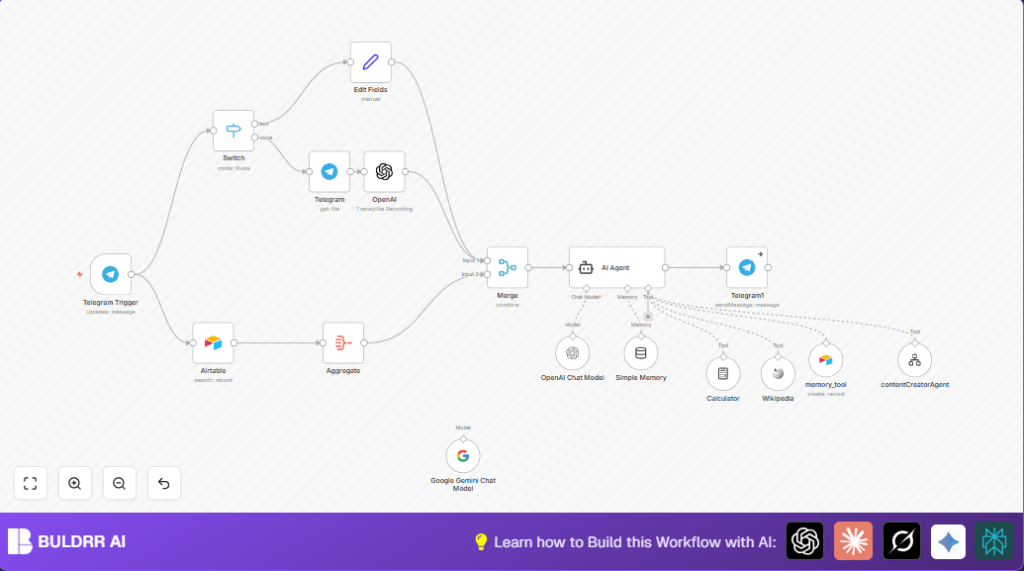
This workflow listens to messages in Telegram.
It checks if the message is text or voice.
Voice messages get downloaded and turned into text.
The system looks up past talks from Airtable memory.
Then AI models like OpenAI GPT-4 and Google Gemini give detailed study help on signal processing.
The AI acts like a tutor who guides learning, not just answers questions.
Finally, it sends the reply back to the Telegram chat.
This helps students get fast, clear tutoring inside Telegram.
Tools and Services Used
- Telegram Bot API: Receives user messages.
- OpenAI API: Transcribes voice audio and provides text chat completion using GPT-4.
- Google Gemini API: Offers advanced AI language model support.
- Airtable: Stores and retrieves user conversation memory.
- n8n: Automates the entire workflow process.
Inputs, Processing, and Outputs
Inputs
- User messages in Telegram, either text or voice notes.
Processing Steps
- Detect message type (text or voice).
- If voice, download audio and transcribe to text with OpenAI’s whisper model.
- Fetch user history from Airtable to remember past interactions.
- Combine input text and memory data.
- Send combined info to AI agent nodes using GPT-4 and Google Gemini to generate study guidance.
- Save concise summary of AI answers back to Airtable for future memory.
- Send AI response text back to Telegram chat.
Outputs
- AI-generated, personalized study help messages sent to Telegram users.
Beginner Step-by-Step: How to Use This Workflow in n8n
Step 1: Import the Workflow
- Download the workflow file using the Download button on this page.
- Open the n8n editor where you manage workflows.
- Click “Import from File” and select the downloaded workflow file.
Step 2: Configure Credentials and IDs
- Add Telegram Bot API credentials in the Telegram Trigger node.
- Enter OpenAI API keys in the OpenAI nodes for transcription and chat.
- Provide Google Gemini API access in the Langchain AI Agent node.
- Update Airtable base ID, table names, and API key in the Airtable Search and Airtable Create nodes.
Step 3: Test the Workflow
- Send a test message or voice note to the Telegram bot.
- Watch the workflow run in n8n to check for any errors.
Step 4: Activate for Production
- Once tested, turn the workflow “On” in n8n to start live operation.
If needed, consider using self-host n8n for more control over data.
Customization Ideas
- Include support for images and PDFs with OCR to answer visual questions.
- Change the AI agent’s prompt to tutor other subjects or switch style from mentor to quizmaster.
- Adjust how much past memory is fetched or stored in Airtable to fit user needs.
- Add translation steps for multilingual support.
- Test different AI models to find cost or speed benefits.
Troubleshooting Common Issues
- Telegram messages not triggering workflow
Check the webhook URL in Telegram bot settings matches the n8n webhook exactly.
Verify the bot has message read permissions and “message” update type is enabled in the Telegram Trigger node. - AI Agent returns no output
Make sure the Merge node combines all required inputs properly.
Check AI agent inputs match expected format and system prompt syntax is correct. - Airtable node not returning memory
Confirm Airtable API key permissions and correct base/table IDs.
Verify the Airtable table has data available.
Pre-Production Checklist
- Check Telegram bot receives text and voice messages correctly.
- Validate audio transcription outputs make sense.
- Make sure Airtable queries return relevant memory.
- Confirm AI agent responses are educational and helpful.
- Verify Telegram bot sends replies back to the user.
- Backup important Airtable data before going live.
Deployment Guide
Turn the workflow on inside n8n after testing.
Watch the workflow dashboard for any errors or quota issues.
Store user memory in Airtable to keep personalized context.
Set alerts for API limits if needed.
Summary
→ This workflow brings intelligent, personalized study help to Telegram users.
→ It converts voice notes into text and remembers past questions for better answers.
✓ Students get quick, clear tutoring on signal processing topics.
✓ The AI guides thinking, not just answers questions directly.
✓ Airtable stores conversation history, improving over time.
✓ Easy to use in n8n with simple import and setup steps.
