

What this workflow does
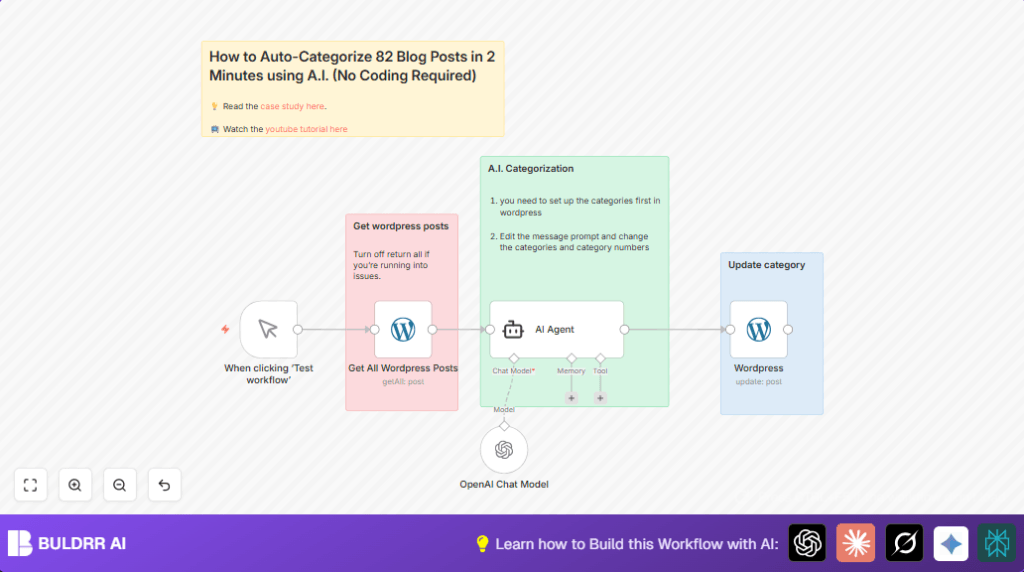
This workflow automatically assigns the right category to every WordPress blog post using AI. It solves the problem of spending hours sorting posts manually and fixes mistakes in categories. Results come fast, with posts categorized correctly to help visitors find content easier and improve site structure.
It works by getting all posts from WordPress, letting AI check each post title, picking one best category ID from a fixed list, then updating each post inside WordPress with that category. This way, no manual category selection is needed.
Who should use this workflow
This workflow is good for those managing many WordPress blog posts and want to save time.
If a person spends hours fixing post categories or makes mistakes, this automation helps. It is easy to use without needing to know coding.
Tools and services used
- n8n: Main automation platform for creating and running the workflow.
- WordPress API: Reads and updates blog posts and categories on the website.
- OpenAI API: AI service to analyze post titles and pick categories.
- LangChain AI Agent node: Uses AI with a custom prompt to assign categories.
How this workflow works (Input → Process → Output)
Input
The workflow starts by fetching all blog posts from WordPress using the WordPress API using an API Key.
Process
The AI Agent node reads each post title and uses a fixed list of category IDs to pick one best category number. OpenAI Chat Model can be used before AI Agent for better understanding.
Output
Posts are updated in WordPress to include the AI-chosen category, making site categories accurate without manual work.
Beginner step-by-step: How to use this workflow in n8n
Step 1: Import the workflow
- Download the workflow file from this page.
- In n8n editor, click on top-right menu, choose Import from File.
- Select the downloaded workflow file to import it inside your n8n workspace.
Step 2: Add credentials
- Open each WordPress node and add valid WordPress API credentials (API Key).
- Open the OpenAI Chat Model node and add your OpenAI API Key.
Step 3: Update IDs if needed
- Check if the AI Agent prompt category IDs match your WordPress categories. Change numbers or names if your site uses different categories.
Step 4: Test the workflow
- Click the Manual Trigger node and then press Execute Workflow.
- Check WordPress admin to confirm posts were categorized correctly.
Step 5: Activate for production
- Toggle the workflow to Active in n8n.
- Use manual trigger when you want to categorize new or changed posts.
Use self-host n8n if running this on your own server.
Customization ideas
- Change the category list in AI Agent prompt to fit your WordPress taxonomy.
- Limit posts fetched by the WordPress getAll node by turning off “Return All” and adding filters to select only new posts.
- Add notifications with Email or Slack nodes after updating posts to get alerts when categorization finishes.
Common issues and fixes
- If WordPress API authentication fails, check API key correctness and user permissions under WordPress > Users > Application Passwords.
- If updated categories do not show in WordPress, verify that the post IDs and category ID fields are correctly mapped in the WordPress update node.
Summary
✓ Automatically assigns one main category to WordPress posts using AI.
✓ Saves hours of manual category editing.
✓ Uses WordPress API and OpenAI AI services.
✓ Helps organize blog content and improve visitor navigation.
✓ Simple to configure and run inside n8n by importing the workflow and adding credentials.
