
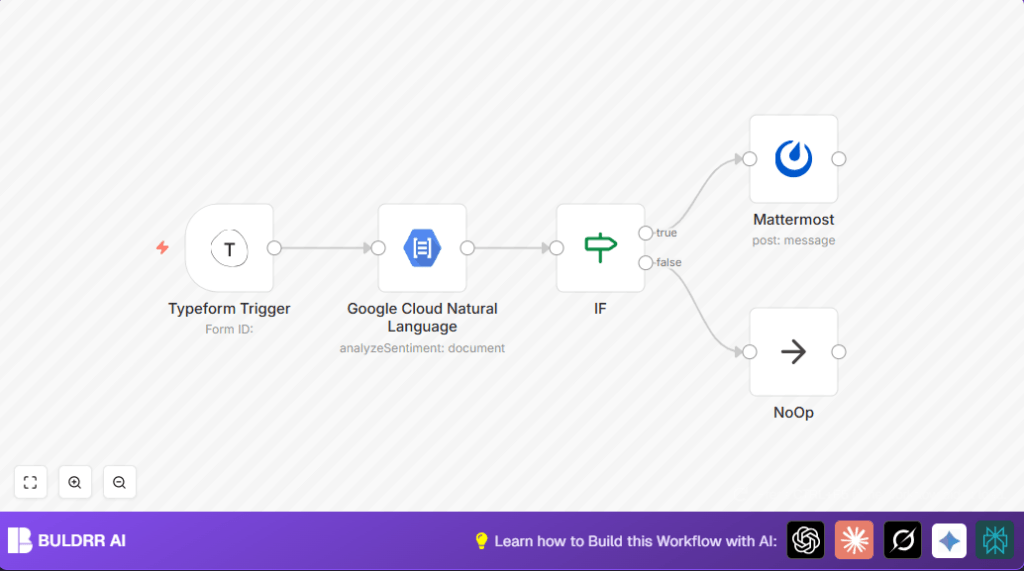

What This Workflow Does
This workflow automates checking event feedback from Typeform for positive or negative feelings.
When new feedback arrives, it reads the answer about the event, sends that text to Google Cloud Natural Language API to get a sentiment score, then checks if the feedback is negative or not.
If the feedback is negative, it sends a message with details to a Mattermost chat channel for quick team review.
If feedback is not negative, it stops silently.
This saves hours of manual reading and helps catch problems fast.
Who Should Use This Workflow
This is for event coordinators or teams that collect written feedback using Typeform and want fast alerts on unhappy feedback.
It fits users who want to reduce manual work and improve response time after events.
No need to read all answers manually or miss critical comments.
Tools and Services Used
- Typeform Trigger node: Watches for new responses in a specific feedback Typeform.
- Google Cloud Natural Language API: Analyzes text sentiment, returns score from -1 (negative) to +1 (positive).
- Mattermost node: Sends feedback alert messages to a selected chat channel.
- NoOp node: Silently ends workflow for neutral or positive feedback.
Workflow Inputs, Processing, and Output
Inputs
- New feedback responses from Typeform form with question: “What did you think about the event?”
Processing Steps
- Trigger node detects each new form response in real time.
- Extracts the exact answer text from the specified question.
- Sends the text to Google Cloud Natural Language API for sentiment analysis.
- Receives sentiment score (numeric, range -1 to 1).
- Checks if the score matches a negative condition using an IF node.
- If negative, triggers sending a formatted message to Mattermost channel.
- If not, passes to NoOp node to silently finish without action.
Output
- A message posted in Mattermost channel with feedback text and its sentiment score for negative feedback items only.
Beginner Step-by-Step: How to Use This Workflow in n8n
Step 1: Import the Workflow
- Download the workflow file using the Download button on this page.
- Open the n8n editor in your account.
- Click on the menu, select “Import from File”, and choose the downloaded file.
Step 2: Configure Credentials and IDs
- Setup your Typeform API credentials in the Typeform Trigger node.
- Check the Typeform Trigger node’s form ID matches your feedback form.
- Add your Google Cloud OAuth2 credentials that have access to Natural Language API in the Google Cloud Natural Language node.
- Verify the expression mapping the feedback text input is correct:
={{$node["Typeform Trigger"].json["What did you think about the event?"]}} - Set your Mattermost channel ID and API credentials in the Mattermost node for posting messages.
- Confirm the message uses this expression exactly to send the text and score:
=You got a new feedback with a score of {{$node["Google Cloud Natural Language"].json["documentSentiment"]["score"]}}. Here is what it says:{{$node["Typeform Trigger"].json["What did you think about the event?"]}} - Make sure the IF node checks for sentiment score less than 0 to catch negative feedback.
Step 3: Test and Activate
- Submit a test feedback response in your Typeform with a negative comment.
- Watch if a message appears in the Mattermost channel.
- If all works, save the workflow and turn the activate toggle to ON.
- Your workflow now runs live to notify your team on negative feedback automatically.
If hosting n8n yourself, link self-host n8n for more setup options.
Customization Ideas
- Change the IF node’s sentiment score threshold to catch mild dissatisfaction by increasing cutoff (e.g., below 0.5).
- Add extra feedback question fields into both the Typeform Trigger extraction and Mattermost message template.
- Use more advanced routing with multiple IF or Switch nodes to send positive, neutral, and negative feedback notices to different Mattermost channels.
Handling Errors and Edge Cases
- If the Google Cloud Natural Language node fails, check if OAuth2 credentials are correct and the API is enabled in your Google Cloud account.
- If no messages appear in Mattermost, verify the IF node condition matches sentiment scores below zero and make sure the Mattermost channel ID is correct.
- If the workflow does not start on new Typeform responses, confirm the webhook URL is properly registered and activated in the Typeform settings.
- Neutral or positive feedback ends in the NoOp node to avoid unnecessary alerts.
Summary of Outcomes
✓ Saves manual review time by automatically analyzing feedback sentiment.
✓ Sends immediate alerts on negative feedback to Mattermost, speeding team response.
✓ Reduces errors from manual reading and missed comments.
✓ Easy to configure and test inside n8n with clear step-by-step usage.
✓ Can be customized for different alert thresholds and multi-channel notifications.
