
Deep Dive: Build an AI-Powered Webpage Content Extractor with n8n
- Updated:
Press CTRL+F5 if the workflow didn't load.

What this workflow does
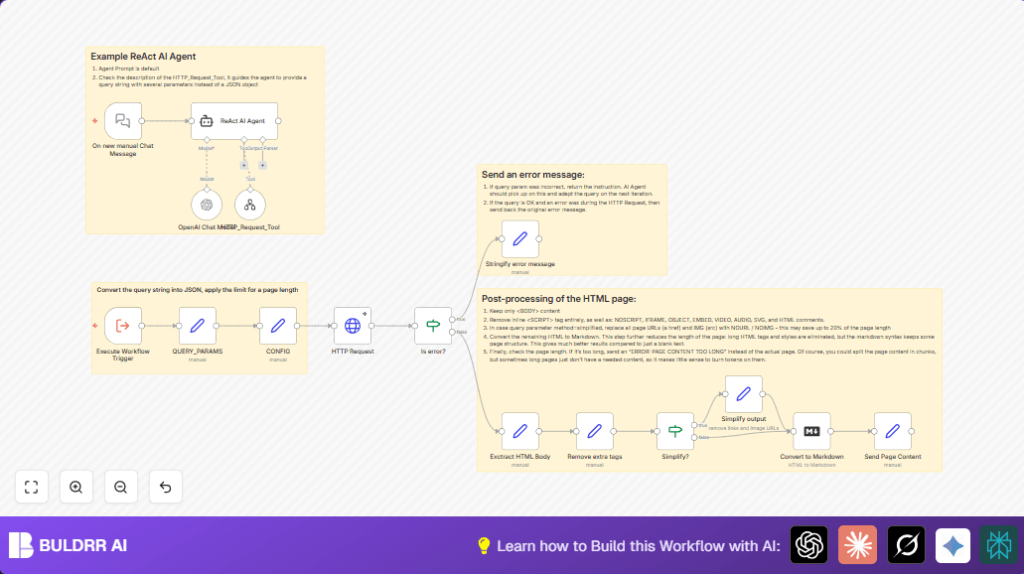
This workflow gets a webpage URL and picks only the important parts from the page body.
It removes scripts, pictures, and other things that don’t help reading.
Then it changes this clean page content into Markdown format.
Users get short and easy text that AI can read well.
The workflow stops if the page text is too long to handle.
Users also can choose to get a more simple version with no links or images.
Who should use this workflow
This tool is good for people who want text content from websites fast.
Users without coding skills can run it in n8n and get neat text output.
If users must get plain content for AI models, this workflow works well.
It saves time from cleaning HTML or long page extra parts.
Tools and services used
- n8n: Workflow automation platform where the flow runs.
- OpenAI API: Provides GPT-4 language model for smart text processing.
- Langchain nodes: For AI agents managing chat and tool calls.
- HTTP Request node: Fetches webpage HTML content.
- Markdown node: Converts HTML into Markdown format.
Inputs, Processing Steps, and Outputs
Inputs
- Manual chat input with URL and method parameters.
- Query string like
?url=https://site.com&method=simplified. - Optional max content length in settings.
Processing Steps
- Parse query: Break query string into usable URL and method keys.
- Call HTTP Request: Get full webpage HTML, allow unsafe certificates.
- Error check: Find if fetch failed and send proper message.
- Extract <body>: Use regex to pull content inside the body tag.
- Clean HTML: Remove unwanted tags like
script,style, and multimedia tags. - Optional simplification: If method is simplified, remove href and image src attributes.
- Convert to Markdown: Change cleaned HTML to Markdown for easier use.
- Check length: Compare Markdown length with max limit and send error if too large.
Outputs
- Markdown text called
page_contentwith clean readable webpage body. - Clear error messages on invalid input or long output.
Beginner step-by-step: How to use this workflow in n8n production
Step 1: Download and import
- Download the workflow using the Download button on this page.
- Open the n8n editor. Use Import from File to add the workflow.
Step 2: Add credentials and update info
- Go to OpenAI Chat Model node and add the API Key.
- Check nodes with URLs or channels and update any IDs or addresses if needed.
Step 3: Test the workflow
- Trigger the Manual Chat Trigger with sample input, like
?url=https://example.com&method=simplified. - Confirm the output shows cleaned Markdown text or an error message.
Step 4: Activate and run in production
- Once satisfied, click the activate button to turn the workflow on.
- Send real queries to automate webpage text clean up.
If users want to run self-host n8n instances, this is a helpful link for setup: self-host n8n.
Customization ideas
- Change maxlimit value to adjust allowed page content size.
- Add nodes to export Markdown to PDF or plain text if needed.
- Edit the ReAct agent prompt text to change AI behavior.
- Use proxies in HTTP Request node for special website access.
- Add nodes to log errors externally for monitoring.
Edge cases and failures
- Invalid query format: Workflow responds with clear error if URL missing or bad.
- SSL or HTTP fetch errors: Allow unauthorized certificates setting helps bypass some issues.
- Content too long: Error returned if page length beyond maxlimit to save resources.
Summary of key points
→ Input a webpage URL and method into a manual chat trigger.
→ Workflow fetches only the body content, cleans to remove scripts and images.
→ Converts to Markdown format easy for AI and humans to read.
→ Stops and informs if page text is too long.
→ Users get fast, neat web content without manual HTML cleaning.
✓ Saves hours of manual web content cleanup.
✓ Produces standardized, readable plain text from pages.
✓ Supports simple or detailed output options.
✓ Easy to import, configure, test, and run inside n8n.
Visit through Desktop to Interact with the Workflow.
