

What this workflow does
This workflow looks inside a Google Drive folder for Amazon Ads reports in XLSX and CSV files.
It reads these reports and organizes the data about campaigns, search terms, budgets, and targeting.
Then, it sends this data to an AI model (GPT-4o) to get clear suggestions for improving Amazon Sponsored Product campaigns.
Finally, it creates an email with detailed recommendations and sends it automatically to a marketing team or manager.
Who should use this workflow
Advertisers or marketing teams handling many Amazon Sponsored Products campaigns.
People who spend hours daily checking reports manually and want quick, reliable optimization tips from AI.
Tools and services used
- n8n: Automation platform to run the workflow.
- Google Drive: Stores daily Amazon Ads reports in XLSX or CSV format.
- OpenAI GPT-4o via Langchain node: AI that analyzes campaign data and creates recommendations in JSON.
- Gmail: Sends formatted emails with campaign optimization advice.
- Amazon Ads Console: Generates and uploads report files to Google Drive daily.
Inputs, Processing, and Output
Inputs
- Amazon Ads reports for Sponsored Products campaigns saved in a Google Drive folder.
- Report filenames indicate types: search_terms, campaigns, targeting, placement, budgets.
Processing Steps
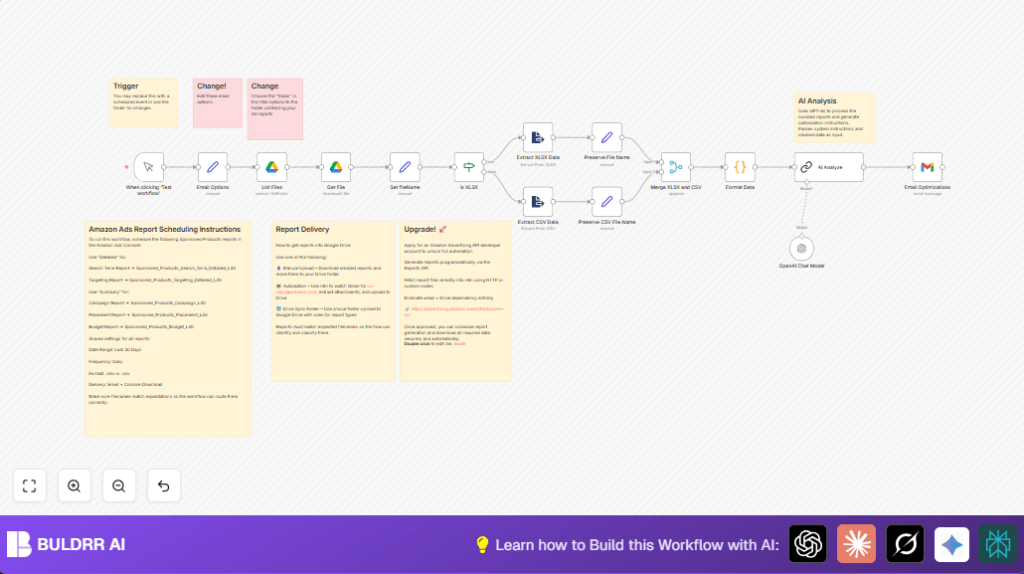
- The List Files node watches the chosen Google Drive folder and gets new files.
- The Get File node downloads each report as a binary.
- An If node checks if the file is XLSX or CSV by filename extension.
- XLSX files send to Extract XLSX Data node; CSV files to Extract CSV Data node to parse them.
- Set nodes tag each parsed JSON dataset with the filename.
- Merge XLSX and CSV node combines data streams.
- A Code node named Format Data groups datasets by type (search_terms, campaigns, targeting, placement, budgets), cleaning and structuring the data for AI.
- The prepared JSON is sent to AI Analyze node using GPT-4o, which analyzes data and returns JSON with campaign bid, budget, keyword, and targeting recommendations.
- The workflow formats the AI output into a readable HTML email.
- Gmail node sends the email to configured recipients automatically.
Output
A detailed email with clear, actionable Amazon Ads optimization recommendations.
Beginner step-by-step: How to use this Amazon Ads AI Optimization workflow in n8n
Step 1: Import the workflow
- Download the workflow from this page using the Download button.
- Open the n8n editor and import the workflow with “Import from File” option.
Step 2: Add credentials
- Configure Google Drive OAuth2 credentials with read access to the reports folder.
- Set up OpenAI API key with access to the GPT-4o model in Langchain node.
- Add Gmail credentials authorized to send emails.
Step 3: Customize settings
- Update the folder ID in the List Files node to your Google Drive folder.
- Set recipient email and subject in the Email Options node.
Step 4: Test and activate
- Run the workflow manually first to check all parts work correctly.
- Change the trigger node from manual to Cron to schedule daily runs.
- Activate the workflow for production.
If hosting n8n outside the cloud, learn about self-host n8n for stable setup.
Customization ideas
- Change report folder in List Files node to organize files anywhere.
- Update email recipient and subject in Email Options node to match team or clients.
- Switch the AI model in the Langchain AI Analyze node to use other OpenAI models accessible to your account.
- Replace manual report uploads with Amazon Ads API connections for automation.
- Adjust the system prompt in AI Analyze node to focus on specific goals like ROAS or campaign types.
Common issues and fixes
- Workflow errors on file name: Files not matching expected keywords cause errors.
Fix by renaming files to include exact keywords: search_term, campaign, targeting, placement, budget. - Emails not sending: Check Gmail OAuth2 credentials authorization.
Make sure sending email matches authorized account. - Bad AI JSON response: AI output may fail due to prompt issues.
Test the prompt separately and confirm strict JSON output.
Summary of results
✓ Save hours daily on manual report checks.
✓ Get consistent, accurate Amazon Ads campaign suggestions.
✓ Automatically receive easy-to-read emails with specific bid and budget changes.
✓ Reduce errors from manual data handling.
✓ Improve ad ROI with faster optimizations.
