
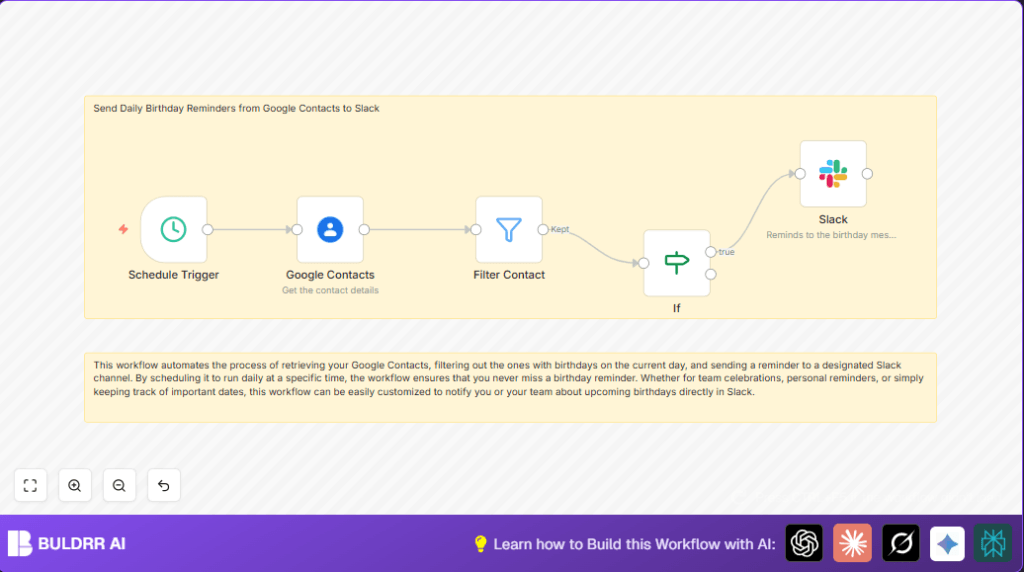

What This Automation Does
This n8n workflow runs every day at 8:00 AM.
It looks in your Google Contacts for people with birthdays today.
Then, it sends a message to a Slack channel to remind your team.
This stops you from missing birthdays and helps your team feel noticed.
It saves you time and avoids manual calendar checks.
The workflow gets all contacts, keeps only those with birthday info, and matches birthdays to today’s date.
For each birthday match, Slack gets a message with their name.
Tools and Services Used
- n8n: Creates and runs the automation workflow.
- Google Contacts API: Provides contact data including birthdays.
- Slack API: Sends messages to a team channel.
Inputs, Processing Steps, and Outputs
Inputs
- Google Contacts list including birthday data
- Current date from the system
Processing Steps
- Fetch all contacts with specified fields from Google Contacts
- Filter out contacts having no birthday data
- Compare each birthday date with today’s date
- Pass contacts with matching birthdays to Slack node
Output
- Slack messages notifying the team of today’s birthdays
Beginner Step-by-Step: How to Use This Workflow in n8n Production
Step 1: Download the Workflow File
- Find the Download button on this page.
- Click it to save the workflow file to your computer.
Step 2: Import Workflow into n8n Editor
- Open the n8n editor where you manage workflows.
- Use the Import from File option to load the downloaded workflow.
Step 3: Configure Credentials and Settings
- Add Google Contacts OAuth2 credentials with proper permissions.
- Add Slack OAuth2 credentials to allow message posting.
- Review and update IDs, emails, and Slack channel names as needed.
- Set the schedule time if you want to change the default 8:00 AM.
Step 4: Test the Workflow
- Run the workflow manually once to check data fetching and message sending.
- Fix any errors shown by credentials or channels.
Step 5: Activate the Workflow for Production
- Switch the workflow status to Active in the n8n dashboard.
- The workflow will now run automatically every day at the set time.
- Check execution logs sometimes to ensure smooth operation.
If hosting your own n8n server, consider resources like self-host n8n for setup help.
Troubleshooting and Common Problems
- Authentication error in Google Contacts node: Recreate OAuth2 credentials and allow contact access.
- Slack messages not appearing: Check Slack OAuth2 credential and correct channel ID.
- No birthdays found today: Verify birthday date format matches the comparison in the If node.
Customization Ideas
- Change daily reminder time in Schedule Trigger node.
- Add nicknames to the Slack message using
nicknamesfield from contacts. - Limit reminders to specific contact groups or labels.
- Create weekly birthday summaries by scanning the next 7 days.
- Edit Slack messages with emojis or personalized text.
Summary of Benefits and Outcome
✓ Saves 15 minutes daily by automating birthday checks.
✓ Avoids missed birthdays improving team relations.
✓ Posts birthday reminders automatically to Slack.
✓ Easy to configure with credentials and scheduling.
✓ Helps maintain a positive team culture at work.
