

What This Workflow Does
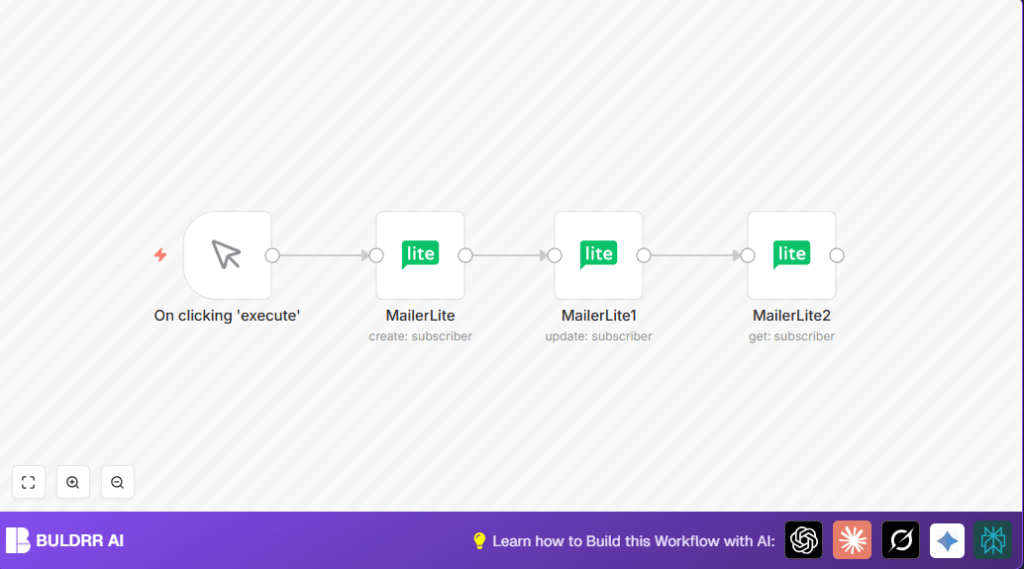
This workflow automates subscriber management in MailerLite. It creates new subscribers with email and name fields. It updates subscriber details like the city. It fetches subscriber info after updates. This saves about two hours weekly by removing manual data entry. Errors from manual updates are reduced and data stays accurate.
Who Should Use This Workflow
This workflow is for newsletter managers and marketers who enter and update subscriber info manually. It suits users who use MailerLite and want to save time managing subscriber emails and custom fields. Anyone uncomfortable with manual updates can rely on this to keep data consistent.
Tools and Services Used
- n8n: Automation platform to build the workflow.
- MailerLite API: Used to create, update, and get subscriber data.
- Manual Trigger node: To start the workflow for testing.
Inputs, Processing Steps, and Output
Inputs
- Subscriber email (e.g., example@n8n.io)
- Subscriber name (e.g., User Name)
- Custom field values (e.g., city: Berlin)
Processing Steps
- Create subscriber: A MailerLite node creates or finds subscriber by email with name set.
- Update subscriber: Another MailerLite node updates a custom field “city” using subscriber email dynamically.
- Fetch subscriber: A final MailerLite node retrieves updated subscriber data by the same email.
Output
The workflow returns subscriber data with updated custom fields. This data can be used for verification or further steps.
Beginner Step-by-Step: How to Use This Workflow in n8n
Step 1: Import the Workflow
- Download the workflow file using the Download button on this page.
- Open n8n editor and choose Import from File to load the workflow.
Step 2: Configure the Workflow
- Add MailerLite API credentials in n8n credentials section.
- Update subscriber emails or IDs in MailerLite nodes if needed.
Step 3: Test the Workflow
- Run the workflow by clicking Manual Trigger and then Execute Workflow.
- Watch if subscriber is created, updated, and fetched successfully.
Step 4: Activate for Production
- Replace Manual Trigger with Webhook node or Schedule Trigger for automation.
- Activate the workflow using toggle switch and save.
- Monitor workflow executions and errors in n8n dashboard.
Optionally, for more control, users can explore self-host n8n options.
Customization Ideas
- Change the subscriber email and name in the create node.
- Add more custom fields like phone or country in the update node.
- Use different triggers like webhook or schedule for automating.
Common Errors and Fixes
Authentication Failed in MailerLite Node
Cause: Wrong or expired API key.
Fix: Update API key in n8n credentials and save.
Subscriber Update Failed Due to Invalid subscriberId
Cause: Incorrect dynamic mapping of subscriberId.
Fix: Make sure to reference subscriberId correctly using expressions like
= {{$node["MailerLite"].json["email"]}}
in update and get nodes.
Pre-Production Checklist
- Verify MailerLite API credentials work.
- Test manual trigger to confirm workflow starts.
- Run full workflow and check subscriber is created, updated, and fetched.
- Review output data from nodes for accuracy.
- Backup subscriber data before live use.
Summary of Results
✓ Subscriber creation with email and name is automated.
✓ Custom fields like city get updated without errors.
✓ Subscriber data fetched immediately for verification.
✓ Manual data entry steps removed, saving time.
✓ Data accuracy improves, avoiding duplicate or wrong info.
