
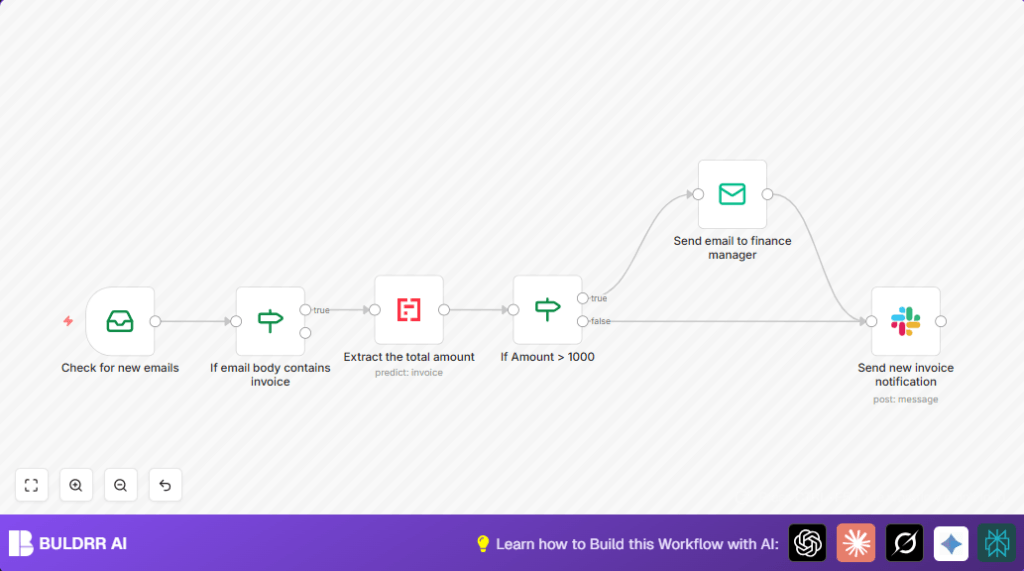

What this workflow does
This workflow regularly checks a Gmail inbox for new emails containing the word “invoice” and processes attached invoices automatically.
It extracts the total amount from invoice files using Mindee’s Invoice API.
If the invoice amount is over $1,000, it sends an email alert to a finance manager for approval and posts a detailed notification to a Slack channel.
This makes sure high-value invoices get quick attention and lowers the chance of missed payments.
Who should use this workflow
This automation suits finance teams or accounts payable workers who handle many invoice emails daily.
It helps anyone wanting to save time by avoiding manual invoice searches and data extraction.
Users who need fast alerts on large invoices and want team notifications on Slack will benefit.
Tools and services used
- Gmail with IMAP: To read incoming invoice emails.
- Mindee Invoice API: AI-powered tool to extract invoice totals from attachments.
- SMTP Email service: To send alert emails to finance managers.
- Slack API: To post notifications to team Slack channels.
- n8n workflow automation platform: To connect these services and automate the process.
How this workflow works — Inputs, Processing, Output
Inputs
- New email messages in Gmail inbox.
- Invoice attachments in email (usually PDFs).
Processing steps
- The workflow scans Gmail inbox for new emails.
- It filters emails whose body text includes the keyword “invoice”, ignoring case.
- From matching emails, it takes the attached invoice file.
- It sends the attachment to Mindee’s Invoice API to extract the total amount.
- If the invoice amount is greater than $1,000, an alert email is sent to the finance manager.
- The workflow posts a Slack message to the team channel with invoice details like sender, subject, amount, and date.
Output
- Email alert to finance manager for high-value invoices.
- Slack notification to accounts team for every invoice.
Beginner step-by-step: How to use this workflow in n8n
Step 1: Import the workflow
- Download the workflow file using the Download button on this page.
- Open n8n editor and select “Import from File”.
- Load the downloaded workflow file.
Step 2: Enter credentials and settings
- Add valid Gmail IMAP credentials for your email account.
- Input Mindee Invoice API Key to authenticate invoice data extraction.
- Fill in SMTP details (like Mailtrap or another service) to send notification emails.
- Provide Slack API token and set the Slack channel name you want the messages to go.
- Update any emails or channels in the nodes if your company info differs.
Step 3: Test and activate
- Run the workflow manually or send a test email with an invoice attachment to your Gmail.
- Check that the finance manager receives alert emails for invoices over $1000.
- Verify the Slack channel shows notifications for all invoices.
- Once confirmed, activate the workflow to run continuously.
By following these steps, the workflow will automate incoming invoice processing with minimal effort.
If you want to host n8n yourself, see self-host n8n options.
Common issues and edge cases
- If no emails are fetched, check Gmail IMAP is enabled and credentials are correct.
- If Mindee returns empty or invalid data, ensure invoice attachments are valid PDFs or images and the node refers to the right binary property.
- If alerts do not send, verify SMTP email settings and Slack permissions including correct channel ID.
- If invoice wording varies, the workflow might miss emails without “invoice” keyword.
Customization ideas
- Change the email filter keyword to catch terms like “bill” or “statement”.
- Adjust the invoice amount threshold to send alerts at different levels.
- Add other notification channels such as Microsoft Teams or Telegram.
- Log invoice data into Google Sheets for tracking history.
- Create multi-criteria approval routes by adding more IF nodes based on due date or vendor.
Summary of results
✓ Saves approximately two hours daily in manual email processing.
✓ Reduces errors in missing invoice payments and late fees.
✓ Enables faster approvals for large invoices by notifying the finance manager.
→ Ensures all invoices are monitored and finance team stays informed on Slack.
→ Improves cash flow and vendor relationships by speeding invoice handling.
