
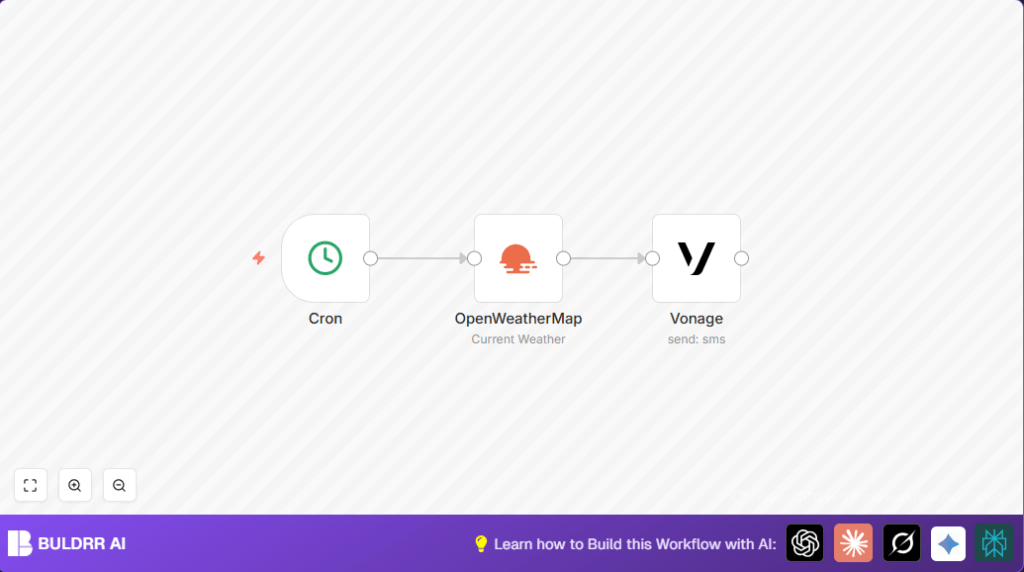

What This Automation Does
This workflow sends daily SMS messages with Berlin’s temperature at 9 AM using n8n.
It solves the problem of checking weather manually every morning.
The result is fast, reliable weather info sent straight to the phone.
The input is a daily trigger by Cron node at 9 AM.
The workflow fetches temperature data from OpenWeatherMap node using the city name “berlin.
It then formats a text message with the temperature value.
Finally, the Vonage node sends this SMS to the chosen phone number.
This automatic process saves time and reduces the stress of manually checking for weather updates daily.
Who Should Use This Workflow
This workflow is best for people who want quick weather updates without opening apps or websites daily.
It suits those who prefer messages on their phone about the temperature in Berlin.
Users who want to avoid outfit mistakes by knowing the daily weather early also benefit.
Anyone with basic understanding of SMS and APIs can use it easily.
Tools and Services Used
- n8n: Automation platform running the workflow.
- Vonage SMS API: Sends text messages to phones.
- OpenWeatherMap API: Provides real-time weather data.
- Cron node: Triggers the workflow daily at 9 AM.
- Vonage node: Sends SMS with dynamic temperature text.
- OpenWeatherMap node: Fetches current temperature for Berlin.
Beginner Step-by-Step: How to Use This Workflow in n8n
Step 1: Import the Workflow
- Download the workflow file using the Download button on this page.
- Open n8n editor already logged in.
- Click on the “Import from File” option.
- Select and upload the downloaded workflow file.
Step 2: Configure API Keys and Settings
- Open the credentials section in n8n and add your OpenWeatherMap API Key.
- Add Vonage API Key and Secret to Vonage credentials.
- In the Vonage node, update the To phone number to your desired recipient, including country code.
- Verify the From sender ID matches your Vonage registered sender ID.
Step 3: Test the Workflow
- Run the workflow manually once by clicking “Execute Workflow.”
- Check for the SMS on your phone to confirm it arrives correctly.
Step 4: Activate for Production
- Once testing is successful, activate the workflow by clicking the “Activate” button.
- The workflow will now run automatically every day at 9 AM without manual intervention.
If self hosting n8n, here is a helpful resource about self-host n8n.
Workflow Inputs, Processing, and Outputs
Inputs
- Daily trigger: Cron node runs once a day at 9 AM.
- City name: Hardcoded as “berlin” in OpenWeatherMap node.
Processing Steps
- Fetch temperature: The OpenWeatherMap node calls API and gets current temp.
- Format message: Construct SMS text using expression:
=Hey! The temperature outside is {{$node["OpenWeatherMap"].json["main"]["temp"]}}°C.
- Send SMS: Vonage node sends message to the target phone number.
Output
Sent SMS with daily Berlin temperature to phone.
No user action needed once active.
Common Problems and Solutions
- Vonage node not sending SMS: Check API key, secret, and phone number format with country code.
- OpenWeatherMap node error: Verify that the API key is correct and active.
- Cron trigger wrong time: Ensure minutes are set to 0 for exact trigger at 9 AM.
- API credentials issues: Confirm keys are not expired or revoked.
Customization Ideas
- Change city by updating the City Name in OpenWeatherMap node.
- Adjust SMS time by changing the hour in the Cron node.
- Add weather details like description in the SMS using:
=Hey! The temperature is {{$node["OpenWeatherMap"].json["main"]["temp"]}}°C, conditions are {{$node["OpenWeatherMap"].json["weather"][0]["description"]}}.
Summary and Outcome
✓ Saves time by automating daily weather SMS
✓ Sends accurate temperature data for Berlin at set time
✓ Easy setup and operation using n8n nodes
✓ Avoids manual weather checks and helps daily planning
✓ Reliable SMS delivery with Vonage API
✓ Basic customization available for user needs
