

What this workflow does
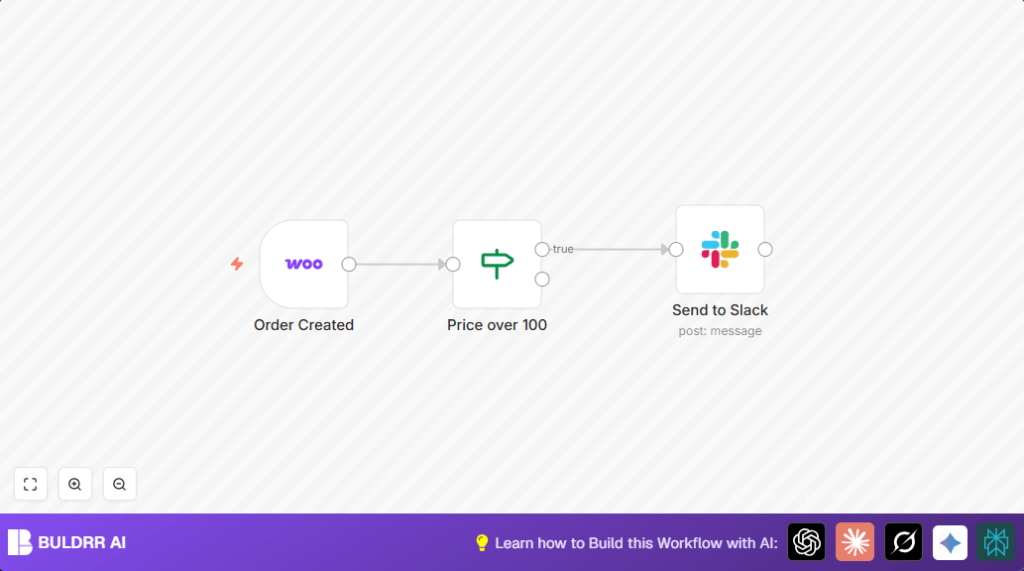
This workflow watches for new orders in WooCommerce and sends alerts to a Slack channel only if the order total is $100 or more.
This helps avoid missing important high-value orders and speeds up team responses.
Who should use this workflow
Small business owners with WooCommerce stores who want faster notifications for bigger orders.
Teams that use Slack and want automatic updates without checking WooCommerce manually.
Tools and services used
- WooCommerce API: Sends order data through webhooks to n8n.
- n8n workflow platform: Handles triggers, conditions, and actions.
- Slack API: Receives formatted messages in specified channels.
Inputs, processing steps and outputs
Inputs
- New order event data from WooCommerce with details including order ID, total, status, date, and transaction ID.
Processing steps
- Trigger: The WooCommerce Trigger listens for new order creation events.
- Filter: An If node checks if the order total is at least $100.
- Notification: The Slack node sends a message with key order details to a specific Slack channel if the order meets the price condition.
Outputs
Slack channel gets a clear alert with order ID, amount, status, creation date, link, and transaction info for orders over $100.
Beginner step-by-step: How to use this workflow in n8n
Importing and setting up
- Download the workflow file using the Download button on this page.
- In the n8n editor, click Import from File and select the downloaded workflow.
Configuring credentials
- Add your WooCommerce API credentials inside the WooCommerce Trigger node settings.
- Connect your Slack API token in the Slack node for message sending.
- Update the Slack channel name to the one your team uses (default is
woo-commerce). - If needed, adjust the minimum order amount in the If node condition from 100 to your preferred value.
Testing and activation
- Test the workflow by creating a test order above the threshold to confirm Slack notification is received.
- Once tested, toggle the workflow to active in the n8n editor to run continuously in production.
Consider using self-host n8n if you want control over your automation environment.
Customization ideas
- Change the price filter in the If node from 100 to another amount based on needs.
- Edit the Slack message text or attachments to add customer details or product lists from WooCommerce data.
- Send alerts to a different Slack channel by updating the channel ID in the Slack node.
Edge cases and failure points
- If no orders trigger the workflow, check WooCommerce webhook setup and API credentials in the WooCommerce Trigger.
- If Slack messages lack order details, verify that JSON field references like
{{$json["id"]}}are correct in the Slack node. - Slack bot permissions must allow posting to the target channel.
Summary of results
✓ Automatically gets notified in Slack for WooCommerce orders over $100.
✓ Saves time by removing manual order checking.
✓ Helps teams quickly respond to important orders.
→ Better customer service and fewer missed orders.
