
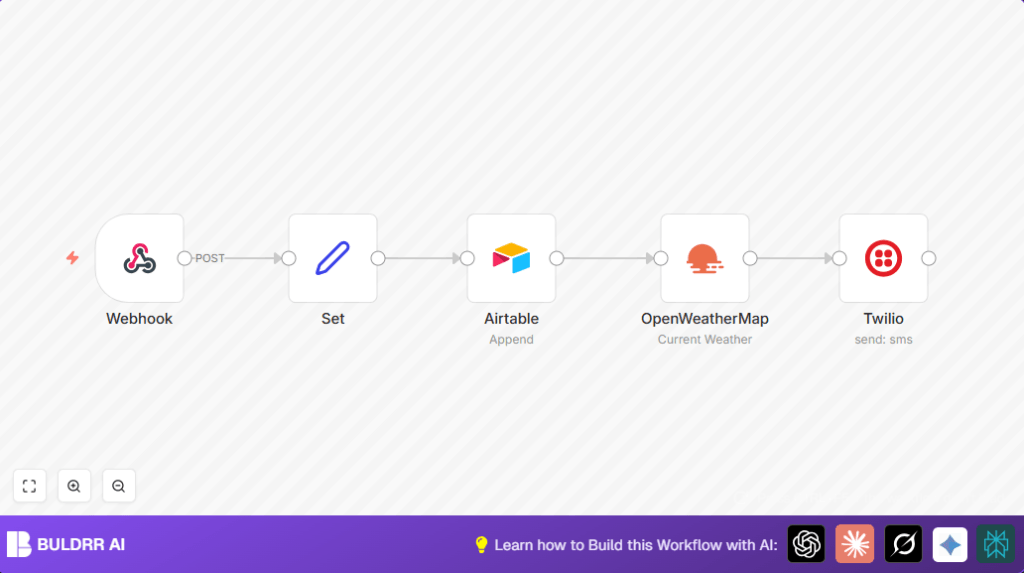

What this workflow does
This workflow automatically sends personalized SMS weather updates to people based on their city input. It solves the problem of manual, slow weather alert sending by getting contact data, saving it, fetching live weather, and texting the info fast.
The workflow takes a user’s name, phone number, and city, then retrieves current weather details and sends a custom SMS with that data. This saves time and reduces mistakes.
Who should use this workflow
People who need to send weather alerts or updates by SMS to many contacts daily.
This fits community organizers, event planners, or anyone managing outdoor activities needing quick weather info to many people.
Tools and services used
- Webhook node: Receives user inputs like name, phone number, and city securely.
- Set node: Extracts and organizes input data into clear fields.
- Airtable: Logs contact info in a table for record keeping.
- OpenWeatherMap API: Provides real-time weather data for the given city.
- Twilio: Sends SMS messages with weather summaries to input phone numbers.
Inputs, processing steps, and output
Inputs
- User data POSTed to a secured webhook with JSON keys:
name,number, andcity.
Processing Steps
- Webhook node captures and authenticates incoming data.
- Set node maps the raw input JSON to fields named
Name,Number, andCity. - Airtable node appends user data as a new record in the base for contact management.
- OpenWeatherMap node fetches live weather using the city extracted from the webhook.
- Twilio node composes and sends a personalized SMS with temperature, humidity, wind speed, and description.
Output
An SMS text sent directly to the user’s phone with current weather tailored to their city.
Beginner step-by-step: How to use this workflow in n8n
Step 1: Import the workflow
- Download the workflow file using the Download button on this page.
- Inside the n8n editor, click “Import from File” and select the downloaded workflow.
Step 2: Configure credentials
- Add or update API keys for your webhook credentials, Airtable account, OpenWeatherMap API key, and Twilio credentials inside the n8n credentials settings.
- Confirm Airtable base and table IDs match your setup to store contacts correctly.
- Check Twilio phone number and other settings to ensure SMS can send properly.
Step 3: Testing the workflow
- Send a test POST request to the webhook URL with JSON containing
name,number, andcity. - Check Airtable for a new contact record.
- Verify that the weather data was fetched and an SMS was sent to the test phone number.
Step 4: Activate for production
- Once testing works, toggle the workflow to “Active” at the top right of the n8n editor.
- Share your webhook URL to your frontend or app that collects user data to trigger this workflow automatically.
- Monitor workflow logs and Airtable records regularly to confirm smooth operation.
Common edge cases and error handling
If the webhook rejects data, check that header authentication tokens are correct and enabled on the Webhook node.
Errors appending data to Airtable usually mean field names or table IDs do not match. Double-check field mappings and table name settings.
SMS sending fails if phone numbers are not in the international E.164 format or if Twilio credentials are invalid. Confirm correct formatting and keys.
Malformed city names or missing OpenWeatherMap API keys result in failed weather calls. Verify spelling and API settings.
Customization ideas
- Change the SMS message template in the Twilio node to include more weather details or use Fahrenheit instead of Celsius.
- Add extra fields like
Emailor subscription preferences in Airtable and in the Set node to expand contact data. - Insert a Cron node before the webhook for scheduled weather alerts without manual input.
