

What This Automation Does
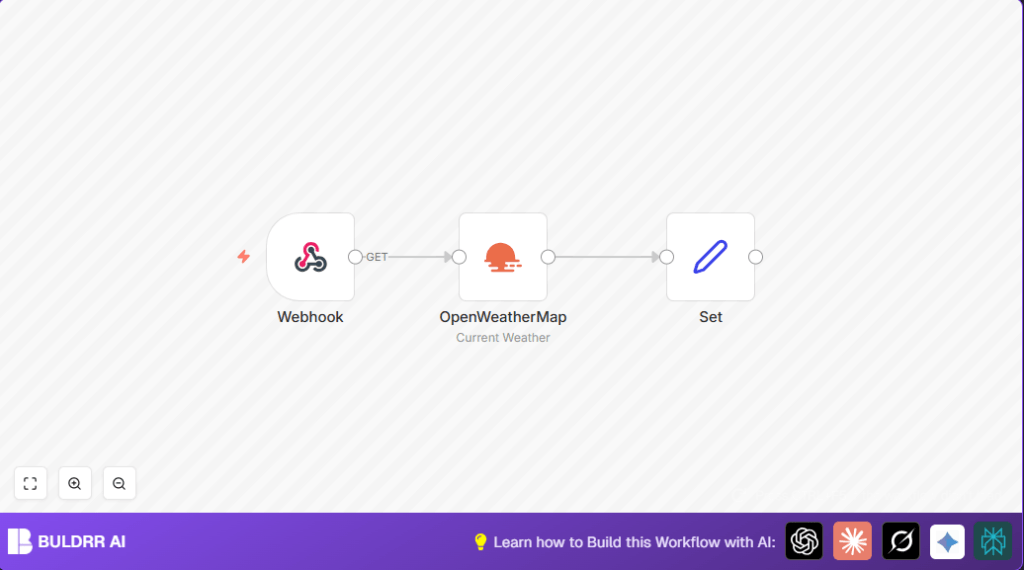
This workflow gets weather data fast for any city named. It solves the problem of wasting time by searching many sites for weather info. When triggered, it fetches temperature, humidity, wind speed, and a short weather description. Users receive a neat JSON with city name and country code. This way, users get quick, clear weather data without opening any site.
Inputs, Processing Steps, and Output
Inputs
- The workflow starts from a Webhook node. It gets a city name sent as JSON in a POST request.
Processing Steps
- The OpenWeatherMap node uses the city name from the webhook input to call OpenWeatherMap API.
- The Set node takes data from the API and extracts only these fields:
- Current temperature in Celsius
- Humidity percent
- Wind speed
- Weather description
- City and country code
- The workflow keeps only these fields for easy reading.
Output
The final output is clean JSON with weather data and location, ready for apps or reports.
Who Should Use This Workflow
This automation fits users who want fast and reliable weather info by city without checking many websites.
It is ideal for planners, event managers, or any people needing weather data quickly and clearly.
Tools and Services Used
- n8n: For building and running the workflow.
- OpenWeatherMap API: Provides weather data by city.
- Webhook: Receives city names to start the workflow.
- Set node: Formats and cleans up the weather data output.
Beginner Step-by-Step: How to Use This Workflow in n8n
Step 1: Import the Workflow
- Download the workflow file using the Download button on this page.
- Open your n8n editor where you want to use the workflow.
- Click on the main menu, then select Import from File.
- Locate the downloaded workflow file and import it.
Step 2: Configure Required Settings
- Go to Webhook node, check the webhook URL path or copy the full webhook URL.
- Open n8n credentials and add your OpenWeatherMap API Key if not done already.
- Review the OpenWeatherMap node to ensure the city name input uses this expression:
{{ $json["body"]["city"] }}This means the node reads the city name from webhook POST JSON body.
- Check Set node to confirm it extracts these fields only: tempC, humidity, windspeed, description, city.
Step 3: Test the Workflow
- Activate the workflow.
- Send a POST request to the webhook URL with this example JSON body:
{
  "city": "London"
}
Use tools like Postman or curl for the test.
You should get JSON weather data for London in the output.
Step 4: Activate for Production
- After testing, activate the workflow for your live use.
- Keep the webhook URL handy to send city names from other apps or scripts.
- Monitor execution logs in n8n for any errors.
If running on your own server, consider secure self-host n8n setup for better control.
Common Customizations
- Change temperature to Fahrenheit by adding unit parameter to the API call.
- Add more weather info fields like pressure or cloudiness in the Set node.
- Use a Cron node to trigger weather checks automatically on schedule.
How to Handle Edge Cases and Failures
- If webhook does not respond, check the Webhook node path and make sure workflow is active.
- If OpenWeatherMap API fails, verify the API Key and check usage limits.
- Test with different city names to be sure API returns valid data.
Summary of Benefits
✓ Saves time by automating weather lookups
✓ Provides accurate and clear weather data for any city
✓ Easy to integrate via webhook in other apps
✓ Reduces risk of errors from manual searching
✓ Can be extended with alerts or scheduling
