

What This Workflow Does
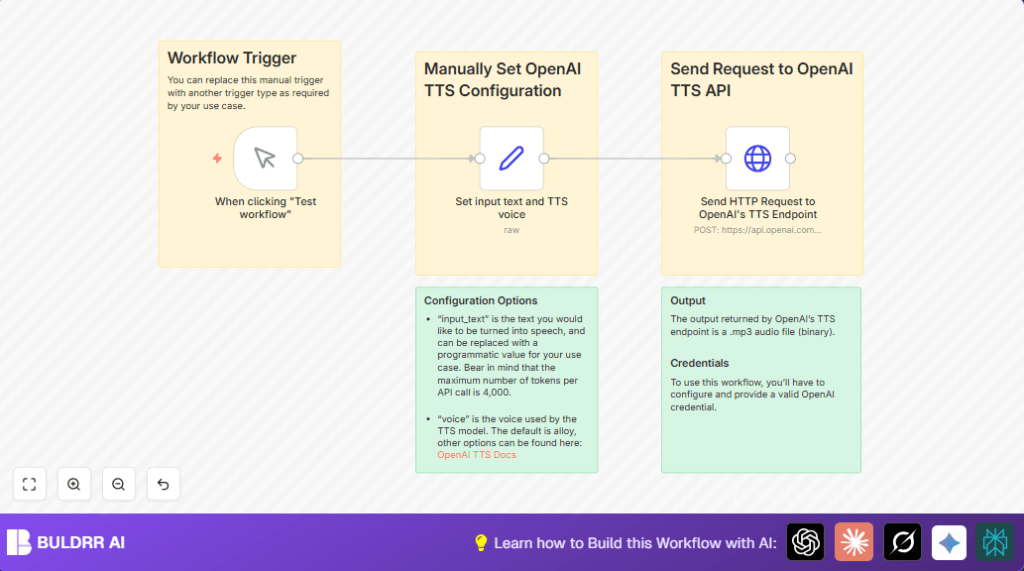
This workflow takes written text and turns it into speech audio with an OpenAI API inside n8n.
It solves the problem of manual or slow text-to-speech work by sending text to OpenAI’s TTS service and getting back an MP3 audio file.
The result is a ready-to-use spoken audio clip based on your text and voice choice.
This saves time and effort by automating speech generation in content production.
Who Should Use This Workflow
- Content Creators: Anyone turning blogs, scripts, or articles into audio.
- Podcasters: Creators who want quick voice output for scripts.
- Accessibility Developers: Teams making audio versions of text content.
- Automation Enthusiasts: Users building text-to-speech tools with n8n.
Tools and Services Used
- n8n Platform: For designing and running the workflow.
- OpenAI TTS API: The service that converts text to speech.
- Manual Trigger node: To start workflow manually.
- Set node: To provide input text and voice parameters.
- HTTP Request node: To send requests and receive audio from OpenAI.
- OpenAI API Key: Needed in n8n credentials to authenticate calls.
Inputs, Processing Steps, and Output
Inputs
- Trigger to start the workflow (manual trigger)
- Text string to convert (input_text in JSON)
- Voice choice string (voice in JSON)
Processing Steps
- The workflow sends a POST request to OpenAI’s /audio/speech endpoint.
- It includes the model tts-1, the input text, and voice choice.
- OpenAI returns a binary MP3 file of the spoken text.
Output
The final output is an MP3 audio file ready for saving or streaming.
Beginner Step-by-Step: How to Use This Workflow in n8n Production
Step 1: Download and Import the Workflow
- Use the Download button on this page to save the workflow JSON file.
- Go to your n8n editor and select Import from File.
- Upload the downloaded workflow JSON file.
Step 2: Configure Credentials and Parameters
- Add your OpenAI API Key credential in n8n if not done yet.
- In the Set node, update
input_textwith the text to speak. - Change the
voicevalue to the preferred voice name if needed. - If there are any IDs, emails, channels, or storage folders, update them here as required.
Step 3: Test the Workflow
- Click Execute Workflow to run the flow manually.
- Check the HTTP Request node output for a binary MP3 file.
- Download or play the MP3 to verify the speech conversion.
Step 4: Activate for Production
- Turn the workflow on in n8n for scheduled or other triggers.
- Replace the Manual Trigger node with Schedule node or Webhook node for automation if needed.
Note: If using your own server, visit self-host n8n for reliable setup.
Customization Ideas
- Change the spoken text by editing the
input_textin the Set node to any sentence. - Switch voices by updating the
voiceparameter to other supported OpenAI voices likeadamoralloy. - Automate by replacing the manual trigger with a Webhook node or Schedule node.
- Add nodes to save audio output to cloud storage like AWS S3, Google Drive, or Dropbox.
Common Issues and Troubleshooting
- 401 Unauthorized or Invalid API Key: Check that OpenAI API key is correct in n8n credentials and selected in the HTTP Request node.
- No Audio or Empty Response: Verify that the parameters
model,input, andvoiceare exactly as documented. - Workflow Not Triggering: Ensure the Manual Trigger node is connected and the Execute Workflow button is pressed.
Pre-Production Checklist
- Make sure the OpenAI API key is valid and has permissions for TTS.
- Confirm the Manual Trigger fires and passes data.
- Check the Set node contains correct JSON keys and values.
- Verify HTTP Request node returns a binary MP3 audio file.
- Test saving or further processing nodes if audio file storage is added.
Deployment Guide
Turn the workflow on inside n8n to run automatically if desired.
Use logs and the execution list to monitor success or errors.
Add error handling nodes to improve stability for production use.
Summary and Results
✓ Converts written text into MP3 speech audio fast.
✓ Saves time by automating text-to-speech conversion using OpenAI.
✓ Works with customizable voice options to match brand tone.
✓ Easy to integrate into larger content workflows inside n8n.
→ Output is a downloadable audio file ready for podcasting or accessibility.
→ Setup requires simple import, configuration, and testing inside n8n.
