

What This Workflow Does
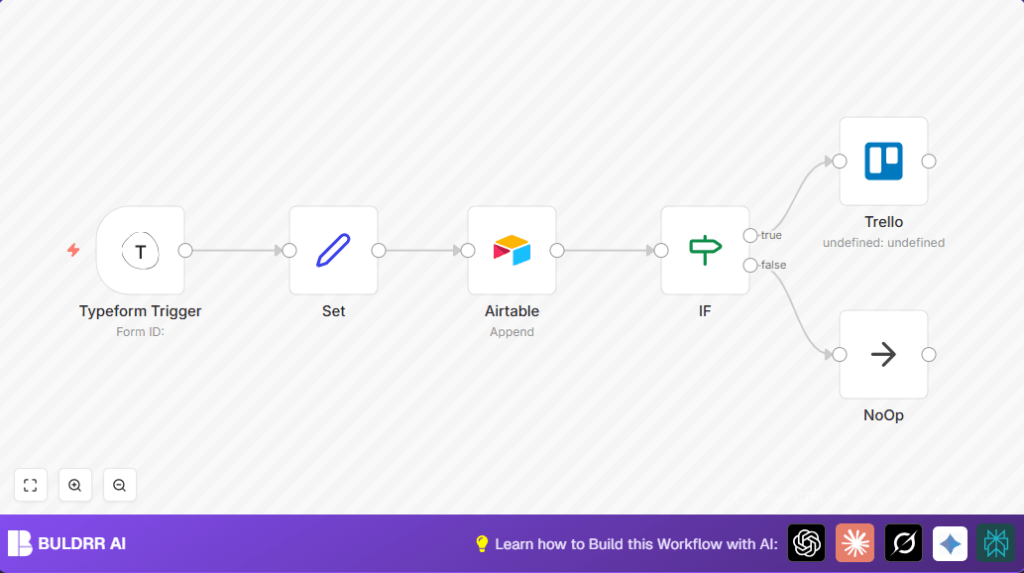
This workflow starts when a new Typeform feedback form is submitted.
It takes key info like score, name, email, and comments from the form.
The data is saved into an Airtable table called “Feedback”.
Then, it checks if the score is exactly 7.
If score equals 7, it makes a Trello card with the feedback details.
If score is not 7, it does nothing more and ends.
This helps collect feedback fast, avoids manual entry mistakes, and sends only important feedback to Trello.
Tools and Services Used
- Typeform: Collects customer feedback via forms.
- Airtable: Stores structured feedback records.
- Trello: Manages feedback tasks by creating cards.
- n8n: Automates the workflow connecting all services.
Inputs, Processing Steps, and Outputs
Inputs
- New feedback submission from Typeform form.
Processing Steps
- Trigger on new submission from Typeform.
- Extract fields: score, name, email, description.
- Save the extracted data to Airtable in the “Feedback” table.
- Check if score equals 7 using an IF condition.
- If true, create a detailed Trello card in chosen list.
- If false, end process with NoOp node.
Outputs
- A newly stored record in Airtable for every form submission.
- A Trello card only for feedback with score 7.
Beginner Step-by-Step: Using This Workflow in n8n Production
Step 1: Import the Workflow
- Download the workflow file using the Download button on this page.
- Open your n8n editor where you want to use this workflow.
- Click on “Import from File” and select the downloaded workflow file.
Step 2: Configure Credentials
- Add or update your API Keys for Typeform, Airtable, and Trello inside n8n credentials.
- Verify these credentials are authorized and working.
Step 3: Update IDs and Settings
- Change the Typeform form ID to match your feedback survey form.
- Update the Airtable base ID and table name if different from “Feedback”.
- Set the correct Trello List ID where cards should be created.
- Check all email addresses, channels, or any other custom fields if applicable.
Step 4: Test the Workflow
- Submit a test feedback form response to trigger the workflow.
- Watch n8n execution logs to confirm data flows through all nodes.
- Check Airtable if the feedback record is added correctly.
- Verify if a Trello card is created only when the score is 7.
Step 5: Activate for Production
- Switch the workflow toggle to “Active” to enable live operation.
- Monitor the workflow logs periodically for errors or failures.
- Consider setting up alerts in n8n for failure notifications.
Note: If self hosting n8n, see self-host n8n for help with your server setup.
Common Customizations
- Change the IF node to set a different score threshold instead of 7 for creating Trello cards.
- Add more fields from Typeform to the Set node and map them to Airtable columns for richer data.
- Assign Trello cards to specific team members by adding their member IDs under Trello node settings.
- Insert a Gmail or SMTP node after IF node to send notification emails on high-value feedback.
- Use a Slack node instead of or in addition to Trello for instant team alerts when cards are created.
Troubleshooting
- No data received from Typeform Trigger:
Make sure webhook is activated and URL in Typeform matches n8n webhook URL. - Airtable append operation fails:
Verify API Key and table name are correct and have proper permissions. - Trello card creation throws error:
Check the Trello List ID is valid and API Key is fresh.
Pre-Production Checklist
- Confirm Typeform webhook is enabled and pointing to n8n URL.
- Submit and verify sample feedback records reach Airtable.
- Test IF node branches by using different score values.
- Ensure Trello cards only appear for feedback with score equal to 7.
- Backup Airtable base if important data must be protected.
Deployment Guide
Activate the workflow in n8n editor.
Monitor initial runs to catch any errors early.
Set notifications for workflow failures to avoid downtime.
The workflow needs minimal updates unless form fields or API Keys change.
Summary
✓ Automatically collects and stores Typeform feedback in Airtable.
✓ Only creates Trello cards for valuable feedback with score 7.
✓ Saves time by removing manual data tasks.
✓ Helps teams focus on important user feedback faster.
Score = {{$node["Typeform Trigger"].json["What score would you like to give?"]}}
Name = {{$node["Typeform Trigger"].json["What is your name?"]}}
Email = {{$node["Typeform Trigger"].json["What is your email address?"]}}
Description = {{$node["Typeform Trigger"].json["Anything else you want to share?"]}}