
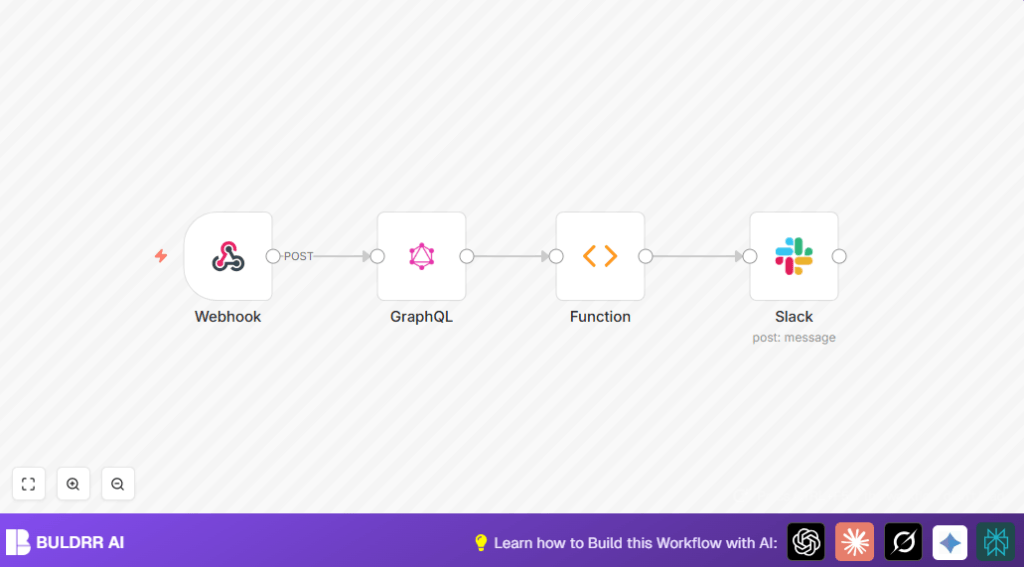

What this workflow does
This workflow gets detailed GitHub user information fast. It solves the problem of slow, manual searching for contact data. The result is a quick Slack message with user name, emails, company, location, and avatar.
The workflow saves time by automating data fetching and sharing inside Slack.
Who should use this workflow
This is for anyone needing GitHub user details quickly while chatting in Slack. It suits teams that contact developers often and want to avoid manual lookup. It helps project managers, team leads, or support who want fast verified emails.
Tools and services used
- n8n automation platform: Runs the workflow for integrations.
- Slack API: Receives commands and posts messages in channels.
- GitHub GraphQL API: Gets user profile data and commit emails.
Inputs → Processing → Output
Input
The input is a Slack slash command with a GitHub username as text.
Processing
The workflow uses the username to query GitHub’s GraphQL API.
It gathers profile info like real name, company, location, avatar URL, and public email.
It also reads the last 25 pull requests by the user to find commit author emails.
Emails are filtered to remove duplicates and GitHub no-reply addresses.
Output
The workflow posts a formatted Slack message in the channel.
The message shows name, verified emails, company, location, and the user’s avatar.
Beginner step-by-step: How to use this workflow in n8n
Step 1: Import the workflow
- Download the workflow file from this page.
- Open your n8n editor.
- Click on the menu and select Import from File.
- Choose the downloaded workflow file to add it.
Step 2: Configure the credentials
- Open the GraphQL node and enter your GitHub personal access token with GraphQL permissions.
- Open the Slack node and connect OAuth2 credentials for your Slack app.
Step 3: Update IDs if needed
- Check if the Slack channel ID matches your workspace.
- If you want messages in a different channel, update the channel ID in the Slack node.
Step 4: Test the workflow
- Run the slash command in Slack, for example:
/githubuser octocat. - Confirm the workflow receives the username and fetches the data.
- Check Slack for the formatted message with user info.
Step 5: Activate the workflow
- Turn on the workflow’s Active switch inside n8n.
- Keep the webhook URL available for Slack POST calls.
- Your team can now get GitHub user info quickly via Slack commands.
For self hosting n8n, use self-host n8n to keep the workflow running reliably.
Code used in the Function node to extract emails
This JavaScript code gathers and cleans emails from GitHub API response data.
let emails = [];
let tempEmails = [];
const name = $node["GraphQL"].json["data"]["data"]["user"]["name"];
const publicEmail = $node["GraphQL"].json["data"]["data"]["user"]["email"];
const username = $node["Webhook"].json["body"]["text"];
const nameRegex = new RegExp(name,"g")

if(publicEmail){
  tempEmails.push(publicEmail);
}

for(const edge of items[0].json.data.data.user.pullRequests.edges){
  for(node of edge.node.commits.nodes){
    if(nameRegex.test(node.commit.author.name) || node.commit.author.name == username) {
      tempEmails.push(node.commit.author.email);
    }
  }
}

emails = [...new Set(tempEmails)];

let re = /^\w+(.)*@users.noreply.github.com/;
emails = emails.filter(email => !re.test(email));

return [{json:{emails}}];
This code adds the public email if available, scans commits for matching author names or username, removes duplicates, and filters out GitHub no-reply emails.
Customization ideas
- Change the number of pull requests scanned by updating
last: 25in the GraphQL query. - Add more GitHub fields like bio or Twitter username in the GraphQL node and Slack message.
- Make Slack notify specific users by adding mentions in the message text of the Slack node.
Common problems & solutions
- GitHub API authorization error: Generate a new personal access token with proper scopes. Update the GraphQL node’s headers.
- Slack node authentication failed: Reconnect Slack OAuth2 credentials in n8n and check permissions.
- No emails showing in Slack message: The Function node filters may be too strict or commit author names don’t match. Adjust regex or check commit data.
Summary of results and benefits
→ The workflow cuts GitHub user data lookup from 15 minutes to a few seconds.
→ Slack channels get verified user emails and profile info instantly.
✓ It removes manual searching and copying errors.
✓ It makes team communication faster and easier.
✓ It works fully inside n8n and Slack with simple configuration.
