
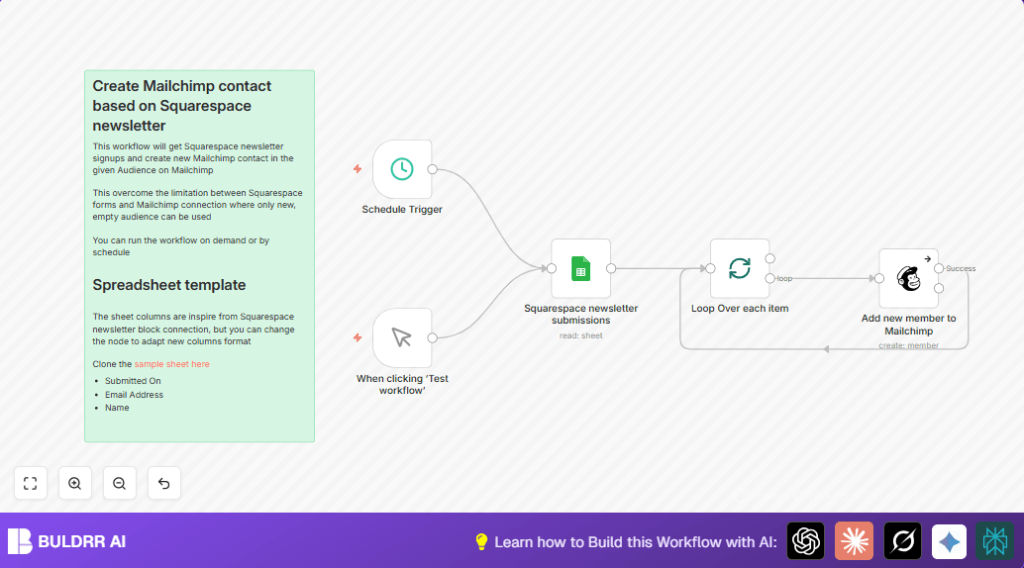

What This Workflow Does
This workflow reads new newsletter signups from a Google Sheets spreadsheet where Squarespace form submissions are saved.
It sends each subscriber’s details to Mailchimp one by one.
The workflow adds or updates Mailchimp contacts with email, name, and signup date.
This stops manual copying from Sheets to Mailchimp, saving many hours.
Who Should Use This Workflow
This workflow is for marketers or small business owners using Squarespace forms to gather newsletter signups.
It helps those who manually copy contacts from Google Sheets into Mailchimp and want to automate this task.
Users with growing subscriber lists will especially save time and reduce errors.
Tools and Services Used
- Squarespace Newsletter Form: Collects email and name of subscribers.
- Google Sheets: Stores form submissions from Squarespace.
- Mailchimp: Manages the email audience to send newsletters.
- n8n: Automates the data transfer between Sheets and Mailchimp.
Inputs, Processing Steps, and Output
Inputs
- Google Sheets with columns: Submitted On (date/time), Email Address, and Name.
- Mailchimp audience with API keys and correct merge fields configured.
Processing Steps
- Fetch all new rows from Google Sheets using Google Sheets node.
- Use SplitInBatches node to process each subscriber one at a time, avoiding API limits.
- Add or update each subscriber in Mailchimp audience via Mailchimp node.
- Map email and name correctly; set subscription status to subscribed; include signup date.
- If errors happen (like duplicate emails), continue processing next subscribers without stopping.
Output
New or updated contacts in Mailchimp audience that match the Google Sheets subscribers.
Beginner Step-by-Step: How to Use This Workflow in n8n
Step 1: Import the Workflow
- Download the workflow file using the Download button on this page.
- Inside the n8n editor, click on the menu and choose “Import from File”.
- Select the downloaded file to load the workflow.
Step 2: Configure Credentials and IDs
- Add your Google Sheets OAuth2 credentials to the Google Sheets node.
- In the Google Sheets node, check the sheet ID and sheet name to match your actual spreadsheet.
- Enter your Mailchimp API Key and select the target audience in the Mailchimp node.
- Check the mapping of fields like email address and first name in the Mailchimp node to match your audience setup.
Step 3: Test and Activate
- Run the Manual Trigger node to test the workflow.
- Check execution results to confirm subscribers were added or updated in Mailchimp.
- If all looks good, activate the workflow to run automatically using the Schedule Trigger node.
- Set schedule interval (daily or hourly) based on your newsletter signup frequency.
This simple process gets the automation working without needing to build the workflow from zero.
If you are using self-host n8n, visit self-host n8n for additional setup help.
Common Edge Cases and Error Handling
Errors like duplicate emails or invalid data do not stop the workflow.
The workflow continues processing all other subscribers even if some cause Mailchimp errors.
If the Google Sheets node returns no data, check credentials and sharing permissions on the spreadsheet.
Verify merge field names in Mailchimp to avoid update failures.
This ensures smooth processing without manual intervention.
Customization Ideas
- Modify merge fields in the Mailchimp node to add last name, phone, or other subscriber data.
- Change batch size in SplitInBatches node to process more subscribers at once if your Mailchimp API rate limit allows it.
- Adjust schedule trigger timing to match your signup volume or marketing calendar.
- Add a node before Mailchimp to validate emails or check if subscriber is already unsubscribed.
Summary of Results
✓ Saving many hours each week previously spent on manual copying.
✓ Reducing manual errors like missed or duplicate subscribers.
✓ Keeping Mailchimp audience always up to date with new newsletter signups.
✓ Workflow runs automatically on schedule or manually triggered anytime.
