

What This Workflow Does
This workflow takes form submissions and turns them into ready Google Docs contracts fast.
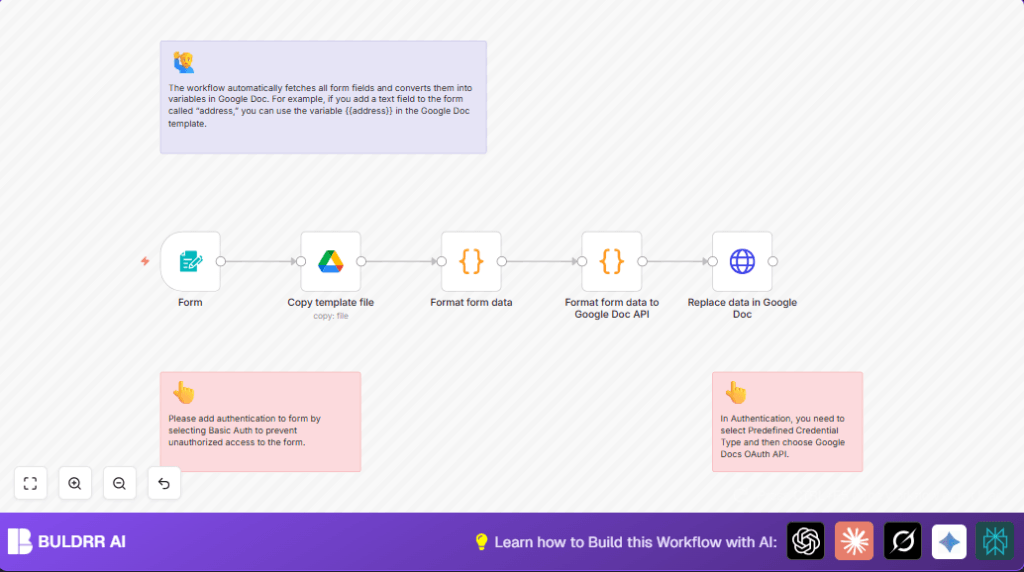
It copies a Google Docs template, replaces placeholders with the form data, and creates a personalized document immediately.
This cuts down hours of manual work and avoids errors like missing or wrong information.
This n8n workflow acts as an automatic Google Doc generator — it
takes form submissions and turns them into ready Google Docs
contracts, reports, or proposals in seconds.
What Types of Documents Can This Generate?
This workflow works for any document that pulls data from a form.
The most common use cases are:
→ Contracts — Client agreements, service contracts, freelance
contracts filled with client name, dates, and terms automatically.
→ Proposals — Business or project proposals generated instantly
from a lead’s submitted details — no manual copy-paste needed.
→ Reports — Structured reports populated with form responses,
survey data, or client inputs, ready to share in seconds.
→ Invoices — Basic invoice documents created from billing form
submissions with client name, amount, and service details.
→ Onboarding Docs — Welcome packets or onboarding forms
personalized per client or employee from a single form submission.
Any document that uses repeated fields and a consistent layout
is a perfect fit for this workflow.
Tools and Services Used
- n8n.io: Runs automation workflows and integrates services.
- Google Drive: Stores and copies the Google Docs template files.
- Google Docs API: Edits document content by replacing placeholder text.
- Form Trigger Node in n8n: Captures client inputs from a web form.
- Google OAuth2 Credentials: Allows access to Google Drive and Docs securely.
Which Form Sources Work With This Workflow?
While this workflow uses n8n’s built-in Form Trigger by default,
it can be adapted to work with multiple form sources:
→n8n Form Trigger — Built-in, no extra tools needed.
Quickest way to get started.
→ *Typeform — Replace the Form Trigger with a Typeform Trigger
node in n8n to capture Typeform submissions and pipe them into
the same Google Docs creation flow.
→ Google Forms — Use a Google Sheets Trigger (since Google Forms
writes to Sheets) to fire the workflow when a new form response
is submitted.
→ Webhooks — Any external tool that can send a POST request —
including Jotform, Tally, or custom web forms — can trigger this
workflow via the Webhook node instead of Form Trigger.
→ Zapier / Make webhooks — If your form is already connected
to Zapier or Make, use their webhook output to trigger this n8n
workflow and generate the Google Doc.
The core workflow logic stays the same — only the trigger node
changes depending on your form tool.
Inputs, Processing Steps, and Output
Inputs
- Client fills out a web form set up inside n8n using Form Trigger.
- Form fields include required data like
nameand optionally more fields like address or email.
- Form fields include required data like
Processing Steps
- The workflow copies a predefined Google Docs template in Google Drive via Google Drive copy operation.
- A Code node extracts form fields into key-value pairs for processing.
- Another Code node formats the key-values as “replaceAllText” requests for Google Docs API.
- The HTTP Request node calls Google Docs API to replace placeholders (like {{name}}) with the form values inside the copied document.
Output
The final output is a personalized Google Docs document copied and updated in Google Drive, ready instantly after submission.
Beginner step-by-step: How to use this workflow in n8n
Importing the workflow
- Download the workflow file using the Download button on this page.
- Open the n8n editor where the workflow will be used.
- Choose Import from File in n8n and select the downloaded workflow file.
Setup after import
- Add OAuth2 Credentials for Google Drive and Google Docs nodes using your Google account with proper access.
- Update the Google Drive node’s
File IDwith your template file ID if different.
- Update the Google Drive node’s
- If more form fields were added, ensure your Google Docs template has matching placeholders with double curly braces, e.g., {{address}}, {{email}}.
- Add Basic Authentication settings in the Form Trigger node to protect the form from unauthorized access.
Testing and activating
- Submit sample data through the form URL provided by the Form Trigger node.
- Check the created Google Docs in your Drive to confirm proper data replacement.
- Once confirmed, toggle the workflow from disabled to enabled to start running it automatically in production.
- Monitor runs and errors via the n8n dashboard logs.
For privacy and control, consider using self-host n8n to run the workflow on your own server.
Key Code Snippets Used
Format form data Code node
This code takes all submitted form data and turns them into an array of key-value pairs.
const data = [];

Object.keys($('Form').all().map((item) => {
  Object.keys(item.json).map((bodyProperty) => {
    data.push({
      key: bodyProperty,
      value: item.json[bodyProperty],
    });
  })
}));

return {
  webhook_data: data,
  pairedItem: 0,
};
Format form data to Google Docs API requests Code node
This code converts the key-values to the Google Docs API “replaceAllText” requests.
const result = [];

$('Format form data').all().map((item) => {
  item.json.webhook_data.map((data) => {
    if ("submittedAt" !== data.key && "formMode" !== data.key) {
      result.push({
        "replaceAllText": {
            "containsText": {
              "text": `{{${data.key}}}`,
              "matchCase": true
            },
            "replaceText": `${data.value}`
        },
      });
    }
  });
})

return {
  data: result,
  pairedItem: 0,
};
Common Problems and How to Fix Them
Failed to copy Google Drive template file
Cause: Wrong template file ID or missing permissions.
Fix: Check the file ID in the Google Drive node and make sure the OAuth user can access the file with edit rights.
Google Docs API Unauthorized or Forbidden error
Cause: OAuth credentials expired or configured wrong.
Fix: Re-authenticate Google Docs OAuth credentials and confirm API is enabled.
Form data not replacing variables in Google Doc
Cause: Placeholder variables in template don’t match form field names exactly.
Fix: Ensure placeholders use double curly braces {{ }} and names match the form fields letter by letter.
Customization Ideas
- Add new form fields (like “email” or “address”) in the Form Trigger node and add matching placeholders in the Google Docs template.
- Change Google Docs template by replacing the template file ID in the Google Drive copy node.
- Protect the form by enabling Basic Authentication in the Form Trigger node settings.
- Adjust the copied file names by editing the expression in the Google Drive node’s Name field, adding timestamps or other details.
Summary
✓ Saves hours of manual copying by automating contract creation from forms.
✓ Eliminates errors from manual data entry, making contracts accurate every time.
✓ Quickly creates personalized Google Docs documents using form input.
✓ Works fully inside n8n using Google Drive and Google Docs API with simple setup.
✓ Suitable for event coordinators, businesses, anyone needing fast document prep from client data.
