
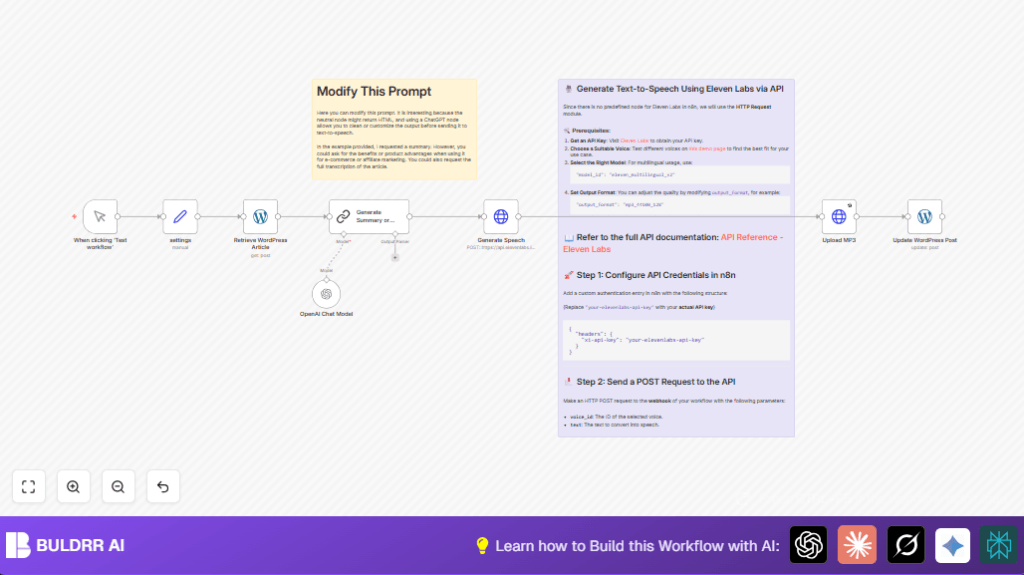

What This Automation Does
This workflow gets one WordPress article by ID.
It then makes a short summary of the article using AI.
Next, it changes this summary into a spoken audio file with Eleven Labs API.
After that, it uploads the audio file back to the WordPress media library.
Finally, it adds an audio player into the post so visitors can listen to the summary.
This saves time by automating a long manual process.
Who Should Use This Workflow
Anyone managing a WordPress blog who wants to add audio summaries.
No need for deep tech skills, just basic n8n knowledge and API keys.
This helps content creators who want to reach listeners and save hours every week.
Tools and Services Used
- WordPress REST API: To get and update posts.
- OpenAI GPT (via LangChain): To summarize article text.
- Eleven Labs Text-to-Speech API: To convert summary text into audio.
- n8n workflow automation: To connect all steps seamlessly.
Inputs, Processing, and Outputs
Inputs
- WordPress post ID to identify the article.
- API credentials for WordPress, OpenAI, and Eleven Labs.
Processing Steps
- Pull article content by post ID from WordPress.
- Send article content to LangChain node to create a short summary.
- Post the summary text to Eleven Labs API to get spoken audio in mp3 format.
- Upload the mp3 audio back to WordPress media library.
- Update the original post to add an audio player with the new audio file.
Outputs
- WordPress article now includes an audio player with the summary.
- New audio file saved in WordPress media library.
Beginner Step-by-Step: How to Use This Workflow in n8n
Step 1: Import the Workflow
- Download the workflow file using the Download button on this page.
- Open the n8n editor.
- Use the menu to select “Import from File” and upload the downloaded workflow.
Step 2: Configure Credentials and IDs
- Add your WordPress API credentials in the credentials manager.
- Add your OpenAI API key for GPT-4o-mini via the LangChain node credentials.
- Add your Eleven Labs API key in the HTTP Request node headers.
- Update the workflow’s WordPress post ID to the article you want to convert.
- Check the Eleven Labs
voice_idin the HTTP Request node URL and update if needed.
Step 3: Test the Workflow
- Run the workflow manually using the Manual Trigger node.
- Check outputs of each node in n8n to confirm no errors.
Step 4: Activate for Production
- Switch the trigger if needed, e.g. use a time-based trigger for regular runs.
- Activate the workflow.
- Monitor runs and logs from the n8n dashboard.
- For stable hosting, consider self-host n8n on a reliable server.
Customization Ideas
- Change the LangChain prompt to get a formal transcription or a more casual summary.
- Pick different voices or languages in the Eleven Labs API by updating the
voice_id. - Adjust audio quality by changing the
output_formatparameter in the Eleven Labs HTTP Request. - Add chunking logic for very long articles before summarizing.
- Embed extra info in posts, like captions or custom messages with the audio player.
Edge Cases and Common Issues
- Eleven Labs “401 Unauthorized” error: Check the API key in HTTP headers is correct and active.
- WordPress update fails: Verify post IDs and ensure the API user has proper write permissions.
- LangChain gives bad summaries: Make sure the full article text is passed correctly to the prompt.
- MP3 upload errors: Confirm you send the audio as binary data with correct content-disposition headers.
Pre-Production Checklist
- Verify all API keys and credentials work with test calls.
- Check WordPress REST API permissions for uploading media and editing posts.
- Test the manual trigger workflow fully before automating.
- Backup WordPress content before large-scale updates.
Summary
✓ Fetches WordPress article content by ID.
✓ Summarizes text using OpenAI GPT via LangChain.
✓ Converts summary to audio using Eleven Labs API.
✓ Uploads MP3 to WordPress media library.
✓ Inserts audio player in original post to listen on site.
→ Saves many hours of manual work.
→ Increases accessibility for visitors who prefer listening.
