

What This Automation Does
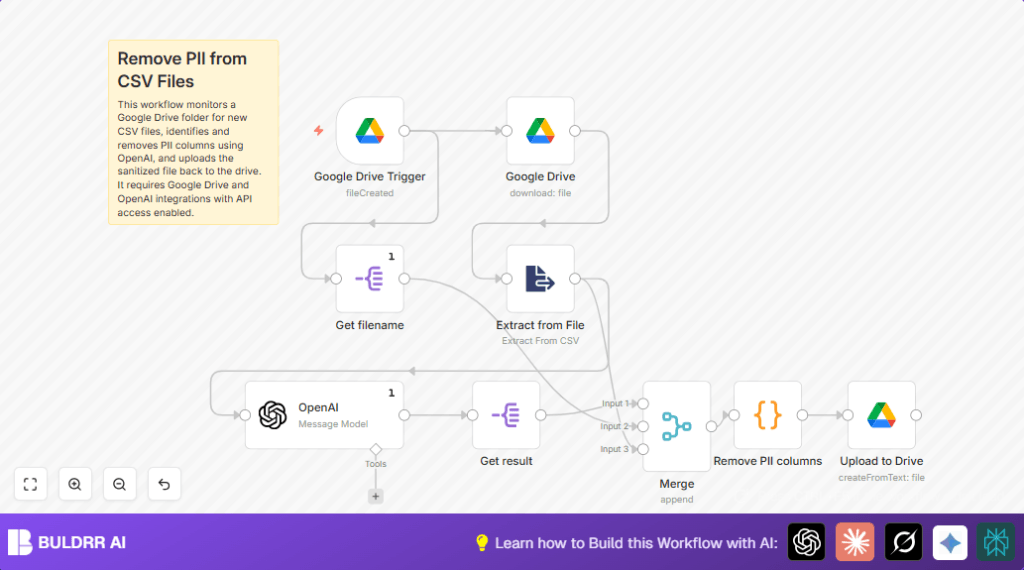
This workflow watches a Google Drive folder for new CSV files.
It finds and removes columns with personal information like names or emails.
The workflow saves a clean CSV without private data in another folder.
This helps avoid mistakes and saves hours of manual checking.
Inputs, Processing, and Outputs
Inputs
- A new CSV file uploaded to a specified Google Drive folder.
Processing Steps
- Trigger: Detect new file in the Google Drive folder.
- Download: Get the file content from Google Drive.
- Extract: Parse CSV into rows and columns.
- Analyze: Use OpenAI GPT-4 to find which columns hold personal info (PII).
- Remove PII: Delete those columns using a code node.
- Save: Upload a new CSV file without PII to a different folder.
Outputs
- A clean CSV file that has no PII columns.
- The new file is saved in a second Google Drive folder.
Beginner Step-by-Step: How to Run This Workflow in n8n
Importing the Workflow
- Download the workflow file using the Download button on this page.
- Open the n8n editor where you build workflows.
- Use the Import from File option to upload the downloaded file.
Configuring Credentials and IDs
- Add the required Google Drive OAuth2 credentials in n8n.
- Add the OpenAI API Key for access to GPT-4 in the OpenAI node.
- Update the folder IDs in the Google Drive Trigger and upload nodes to match your Drive folders.
- Check the prompt inside the OpenAI node to confirm it matches the one below for PII detection:
Analyze the provided tabular data and identify the columns that contain personally identifiable information (PII). Return only the column names that contain PII, separated by commas.Testing the Workflow
- Upload a sample CSV file to the monitored Google Drive folder.
- Watch the workflow trigger and run step-by-step links in n8n.
- Check that the clean CSV file without PII appears in the destination folder.
Activating for Production
- Turn on the workflow using the toggle switch in n8n.
- The workflow now runs automatically every minute, handling new CSV uploads.
- Monitor execution logs for errors and fix if needed.
If you are interested in self hosting n8n, see this resource for guidance: self-host n8n.
Tools and Services Used
- Google Drive API: Watches folder, downloads and uploads CSV files.
- OpenAI GPT-4 (model gpt-4o-mini): Analyzes CSV headers to spot PII columns.
- n8n Automation Platform: Connects nodes and automates the full process.
Customization Ideas
- Change Google Drive folders monitored or saved to by updating folder ID settings.
- Swap OpenAI GPT-4 model for another if desired, keeping prompt adjusted.
- Set the Google Drive Trigger polling interval to reduce API use.
- Change filename suffix in the code node to suit naming rules.
- Save sanitized files in subfolders or archives as backup.
Common Problems and Fixes
Error: “PII column names are missing in the input data.”
The OpenAI node did not return the column names as expected, or the node extracting the message was misconfigured.
Check the OpenAI output in the run log to confirm the response is correct.
Verify the Split Out node targets the exact message.content.content field.
New files do not trigger the workflow
Incorrect folder ID or Google Drive credentials often causes no trigger.
Confirm the folder ID is correct from the Drive URL and credentials are authorized.
Adjust polling if triggers are missed.
Sanitized files are empty or malformed
JavaScript errors in the code node may cause faulty output.
Check CSV structure and code syntax.
Make sure data merges are correct before processing.
Conclusion
This workflow removes personal data from new CSV files automatically.
It saves users hours of work and reduces privacy risks.
The output is clean CSV data ready for safe analysis or sharing.
You can build on this foundation to add alerts or distribute sanitized data.
Automating data cleaning helps teams save time and stay compliant.
Summary
✓ Workflow detects new CSVs in Google Drive.
✓ It uses AI to find and remove personal information fields.
✓ Saves sanitized CSVs into a safe folder automatically.
→ This process cuts manual work and reduces data leak risks.
→ Users get ready-to-use privacy-safe data files for analysis.
