
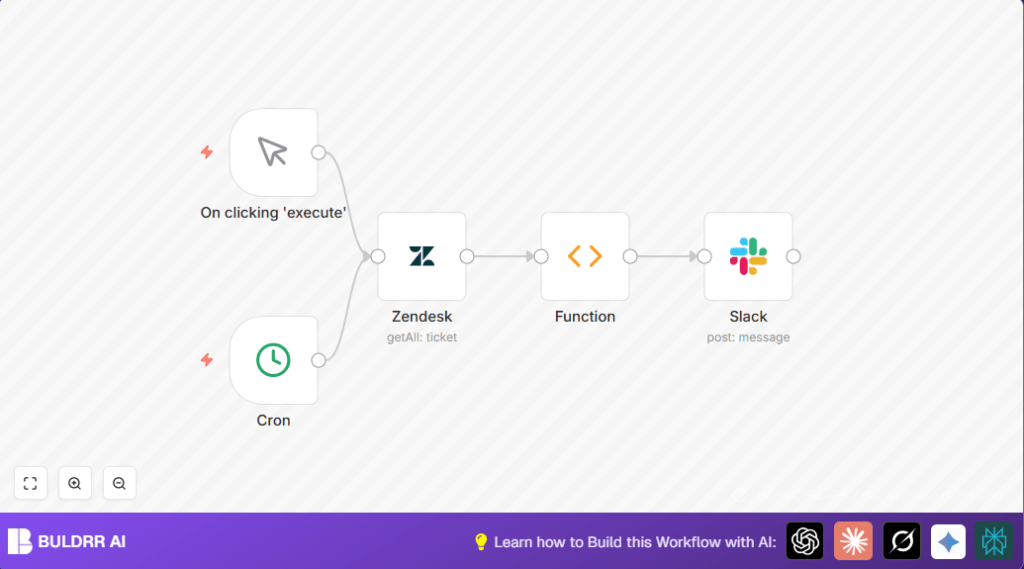

What This Workflow Does ⚙️
This workflow finds all unassigned Zendesk tickets that are active and sends a list with links to a Slack channel every day at 4:30 PM.
It saves time by removing the need to check tickets by hand and helps the support team reply faster.
It works by using scheduled triggers to collect tickets, create a message, and post it to Slack with clickable ticket details.
Who Should Use This Workflow
This is for customer support managers or teams using Zendesk and Slack.
It is useful if manual ticket checks take too long or some tickets get missed.
You can run this daily or whenever ticket updates are needed.
Tools Used
- Zendesk API: To get unassigned, active tickets.
- Slack API: To post alerts to a channel.
- n8n Automation Platform: To connect the workflow steps.
Beginner Step-by-Step: How to Use This Workflow in n8n
Importing the Workflow
- Click the Download button on this page to get the workflow file.
- In your n8n editor, click the menu and choose “Import from File”.
- Select the downloaded workflow file.
Configuring the Workflow
- Add Zendesk API credentials to the Zendesk node.
- Add Slack API credentials to the Slack node.
- If needed, update any Slack channel names or Zendesk filters.
- Check the Function node code to confirm ticket URL format matches your Zendesk setup.
Testing and Activation
- Run the workflow manually using the Manual Trigger to check if tickets show in Slack.
- Fix any errors from Zendesk or Slack nodes if the test fails.
- Turn on the workflow for automatic runs at 4:30 PM daily.
- Optionally, visit self-host n8n if hosting yourself for reliable automation.
Workflow Inputs, Processing, and Outputs
Inputs
- Zendesk API credentials for data access.
- Slack API credentials and target channel for messages.
- Scheduled or manual trigger to start.
Processing Steps
- Triggers activate the workflow via Manual Trigger or Cron nodes.
- Zendesk node requests all tickets without an assignee and status below pending.
- Function node loops through tickets, builds a text message with ticket ID, status, subject, and clickable link.
- Slack node posts the formatted message to the chosen Slack channel.
Output
A Slack message listing all unassigned Zendesk tickets. Each ticket line includes a clickable link that opens the ticket in the Zendesk interface.
This alert helps the support team quickly spot and assign new tickets.
Common Edge Cases and Troubleshooting
- If the Zendesk node returns no tickets, check the query syntax and confirm unassigned tickets exist.
- If the Slack message fails, verify Slack API keys and that the bot is allowed in the target channel.
- Incorrect URLs in the Function node can break ticket links; double-check string replacements.
- Time zones in Cron settings may cause unexpected run times; ensure it is set correctly.
Customizations ✏️
- Change Zendesk query to filter by ticket priority or tags, like
assignee:none priority:high. - Edit Cron node to adjust message times or run multiple times daily.
- Add more details in the Function node code such as requester names or creation dates.
- Send alerts to different Slack channels by replicating the Slack node.
Pre-Production Checklist ✅
- Verify Zendesk API credentials allow reading tickets.
- Test Zendesk node alone to confirm it fetches the expected tickets.
- Run the Function node with sample data to confirm message looks right.
- Test Slack node independently by sending a simple message.
- Test both triggers manually and with Cron scheduling.
Activation and Maintenance
Activate the workflow using the toggle switch in n8n to run every day at 4:30 PM.
Use the manual trigger for on-demand checks.
Watch the n8n dashboard logs to see if messages post successfully.
Set alerts in n8n if any nodes fail often to avoid missing ticket updates.
Code snippet for Slack message formatting in the Function node
This JavaScript code loops through tickets and builds a Slack message with clickable ticket links.
// Create our Slack message
let message = "*Unassigned Tickets*\n\n";
for (item of items) {
  message += "*<" + item.json.url.replace("api/v2","agent").replace(".json","") + "|" + item.json.id + ">* [" + item.json.status.toUpperCase() + "] - " + item.json.subject + "\n";
}
return [{json: {message}}];
Summary and Results
✓ Saves over two hours weekly by removing manual ticket checks.
✓ Sends daily alerts listing unassigned Zendesk tickets to Slack.
✓ Helps support teams find and assign tickets faster.
✓ Easy to configure and test inside the n8n platform.
✓ Can be expanded for priority tickets, more details, or multiple channels.
