

What This Automation Does
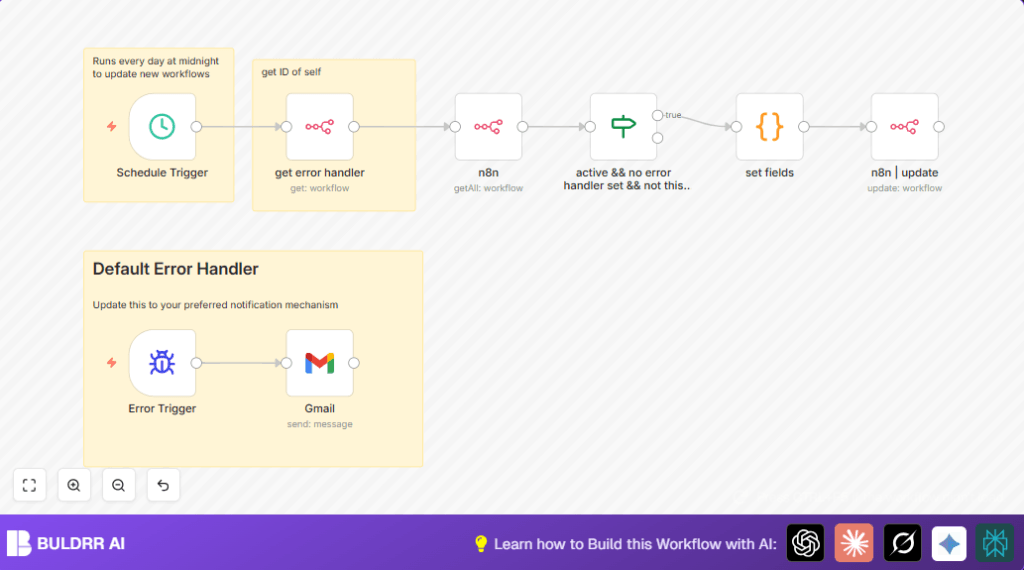
This workflow finds any active n8n workflows that do not have an error handler set.
It then sets a default error handler automatically for them.
After that, it watches for workflow failures and sends email notifications instantly.
This stops missed errors and keeps you informed fast.
How the Workflow Works
Inputs: The workflow starts using a scheduled time trigger every day at midnight.
It also gets the ID of the error handler workflow itself to use later.
Processing Steps: It fetches all active workflows from the n8n instance using the API.
Then, it filters only those that are active, have no error handler, and are not the default error handler workflow.
For each filtered workflow, it updates the settings to assign the error handler workflow ID as their error handler.
Finally, an Error Trigger node listens for any workflow errors across n8n.
Output: When a workflow fails, an email is sent immediately with the name of the failed workflow and a link to the error details.
This way, you get fast alerts of problems so you can fix them quickly.
Who Should Use This Workflow
This is helpful for anyone running many n8n workflows who wants to catch failures fast.
It fits users managing dozens or hundreds of workflows and who want automatic error notification setup.
No need to check each workflow manually or risk missing alerts.
It works well for teams using self-host n8n or n8n cloud.
Tools / Services Used
- n8n Automation Platform API: To get and update workflows programmatically.
- Gmail with OAuth2: To send email alerts on workflow failures.
- n8n Nodes: Schedule Trigger, If, Code, Error Trigger, Gmail node.
Beginner Step-by-Step: How to Use This Workflow in n8n
Import Workflow
- Download the workflow file using the Download button on this page.
- Open your n8n editor where you manage workflows.
- Click on “Import from File” and select the downloaded workflow JSON file.
Configure Credentials
- Go to each n8n node that connects to APIs (like the n8n API nodes and Gmail node).
- Add or select your valid API credentials or OAuth2 keys.
- Make sure the Gmail node’s “sendTo” field has your email address or team emails.
Update IDs and Emails
- If needed, update any workflow IDs or email addresses used inside the nodes.
- Check the Code node with the JavaScript code to confirm it gets the correct error handler workflow ID.
Test the Workflow
- Manually trigger the Schedule Trigger to run the workflow once.
- Watch execution logs to ensure workflows without error handlers get updated.
- Cause a test error in a sample workflow to verify the email notification arrives.
Activate for Production
- Once tests pass, toggle the workflow live in n8n.
- Let it run daily to maintain error handlers and receive error alerts.
This lets you use the workflow immediately for automated error management.
If hosting n8n on your own server, check resources like self-host n8n for setup help.
Code for Updating Workflow Error Handler
The Code node uses JavaScript to update each workflow’s error handler.
This script gets the workflow JSON, sets the errorWorkflow field to the error handler workflow ID, and returns updated data.
const data = $json;

// Assign errorWorkflow to the error handler ID we got earlier
 data.settings.errorWorkflow = $('get error handler').item.json.id;

// Remove the callerPolicy to avoid conflicts
 delete data.settings.callerPolicy;

// Return updated workflow information
 return {
   id: data.id,
   name: data.name,
   nodes: data.nodes,
   connections: data.connections,
   settings: data.settings
 };
This script makes the update task fast and automatic for many workflows at once.
Customizations ✏️
- Change the Gmail node to Slack or Microsoft Teams nodes to send error alerts to chat instead of email.
- Adjust the Schedule Trigger time or frequency to suit your needs better.
- Add multiple email addresses separated by commas in the Gmail node to notify a bigger team.
- Enhance the email content with extra details like error message or timestamps in the Gmail node message.
- Create a less noisy error handler workflow that logs errors silently without notifications for test environments.
Troubleshooting 🔧
- Issue: No workflows update or no error emails received.
Cause: Wrong or expired API credentials in n8n or Gmail nodes.
Fix: Re-authenticate under n8n credentials and test the workflow manually. - Issue: Gmail node shows authentication or quota errors.
Cause: Gmail API limits hit or OAuth token expired.
Fix: Check Google API console, renew OAuth tokens, or create new credentials. - Issue: Infinite update loop on error handler workflow.
Cause: Error handler workflow setting itself as error handler.
Fix: If node excludes the error handler workflow by ID properly. Verify this condition matches your actual workflow ID.
Pre-Production Checklist ✅
- Make sure Gmail OAuth2 credentials have permission to send emails.
- Trigger the Schedule Trigger node manually to confirm workflows fetch correctly.
- Check the If node output to confirm only workflows without error handlers pass through.
- Create a test error in a workflow to verify email notification is sent fast.
- Backup all current workflow settings before activating this automation for rollback safety.
Deployment Guide
Turn on the workflow by toggling it live in your n8n editor.
Watch the execution logs for successful updates and error emails.
Set up error log monitoring on the n8n server or via your hosting platform.
Optionally set alert escalation if emails stop being sent.
Summary
✓ Automates setting default error handlers for workflows without one.
✓ Sends immediate Gmail alerts when workflows fail.
✓ Saves time by avoiding manual error checking.
✓ Keeps automation running smoothly with fast failure awareness.
✓ Works with many workflows and scales for large n8n installations.
