
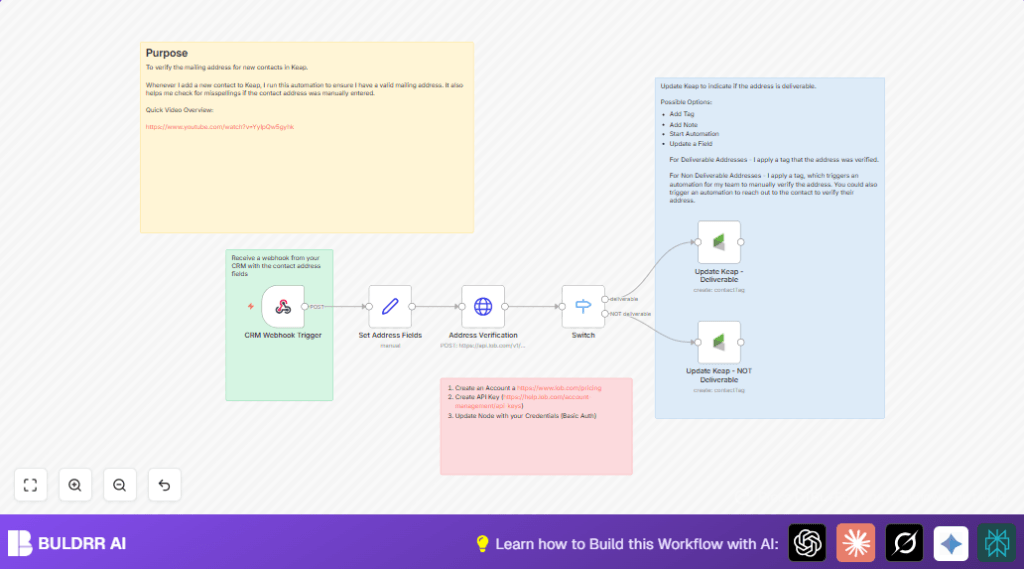

What this workflow does
This workflow checks if new mailing addresses in Keap CRM are correct and deliverable. It stops wrong or incomplete addresses from causing problems like returned mail. When a new contact is created, the workflow tests the address using Lob’s US verification API and then tags the contact in Keap as deliverable or not deliverable.
This saves time. It avoids manual checking and tagging. It helps keep address data clean and ready for sending mail.
Tools and services used
- Keap CRM: Stores contacts and their addresses.
- n8n workflow automation: Runs the steps automatically on new contacts.
- Lob US Address Verification API: Checks if US addresses are deliverable.
- Keap OAuth2 API credentials: Needed for updating contact tags in Keap.
Who should use this workflow
This helps anyone who adds many new contacts with mailing addresses in Keap CRM. It is useful if addresses often have mistakes or missing parts. It fits sales teams, marketing groups, or customer service teams wanting accurate address data automatically verified and tagged.
How this workflow works (Input → Process → Output)
Inputs
The webhook receives new contact data from Keap. This data includes address fields like street, city, state, and zip code.
Processing Steps
- The Webhook node catches the new contact data sent from Keap.
- The Set node extracts and assigns the address fields to variables.
- The HTTP Request node sends these address fields to Lob’s US verification API.
- The Switch node looks at Lob’s response, especially the
deliverabilityfield. - If the address is “deliverable”, the workflow continues to tag the contact with “Mailing Address Deliverable” in Keap.
- If the address is not deliverable, the contact is tagged with “Mailing Address NOT Deliverable” in Keap.
Output
Keap contacts get tagged automatically based on address verification results. This signals which contacts have confirmed good addresses and which need review.
Beginner step-by-step: How to use this workflow in n8n
1. Import the workflow
- Click the Download button on this page to save the workflow file.
- Open n8n editor where you want to run this automation.
- Use the top menu to choose Import from File and select the downloaded workflow file.
2. Set up connections
- Add your Lob API key in the HTTP Request node authentication settings (Basic Auth).
- Add your Keap OAuth2 credentials in the Keap nodes for updating contacts.
- Check if any tag IDs or contact ID references need updating based on your Keap setup.
3. Test and activate
- Send a sample contact creation JSON payload to the Webhook node URL to test if the workflow processes as expected.
- Check if the contact in Keap gets tagged correctly based on the address verification.
- Once confirmed, activate the workflow by enabling the webhook in the n8n editor.
- Make sure your Keap system sends new contact data via webhook to this n8n URL in real time.
If hosting n8n yourself, explore self-host n8n options to run reliably.
Customization ideas
- Change the tag names or add more detailed actions in Keap.
- Modify the HTTP Request node to check international addresses via Lob.
- Add email or SMS sent to contacts if address is not deliverable for correction.
- Log results in Google Sheets or another database for tracking verification history.
- Limit workflow triggers to certain contact groups or add extra data validation.
Common problems and solutions
- 404 Not Found error from Lob API: Check the URL is exactly
https://api.lob.com/v1/us_verificationsand API key is correct. - OAuth2 token expired for Keap: Re-authenticate OAuth2 credentials in n8n settings to refresh tokens.
- Webhook doesn’t receive data: Confirm webhook path matches the one in Keap and HTTP Method is set to POST.
Summary of results and benefits
✓ Saves hours every week by automating address checks.
✓ Improves data quality in Keap CRM.
✓ Automatically tags contacts for easy follow-up.
→ Reduces returned mail and wasted effort.
→ Speeds up customer engagement with accurate info.
