

What This Workflow Does
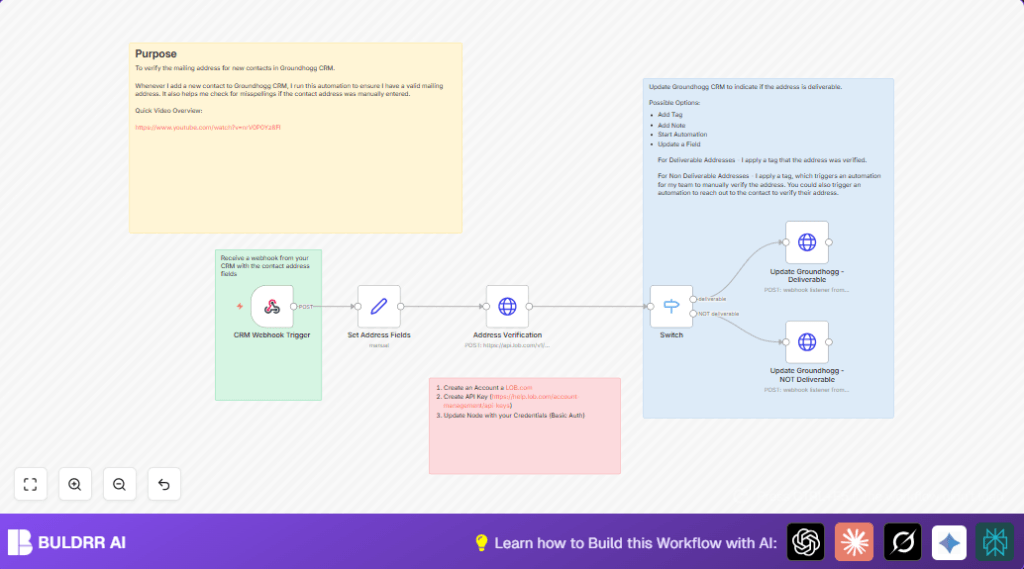
This workflow checks if a mailing address is correct when a new contact is added in Groundhogg CRM. It receives contact address data, sends it to Lob API for verification, and then tags the contact as deliverable or not in Groundhogg. This stops wrong addresses from causing returned mail or wasted effort.
The workflow solves the problem of manual address checking and errors by automating verification and tagging. The result is better mail success and saved time.
Who Should Use This Workflow
This is useful for marketers or small business owners who use Groundhogg CRM and send mail to customers. Anyone who wants to avoid postage waste from bad addresses needs this.
The workflow fits users who want fast, automatic address checks without extra work.
Tools and Services Used
- Groundhogg CRM: Sends new contact info with address via webhook.
- n8n: Runs the automation workflow that receives webhook data, processes it, and makes API calls.
- Lob API: Verifies US mailing addresses and returns if they are valid.
- HTTP Request node: Sends and receives data from Lob and updates Groundhogg tags.
- Webhook node: Receives contact data from Groundhogg.
Inputs, Processing Steps, and Output
Input
- New contact details from Groundhogg CRM through a webhook.
- Data includes contact ID, primary address, city, state, and zip code.
Processing Steps
- Webhook node receives new contact data.
- Set node extracts and formats address fields for the API.
- HTTP Request node sends the address to Lob API with Basic Auth.
- Switch node checks Lob’s deliverability response.
- Depending on the result, another HTTP Request node tags contact as “Mailing Address Deliverable” or “Mailing Address NOT Deliverable” in Groundhogg.
Output
- Contacts tagged in Groundhogg with deliverability status.
- Data to trigger follow-up workflows for non-deliverable addresses.
Beginner Step-by-Step: How to Use This Workflow in n8n
Import the Workflow
- Download the workflow file using the Download button on this page.
- In the n8n editor, click on “Import from File” and select the downloaded file.
Configure Credentials and Settings
- Add your Lob API Key in the HTTP Request node credentials section for Basic Auth.
- Update any IDs, webhook paths, or URLs if your Groundhogg setup differs.
- Verify the tag names match your Groundhogg CRM tags.
Test the Workflow
- Send a test contact from Groundhogg or a REST client to the Webhook node URL.
- Check the Lob API and tagging nodes run successfully.
Activate for Production
- Change the workflow toggle to active so it runs on new contacts.
- Monitor executions in the n8n dashboard to catch errors early.
For better uptime, consider self-host n8n on a cloud server.
Edge Cases and Failures
- If Lob API returns HTTP 401 Unauthorized, check that API Key is correct in the HTTP Request node.
- If the webhook doesn’t receive data, verify the webhook URL matches exactly in Groundhogg CRM settings.
- If tags don’t update in Groundhogg, check if the HTTP Request node targeting Groundhogg has the correct URL and contact ID.
- Missing address fields will cause Lob API errors—ensure all required fields like address, city, state, and zip code are sent.
Customization Ideas
- Use the “NOT Deliverable” tag node to start an email sequence asking the contact to confirm their address.
- Add an HTTP Request node to append address verification notes in Groundhogg instead of tagging.
- Before calling Lob API, add a decision node to skip or use a different API for international addresses.
- Parse Lob’s corrected address output and update contact fields automatically.
- Rotate several Lob API Keys if volume is high by adjusting HTTP Request node authentication dynamically.
Summary
✓ Automates checking of US mailing addresses for new CRM contacts.
✓ Tags contacts depending on deliverability for easy follow-up.
✓ Saves hours of manual verifying and reduces mailing errors.
→ Ensures mailing campaigns hit correct addresses and customers.
→ Improves customer outreach with fewer returned mails.
