
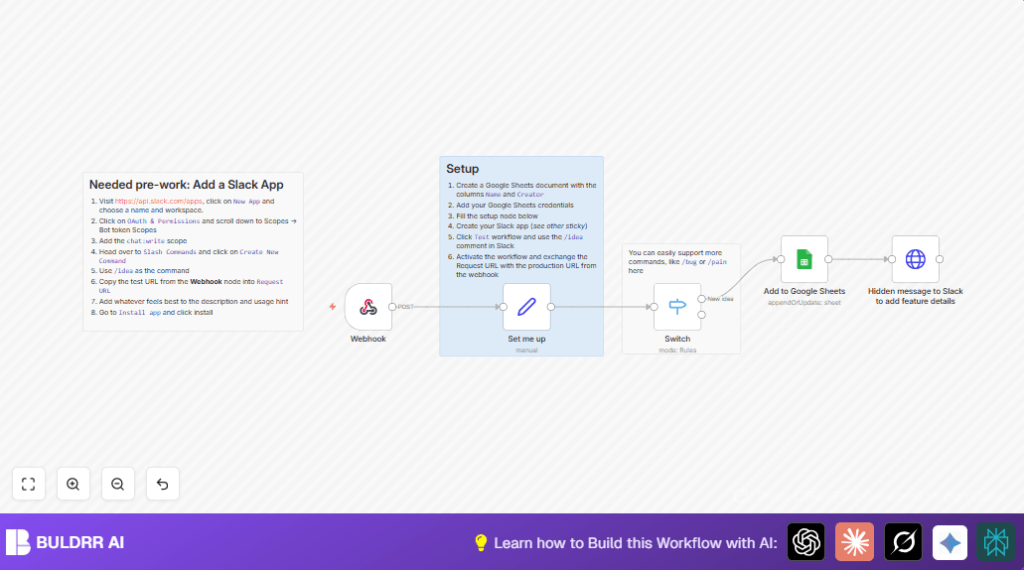

What This Automation Does
This workflow takes ideas sent by Slack slash commands and saves them into Google Sheets without needing you to type manually.
It solves the problem of losing ideas in busy Slack chats and helps keep everything organized in one place.
When someone types /idea, their message and username get recorded in your spreadsheet automatically.
The workflow listens for slash commands, processes the input text, and adds rows to a Google Sheet with two columns: Name and Creator .
Then it sends a simple reply back to Slack, letting the user know their idea was saved.
Tools and Services Used
- Slack App with slash commands: Sends idea text to the workflow through a webhook.
- n8n Workflow: Handles incoming Slack data, processes it, and talks to Google Sheets.
- Google Sheets API: Stores the ideas and usernames in a spreadsheet.
Inputs, Processing Steps, and Output
Inputs
- Slack slash command with text input (idea description).
- User information such as Slack username.
Processing Steps
- The Webhook node receives the Slack command via a POST request.
- The workflow uses a Switch node to check which command was sent (e.g.,
/idea) and route processing accordingly. - A Set node holds the Google Sheets URL needed for appending data.
- The Google Sheets node appends or updates a row with the idea text mapped to the Name column and username to Creator.
- An HTTP Request node posts a confirmation message back to Slack using the
response_url.
Outputs
- New or updated row in Google Sheets that logs the idea text and creator name.
- Confirmation message in Slack confirming successful idea submission.
Who Should Use This Workflow
This setup is good for teams who collect ideas or feedback often in Slack.
It works well when team members send quick, informal messages but still want those ideas saved for review later.
Managers or team leads wanting to save time by automating note-taking and idea tracking get the most benefit.
Beginner Step-by-Step: How to Use This Workflow in n8n Production
Import the Workflow
- Click the Download button on this page to get the workflow JSON file.
- Open the n8n editor where you already work.
- Choose Import from File and select the downloaded JSON.
Configure Credentials and IDs
- Add or update your Google Sheets API credentials inside n8n.
- Verify the Google Sheets URL in the Set me up node matches your target spreadsheet.
- Make sure the Slack app credentials with bot token and slash command URL are correct.
Test Workflow
- Save the workflow and trigger a test by typing
/ideafollowed by message in Slack. - Check that the idea appears in your Google Sheet and you get confirmation in Slack.
Activate Workflow for Production
- Turn on the workflow in n8n so it always listens.
- Tell your team to use the slash command to submit ideas.
This approach avoids building from scratch and helps you get started fast.
For self hosting n8n, visit self-host n8n.
Customization Ideas
- Add more rules in the Switch node for other slash commands like
/bugor/pain. - Change the confirmation HTTP Request node to send richer Slack messages with emojis or attachments.
- Add a timestamp column in Google Sheets to track when ideas arrive.
Common Problems and Fixes
Workflow Does Not Trigger on Slack Command
Check that the slash command URL exactly matches the Webhook node URL.
Make sure HTTP method in Slack is set to POST.
Google Sheets Fails to Append Data
Confirm Google Sheets credentials are added in n8n.
Check that the sheet URL or document ID in Set me up node is correct.
Pre-Production Checklist
- Google Sheet has columns named Name and Creator exactly.
- Slack slash command points to correct webhook URL.
- Google Sheets credentials are authorized in n8n.
- Workflow is activated before testing slash commands.
Summary of Results
✓ Saves 15-30 minutes daily by removing manual copy-paste.
✓ Captures ideas quickly and stores details in Google Sheets.
✓ Gives instant confirmation back in Slack to encourage use.
→ Improves team collaboration by organizing scattered feedback.
→ Allows easy addition of new commands for bugs or pains.
