

What This Automation Does
This workflow helps sales managers send follow-up emails automatically and record results in HubSpot.
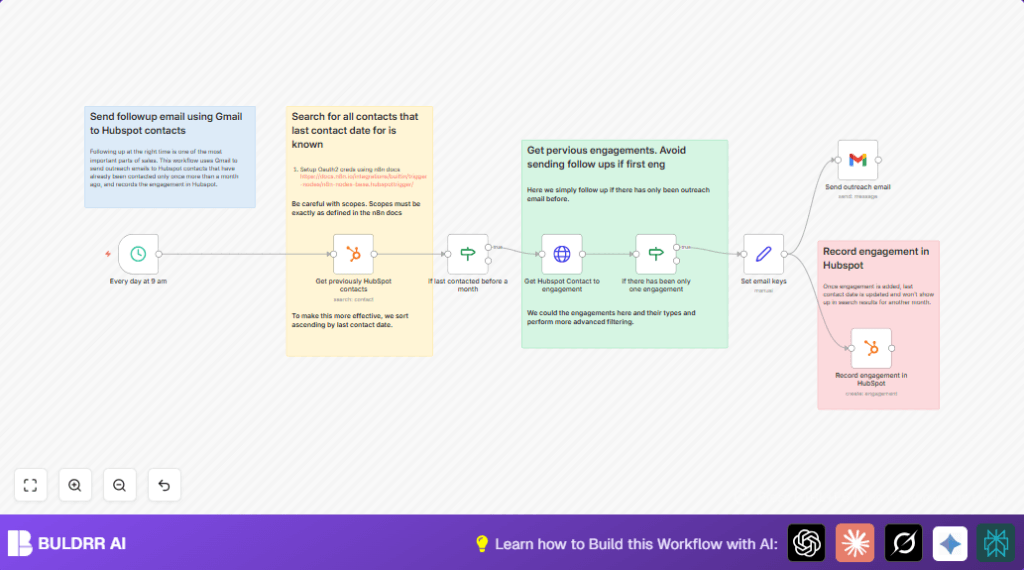
It finds contacts last reached over 30 days ago, sends a friendly email via Gmail, and logs the outreach back in HubSpot.
This stops missed follow-ups and reduces manual work drastically.
The process saves nearly 10 hours weekly by handling outreach and CRM updates without needing user action.
Inputs, Processing Steps, and Output
Inputs
- HubSpot Contacts: Contacts with a recorded last contact date.
Processing Steps
- Search HubSpot for contacts with
notes_last_contactedproperty. - Filter contacts last contacted more than 30 days ago.
- Retrieve engagement records for each contact via HubSpot API.
- Filter contacts with exactly one prior engagement.
- Compose personalized follow-up email content using contact details.
- Send the email through Gmail with OAuth2 authentication.
- Create a new engagement record in HubSpot for sent emails.
Output
- Sent follow-up emails to the right contacts.
- Updated HubSpot engagement logs for accurate contact tracking.
Who Should Use This Workflow
This workflow suits sales teams or managers using HubSpot and Gmail who want to reduce manual follow-ups.
It fits busy teams needing to keep contacts engaged with timely and tracked outreach.
Tools and Services Used
- n8n: Workflow automation platform.
- HubSpot API: To read contacts, check engagements, and log outreach.
- Gmail API: To send personalized follow-up emails.
Beginner Step-by-Step: How to Use This Workflow in n8n
Step 1: Download and Import
- Click the Download button provided on this page.
- Inside the n8n editor, select Import from File and upload the workflow JSON.
Step 2: Configure Credentials
- Add your OAuth2 credentials for Gmail node and HubSpot node.
- Ensure permissions include reading contacts and sending email.
Step 3: Update Variables
- Check any hardcoded IDs or emails and update them to match your HubSpot and Gmail accounts if needed.
- Review the Set node with email content and change messages or sender names if preferred.
Step 4: Test the Workflow
- Run the workflow manually inside n8n to verify emails send and contacts update.
- Check inbox and HubSpot engagement history.
Step 5: Activate for Production
- Enable the workflow to run daily at 9 AM automatically.
- Monitor first few runs for errors or missed contacts.
- Consider connecting alert nodes or logging for ongoing visibility.
For users running self-host n8n instances, refer to self-host n8n options to maintain OAuth tokens securely.
Common Issues and Edge Cases
- OAuth2 tokens expire — reauthorize HubSpot node or Gmail node as needed.
- If date filters exclude all contacts, check date formatting in filter expressions.
- Incorrect HubSpot API endpoints or permissions can cause engagement retrieval errors.
- Missing association of engagements to contacts can prevent last contact date updates.
- API quotas — running for large contact lists may require throttling or batch processing.
Customization Ideas
- Change follow-up interval days by altering the date condition in the If node to 14, 60, or other.
- Personalize email content further in the Set node using more contact properties.
- Filter contacts with different engagement counts or types.
- Add logging of emails sent to Google Sheets or databases for audit.
- Use different Gmail accounts or domain aliases to send emails.
Summary
✓ Sends well-timed follow-up emails automatically.
✓ Updates HubSpot engagement records correctly.
✓ Saves many hours of manual work each week.
→ Prevents missed sales opportunities.
→ Keeps outreach polite and not spammy.
