

Automate Telegram Chat Replies with n8n and OpenAI GPT-4o-Mini

Discover how to automate personalized Telegram chat responses using the n8n workflow integrating Telegram Trigger, AI Agent with Langchain, and OpenAI’s GPT-4o-Mini. This automation reduces manual response time and ensures quick, helpful replies with emojis.
telegramTrigger
agent
lmChatOpenAi
+1
Workflow Identifier: 1493
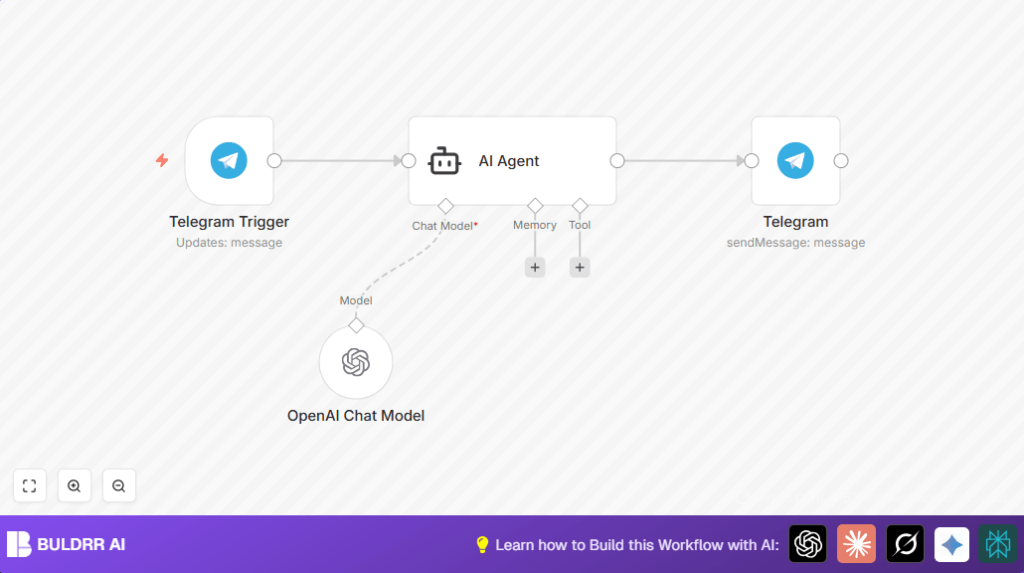
NODES in Use: telegramTrigger, agent, lmChatOpenAi, telegram
Automate Telegram replies with n8n and OpenAI

Press CTRL+F5 if the workflow didn't load.

Learn how to Build this Workflow with AI:

What this workflow does

This workflow answers Telegram messages automatically using AI.
It takes user messages sent to your Telegram bot, creates friendly replies with emojis, and sends them back fast.
This helps solve slow or missing responses in busy Telegram chats.
The result is quick, human-like replies that keep users happy and save time.


Who should use this workflow

Anyone managing active Telegram groups or channels with many messages.
It is good for community managers and support teams wanting to automate replies.
It helps cut down manual answering work and avoid delayed responses.
Basic n8n knowledge and API keys are needed.


Tools and services used

  • Telegram Bot API: Receives user messages.
  • n8n automation platform: Connects and manages workflow nodes.
  • Langchain AI Agent node: Creates emoji-rich helpful replies.
  • OpenAI Chat Model GPT-4o-Mini: Generates natural language responses.


Inputs, Processing Steps, and Outputs

Inputs

  • Incoming messages from Telegram users to the bot.

Processing Steps

  • Telegram Trigger node listens to new messages.
  • AI Agent node builds a reply prompt including emojis.
  • OpenAI Chat Model GPT-4o-Mini generates context-aware text based on the prompt.
  • Generated reply text goes back to Telegram node.
  • Telegram node sends the reply message back to the chat.

Output

  • Automated, friendly, emoji-enhanced replies sent to Telegram chats quickly.


Beginner step-by-step: How to use this workflow in n8n

Step 1: Import workflow file

  1. Inside the n8n editor, click “Import from File.”
  2. Choose the downloaded workflow JSON file from this page.

Step 2: Configure credentials and details

  1. Add Telegram Bot API credentials to Telegram Trigger and Telegram nodes.
  2. Insert OpenAI API Key for the OpenAI Chat Model node.
  3. If needed, update IDs like chatId or message paths in nodes.
  4. Check the prompt text in AI Agent node:
    =Respond to this as a helpful assistant with emojis:  {{ $json.message.text }}

    Make sure it is included exactly to get emoji replies.

Step 3: Test the workflow

  1. Try sending a message to the Telegram bot in your chat.
  2. Confirm the workflow replies promptly with a friendly, emoji-rich answer.

Step 4: Activate for production

  1. Switch the workflow status to active in n8n.
  2. Monitor executions for errors or API issues.

For stability, use self-host n8n if running on your own server.


Customization ideas

  • Change the AI prompt in AI Agent node to adjust reply style.
  • Switch model in OpenAI Chat Model node to other GPT versions.
  • Add logging nodes after AI Agent to save chat replies.
  • Insert filter nodes to ignore bot messages or keywords.
  • Duplicate for multiple Telegram bots with different credentials.


Handling edge cases and failures

Webhook not receiving messages

Cause: Wrong bot API key or webhook not set on Telegram.

Fix: Check correct API token and re-register webhook URL from Telegram Trigger node.

Empty or error AI responses

Cause: Invalid OpenAI API Key or quota exceeded.

Fix: Verify and update OpenAI credentials and subscription status.


Summary of results

✓ Fast, friendly Telegram replies with emojis.
✓ Saves manual reply time.
✓ Keeps chat users satisfied.
✓ Easy to configure and run inside n8n.
✓ Works automatically without manual steps.


Automate Telegram replies with n8n and OpenAI

Visit through Desktop to Interact with the Workflow.

Frequently Asked Questions

The workflow uses the Telegram Trigger node with the bot API to receive new messages.
The OpenAI Chat Model GPT-4o-Mini is used to produce natural language responses.
Yes, by editing the prompt text in the AI Agent node, users can adjust the tone and style.
Check that the OpenAI API key is valid and that API usage limits have not been reached.

Promoted by BULDRR AI

Related Workflows

Automate Twist Channel Creation and Messaging with n8n

This workflow automates creating and updating a channel in Twist and sending a personalized message to specific users. It eliminates manual setup errors and saves time managing Twist communications.

Automate Ideogram Image Generation with Google Sheets & Gmail

This workflow automates graphic design image generation via Ideogram AI, storing image data in Google Sheets and Google Drive, with email alerts via Gmail. It saves designers hours by automating image creation, remixing, review, and record-keeping.

Automate IT Support with Slack and OpenAI in n8n

Streamline IT support by automating Slack message handling using n8n and OpenAI. This workflow handles Slack DMs, filters bots, queries a Confluence knowledge base, and delivers AI-generated responses, improving support efficiency and response time.

Automate Crypto Analysis with CoinMarketCap & n8n AI Agent

Discover how this unique n8n workflow leverages CoinMarketCap’s multi-agent AI to deliver precise, real-time cryptocurrency insights directly via Telegram. Manage crypto data analysis efficiently with automated multi-source API integration.

Automate Gumroad to Beehiiv Subscriber Sync with n8n

Learn how to automatically add new Gumroad sales customers as Beehiiv newsletter subscribers using n8n automation. This workflow saves time by syncing sales data to Google Sheets CRM and notifying your Telegram channel instantly.

Generate On-Brand Blog Articles Using n8n and OpenAI

This workflow automates the creation of on-brand blog articles by analyzing existing company content using n8n and OpenAI. It extracts article structures and brand voice to produce consistent draft articles, saving significant content creation time.
1:1 Free Strategy Session
Your competitors are already automating. Are you still paying for it manually?

Do you want to adopt AI Automation?

Every hour your team does repetitive work, you're burning real money.
While you wait, faster businesses are cutting costs and moving quicker.
AI and automations aren't the future anymore — they're the present.

Book a live 1-on-1 session where we show you exactly which of your daily tasks can be automated — and what it’s costing you not to.