
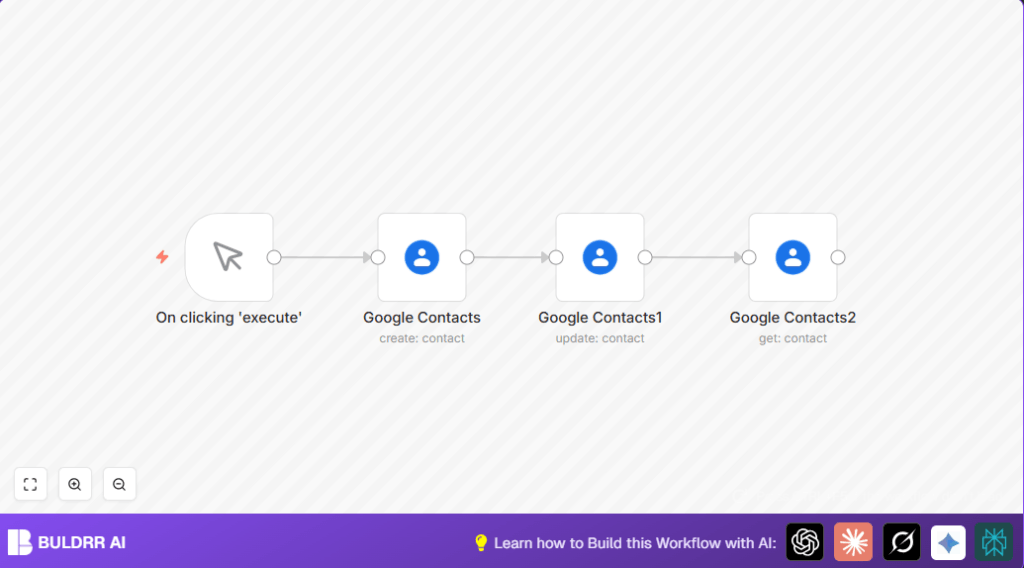

What this workflow does
This workflow helps you manage Google Contacts automatically. It stops you from typing contact info by hand each time. The workflow adds new contacts, changes company details, and fetches the updated info all by itself. This saves time and avoids data mistakes.
You put in simple info, and the workflow uses Google Contacts API to do the rest. You get fresh, correct contact data fast without extra work.
Who should use this workflow
This workflow fits if you handle many Google Contacts daily.
You want less typing. You want fewer errors. You want ready-to-use contact data.
Anyone managing contacts for sales, customer service, or business growth finds this useful.
Tools and services used
- Google Contacts API: Creates, updates, and gets contact data.
- n8n workflow automation: Links Google Contacts steps without coding.
- OAuth2 credentials: Allow secure access to your Google Contacts.
Inputs, Processing Steps, and Outputs
Inputs
- Trigger to start workflow manually.
- Initial contact names (givenName and familyName).
- Company information details for updating contacts.
Processing Steps
- Start workflow by manual trigger.
- Create a Google Contact with given and family name “n8n”.
- Grab the new contact’s ID for next steps.
- Update contact’s company details using stored contact ID.
- Get updated contact details, focusing on organization info.
Outputs
- Confirmation of contact creation with contact ID.
- Success on company info updated.
- Display of fresh contact info including organizations.
Beginner step-by-step: How to use this workflow in production inside n8n
Step 1: Import the Workflow
- Download the workflow using the Download button on this page.
- Go to n8n editor where you want to use the workflow.
- Click the menu, choose “Import from File”, and select the downloaded workflow file.
Step 2: Configure Credentials and IDs
- Add the Google Contacts OAuth2 credentials under Settings > Credentials.
- Make sure the credentials have permission to use Google Contacts API.
- If needed, update any contact IDs, emails, or other fields inside nodes to match your data.
Step 3: Test Workflow Execution
- Click on the manual trigger node labeled Manual Trigger node.
- Run the workflow using the execute button.
- Check the output for contact creation, update success, and retrieved data.
Step 4: Activate Workflow for Production
- Enable the workflow by toggling the Active switch in the n8n editor.
- You can now run the workflow manually or connect it to event triggers.
- Monitor the workflow runs and adjust credentials or parameters if needed.
For self hosting n8n or running on your own server, see self-host n8n for help.
Customization Ideas
- Add more contact fields like phone numbers, emails, or addresses during contact creation.
- Include social profiles, notes, or multiple companies when updating contact info.
- Use dynamic data from other nodes or triggers to handle different contacts without changing the workflow.
Common problems and fixes
Problem: “Invalid Credentials” error when accessing Google Contacts nodes
Cause: The OAuth2 credentials are not correct or expired in n8n.
Fix: Go to Settings > Credentials in n8n, and re-link or update Google Contacts credentials. Make sure the right scopes and refresh tokens are in place.
Problem: Contact not updating even though workflow run shows success
Cause: The contactId from the create step is not given right to the update step.
Fix: Check the JSON expression in the update node’s contactId field. It should look like this:
{{$node["Google Contacts"].json["contactId"]}}Summary: What you gain from this workflow
✓ Saves you time by handling contact creation and updates automatically.
✓ Avoids manual typos and data mistakes.
✓ Keeps Google Contacts up to date with key organization info.
→ Lets you focus on connecting with clients instead of managing data.
→ Easily expand to sync contacts with CRM or trigger automated follow-ups.
