

What This Workflow Does
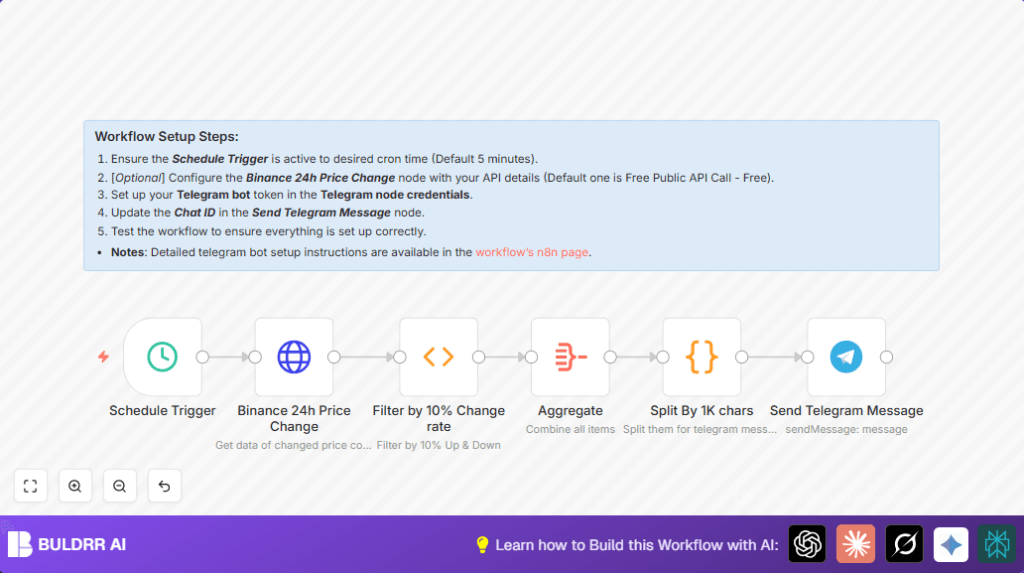
This workflow watches crypto coin prices taken from Binance’s public API every 5 minutes. It finds coins with price changes over 15% in the last 24 hours. Then, it sends alerts about those big changes directly to a Telegram group chat. This helps avoid missing sudden price moves without checking manually.
The result is fast and easy notifications for coins moving a lot, so the user can react quickly and save time.
Tools and Services Used
- n8n automation platform: Runs and links all the workflow nodes.
- Binance Public API: Provides raw 24-hour coin price change data without credentials.
- Telegram Bot API: Sends alerts to a chosen Telegram group or chat.
How the Workflow Works: Inputs, Processing, and Output
Inputs
The workflow triggers every 5 minutes automatically from a Schedule Trigger node.
No manual input is required once active.
Processing Steps
- Data is fetched from Binance’s endpoint
https://api.binance.com/api/v1/ticker/24hrby an HTTP Request node. - A Function node filters coins with price change ±15% or more.
- Filtered coins are sorted by highest price change percentage.
- An Aggregate node groups all filtered coin notifications into one collection.
- A Code node splits the message collection into chunks under 1000 characters for Telegram’s limit.
- The Telegram node sends one chunked message at a time to the specified Telegram group chat.
Output
The user receives formatted Telegram messages listing coins with large 24-hour price moves and their last trade prices.
Messages are split properly to avoid errors due to Telegram message size.
Who Should Use This Workflow
This workflow fits anybody who watches cryptocurrencies and needs quick alerts on big price changes.
It is good for busy traders, investors, or analysts who cannot check prices constantly by hand.
The workflow reduces missed opportunities or late reactions from slow manual checking.
Beginner Step-by-Step: How to Use This Workflow in n8n
Step 1: Import Workflow
- Download the full workflow file using the Download button on this page.
- Inside the n8n editor, click “Import from File” and load the downloaded workflow.
Step 2: Configure Credentials and IDs
- Open each node that requires credentials, like the Telegram node, and add your Telegram bot token.
- Update the Telegram chat ID to the group or user ID where messages must go.
Step 3: Verify Other Settings
- Check the HTTP Request node URL is set to
https://api.binance.com/api/v1/ticker/24hras given. - Review the Function node code to confirm the 15% price change filter is set as desired.
Step 4: Run and Test
- Execute the workflow manually once by clicking each node’s execute button to check if the data flows and messages are sent.
- Look for errors in the workflow output or Telegram messages.
Step 5: Activate for Production
- Activate the workflow so it runs every 5 minutes automatically.
- Monitor initial runs to make sure messages arrive on time.
For users running self-host n8n, ensure the server is running and public access is available for timely execution.
Customization Ideas
- Change the price change filter percentage in Function node code to lower or raise alert sensitivity.
- Modify message chunk size in the Code node to fit different messaging platform limits.
- Duplicate the Telegram node to send alerts to multiple chats or users.
- Replace public Binance API with authenticated APIs if private or more detailed data is needed.
Common Errors and How to Fix Them
- Telegram messages not sent: Check Telegram bot token and chat ID. Make sure the bot is added to the target chat.
- Empty or error data from Binance: Verify Binance API URL and network connection are correct.
- Function node errors: Check JavaScript code syntax and the input data format from previous node.
