
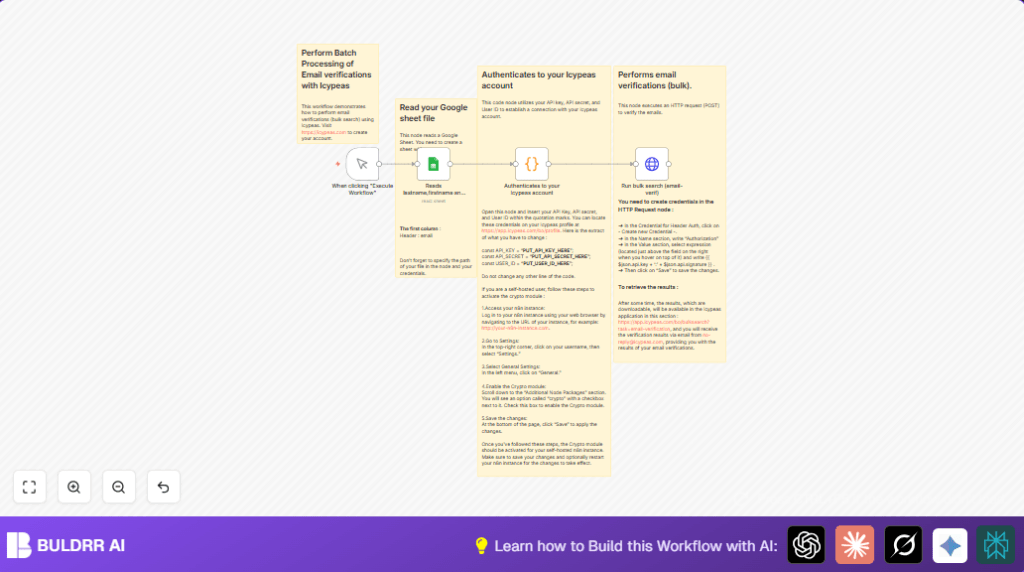

What This Workflow Does
This workflow reads a list of emails from a Google Sheet and sends them to Icypeas API to verify if they are valid.
It stops manual checking and saves time for people who send many emails.
The result helps keep email lists clean by showing which addresses are good or bad.
Who Should Use This Workflow
- Marketing teams: To check big email lists before campaigns.
- Sales groups: To avoid bad contacts in outreach.
- Data managers: To clean email data fast.
Tools and Services Used
- Google Sheets: Holds the list of email addresses to verify.
- Icypeas API: Checks the emails for validity and risks.
- n8n automation platform: Runs the workflow connecting data and API calls.
Inputs, Processing, and Output
Inputs
- Email addresses in a Google Sheet file under the first column named
email. - Icypeas API key, secret, and user ID for authentication.
Processing Steps
- The workflow starts when manually triggered in n8n.
- Reads lastname,firstname and company from your sheet node fetches the emails.
- Authenticates to your Icypeas account code node generates the authentication signature.
- Run bulk search (email-verif) HTTP Request posts the email list to Icypeas API with proper headers.
Output
- Verification job starts at Icypeas.
- Results become available in the Icypeas web dashboard and by email notification later.
Beginner Step-by-Step: How to Use This Workflow in Production
Step 1: Import Workflow to n8n
- Download the workflow file by clicking the Download button on this page.
- In the n8n editor, click “Import from File” and select the downloaded workflow file.
Step 2: Configure Credentials and Parameters
- Open the Authenticates to your Icypeas account code node.
- Replace the placeholders
API_KEY,API_SECRET, andUSER_IDwith your actual Icypeas API credentials. - Verify the Reads lastname,firstname and company from your sheet Google Sheets node has the correct Document ID and Sheet name for your email list.
- Set up header authentication in the Run bulk search (email-verif) HTTP Request node using the expression
{{ $json.api.key + ':' + $json.api.signature }}as described.
Step 3: Test the Workflow
- Click the When clicking “Execute Workflow” node’s Execute button to manually start the workflow.
- Watch for successful node executions and check that the emails are sent to Icypeas.
Step 4: Activate for Production
- Once testing is good, turn on the workflow in n8n to keep it ready.
- Run this manually when needed or replace the manual trigger with a Cron node to automate timing.
Following this lets the user easily run bulk email checks without building from scratch or deep coding.
If using self-host n8n, remember to enable the crypto module as per the workflow notes: self-host n8n.
Customization Ideas
- Change the Google Sheet or column name in the Google Sheets node on folder and tab.
- Filter emails with a Function node before sending to Icypeas to remove bad formats.
- Add security tokens or headers in the HTTP Request node if Icypeas updates requirements.
- Replace manual trigger node with a Cron node to auto run the checks on schedule.
- Write back results to Google Sheets or add Slack notifications for alerts.
Troubleshooting Tips
- 401 Unauthorized from HTTP Request means wrong API credentials or signature. Double check keys in the Code node.
- Google Sheets node not reading data means no credentials or wrong sheet info. Re-authenticate and verify Document ID and Sheet Name.
- Crypto module errors on self-hosted setups happen if crypto is not enabled. Follow instructions to enable crypto for self-host n8n.
Pre-Production Checklist
- Google Sheet has column named exactly
emailwith valid email addresses. - Icypeas API_KEY, API_SECRET, and USER_ID are inserted correctly in the Code node.
- Google Sheets and HTTP Request nodes properly authenticated without errors on test run.
- Run the workflow manually to confirm emails are sent to Icypeas.
- Look for verification results email or dashboard notification from Icypeas.
- Backup your email list data before largescale tests.
Summary of Benefits
✓ Saves hours by stopping manual email validation work.
✓ Cuts human mistakes and cleans email lists better.
✓ Protects sender reputation with fewer bounce-backs.
✓ Runs on-demand or on schedule inside n8n.
→ You get verified email lists quicker, safer, and with less effort.
