
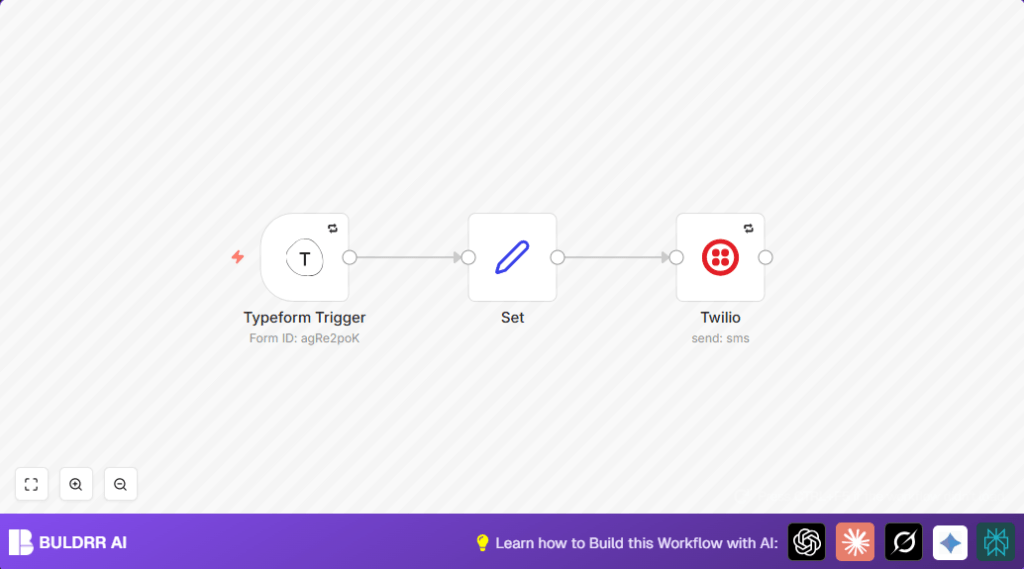

What This Automation Does
This workflow gets new answers from a Typeform survey and sends a WhatsApp message fast.
It stops wasting time copying info from forms to WhatsApp.
Once someone submits the Typeform, the sales team sees their details right away on WhatsApp.
The message shows all important answers nicely arranged.
It tries again if message sending fails.
Overall, the workflow makes sure leads don’t get missed and saves hours of manual work.
Tools and Services Used
- Typeform account: Collects answers from users through forms.
- Twilio account: Sends WhatsApp messages with the lead data.
- n8n platform: Runs the automation workflow linking Typeform and Twilio.
Workflow Inputs, Processing, and Output
Inputs:
- New form submission data from Typeform, including customer answers.
Processing Steps:
- The Typeform Trigger node listens for new form responses with OAuth2 login.
- The Set node grabs specific answers like last name, first name, number of children, country, email, and birth date.
- The answers are put into a clear text message format using expressions.
- The Twilio node sends this text as a WhatsApp message to the sales number.
- Retry is on for sending messages and triggering, so short errors won’t lose leads.
Output:
- A WhatsApp message arrives immediately with customer details from the form.
- The sales team gets fast, accurate lead info without manual typing.
Beginner Step-by-Step: How to Use This Workflow in n8n
Step 1: Import the Workflow
- Click the Download button on this page to get the workflow file.
- In the n8n editor, click Import from File and select the downloaded file.
Step 2: Configure Credentials and Settings
- Add or update the Typeform OAuth2 credentials in the Typeform Trigger node.
- Enter your Typeform ID in the Typeform Trigger node.
- Add Twilio credentials (Account SID and Auth Token) in the Twilio node.
- Update the
toWhatsApp recipient number and thefromTwilio WhatsApp sender number in the Twilio node.
Step 3: Test the Workflow
- Submit a test entry to the Typeform form.
- Use the n8n editor to run the workflow once and check the message content.
Step 4: Activate the Workflow for Production
- Toggle the workflow active in n8n. The Typeform Trigger will listen to live submissions.
- Monitor runs on the n8n dashboard and check retry settings are enabled.
- Consider self-host n8n for better control and reliability.
Common Mistakes and How to Avoid Them
- Typeform OAuth2 not set: The Typeform Trigger won’t fire without correct login.
- Answer labels mismatch: The Set node expressions require exact field names from Typeform answers.
- Wrong phone number format: WhatsApp numbers must have + and country code, exactly as Twilio needs.
- Not verified Twilio WhatsApp numbers: Messages won’t send if numbers are not approved in Twilio’s WhatsApp sandbox or production.
Customization Ideas
- Change the
torecipient number in the Twilio node to send WhatsApp messages to others. - Add or remove fields from the message in the Set node to match different Typeform shapes.
- Record messages in Google Sheets or logging files after sending for audit trails.
Pre-Production Checklist
- Typeform OAuth2 credentials are valid and connected.
- Test the form to confirm the Set node message looks correct.
- Twilio numbers are correct and WhatsApp-enabled.
- Manual WhatsApp message sends via Twilio succeed.
- Retry options turned on for trigger and Twilio nodes.
Deployment Guide
Turn the workflow active in n8n after testing.
The Typeform Trigger listens for new form submissions as webhooks.
Watch workflow executions inside n8n to catch errors early.
Add email or Slack alerts if desired to spot failed sends fast.
Summary
✓ Saves hours daily by automating data transfer from forms to WhatsApp.
✓ Speeds up responses by delivering leads instantly.
✓ Avoids manual typos and lost leads.
✓ Runs live with retries for reliability.
✓ Easy to customize for different form fields and recipients.
