

What This Automation Does
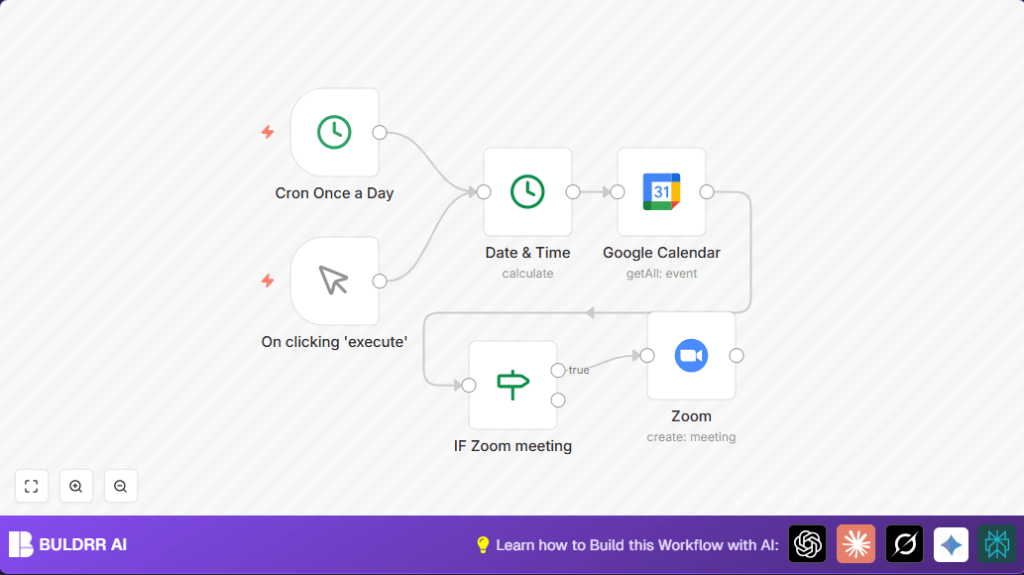
This workflow finds upcoming events in Google Calendar within 12 hours and creates matching Zoom meetings automatically.
It skips events like “in person,” “signal,” or canceled ones to avoid mistakes.
The result is Zoom meetings with correct topics and precise start times and durations.
Users save hours weekly on manual scheduling.
Tools and Services Used
- Google Calendar API: Provides event details using OAuth2 credentials.
- Zoom API: Creates scheduled meetings based on filtered events.
- n8n Automation Platform: Connects nodes for scheduling and logic.
Inputs, Processing Steps, and Output
Inputs
- Current time as a timestamp.
- Google Calendar events scheduled in the next 12 hours.
- User’s OAuth2 credentials for Google Calendar and Zoom.
Processing Steps
- Trigger the workflow daily at 7 AM or manually.
- Calculate the time window (now plus 12 hours).
- Query Google Calendar for events inside this window.
- Filter out events where transparency is “transparent” or summary contains keywords “signal”, “minute meeting”, or “in person”.
- For remaining events, compute meeting duration by subtracting start time from end time.
- Create Zoom meetings with matching topics and timings.
Outputs
- Zoom meetings are created matching Google Calendar events.
- Users get calendar meetings with auto-added Zoom links.
Who Should Use This Workflow
This workflow fits users who schedule many meetings and want to avoid manual errors.
It helps project managers, team leads, or admins needing Zoom links automatically.
People with busy calendars but limited time to create Zoom meetings will find this useful.
Beginner Step-by-Step: How to Use This Workflow in n8n
1. Import Workflow
- Download the workflow file using the Download button found on this page.
- Open n8n editor (already logged in).
- Click “Import” then “Import from File”.
- Select and upload the downloaded workflow.
2. Configure Credentials and IDs
- Add Google Calendar OAuth2 credentials in n8n credentials manager.
- Add Zoom OAuth2 credentials similarly.
- Open the Google Calendar node and update the Calendar ID field with the correct calendar to check.
- Check for any other IDs, emails, or fields that need updating.
3. Test the Workflow
- Click the manualTrigger node and run the workflow.
- Verify that Zoom meetings get created for upcoming calendar events fitting the filters.
- Check the logs inside n8n for errors and fix any credential or ID problems.
4. Activate for Production
- Enable the Cron node to schedule the daily check (default 7 AM).
- Save and activate the workflow.
- Optionally use self-host n8n for better control or performance.
- Monitor Zoom meetings creation regularly to ensure smooth process.
Common Customizations
- Change the Google Calendar node calendar ID to track different calendars.
- Modify the IF node to add or remove filter keywords to match specific needs.
- Adjust the time window in the Date & Time node to check 6 or 24 hours instead of 12.
- Add notification nodes like email or Slack after creating Zoom meeting.
- Force timezone for Zoom meetings if needed, regardless of event timezone.
Troubleshooting & Edge Cases
- Zoom OAuth2 Authentication Errors: Usually caused by expired or wrong credentials.
Try reauthenticating the Zoom node with correct OAuth2 credentials. - No Events Triggered: Often due to incorrect calendar ID or filters set too strict.
Check calendar setting and relax IF node filters if no Zoom meetings created. - Time Zone Mismatches: May cause wrong meeting times.
Ensure timezone parameters are correct in both Google Calendar and Zoom nodes.
Code Example to Calculate Zoom Meeting Duration
Inside the Zoom node, use this expression in the Duration field.
It calculates meeting length in minutes from Google Calendar event times.
=((Date.parse($node["IF Zoom meeting"].json["end"]["dateTime"]) - Date.parse($node["IF Zoom meeting"].json["start"]["dateTime"]))/(60*1000))Summary and Outcome
✓ Saves hours weekly by automating Zoom meeting creation.
✓ Avoids errors like double bookings or missing Zoom links.
✓ Automatically matches meeting topics and timings.
✓ Uses OAuth2 credentials for secure API access.
✓ Filters events to prevent creating Zoom meetings for inappropriate events.
→ Runs daily with an option for manual execution.
→ Helps busy users focus on real tasks instead of scheduling.
