
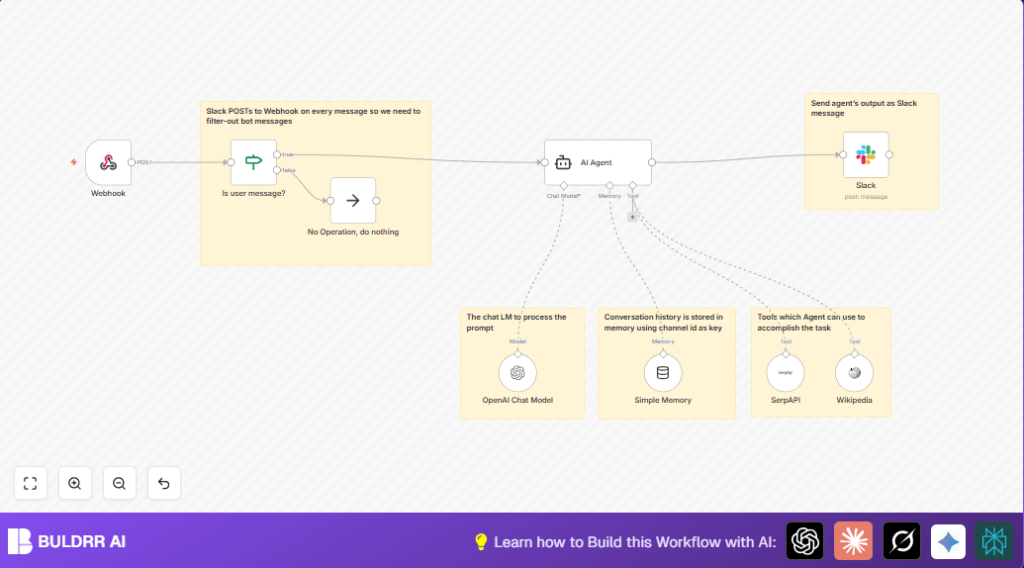

What This Workflow Does
This workflow listens to messages in a Slack channel and replies automatically like Gilfoyle from Silicon Valley.
It filters out any messages from bots to avoid useless responses.
When a user sends a question, the workflow uses an AI agent powered by GPT-4o-mini to provide blunt, direct answers with Gilfoyle’s personality.
The AI can look up current facts using SerpAPI and Wikipedia, so answers are fresh and accurate.
It remembers past chats in the same Slack channel to keep replies relevant.
The final answers post back to the channel as direct replies to users, saving time and improving support.
Who Should Use This Workflow
This automaton is great for Slack channels where tech support or complex questions go unanswered for long.
It fits teams wanting to reduce manual replying and avoid missing real questions hidden in bot noise.
Users who want fun, sarcastic, no-nonsense replies in a Slack chat will find this useful.
Tools and Services Used
- Slack API: To get real-time messages and post replies.
- OpenAI GPT-4o-mini model: To generate Gilfoyle-style AI answers.
- Langchain AI Agent nodes: To run chat logic with memory and tools.
- SerpAPI: To search the web for live information.
- Wikipedia API: To get knowledge from Wikipedia articles.
How This Workflow Works (Input → Process → Output)
Inputs
- Messages sent in a Slack channel.
- Messages ignored if sent by bots.
Processing Steps
- Use a Webhook node to catch new Slack messages.
- Check message has no
bot_idusing If node. - Send user text to AI Agent node with Gilfoyle’s blunt personality set in the system prompt.
- AI Agent calls SerpAPI and Wikipedia nodes if answers need updated info.
- Store conversation history in a Simple Memory Langchain node by Slack channel ID.
- Use OpenAI GPT-4o-mini chatbot model as main AI engine.
- Generate AI answer text.
Output
- A reply posted back in the Slack channel directly responding to the user.
- Bot messages are ignored and cause no action.
Beginner Step-by-Step: How to Use This Workflow Inside n8n
Download and Import Workflow
- Download the workflow file using the Download button on this page.
- Open the n8n editor where you want to run this automation.
- Use the Import from File option to load the downloaded workflow.
Configure Credentials and IDs
- Enter your Slack API credentials in the Webhook node and Slack node.
- Add your OpenAI API key for the GPT-4o-mini model in the OpenAI Chat Model node.
- Fill in SerpAPI and Wikipedia API keys in the respective Langchain tool nodes.
- Update any Slack channel IDs or user pointers if needed (usually in the Slack node for reply).
Test and Activate
- Send test messages in your Slack channel to check if the workflow triggers and replies properly.
- Edit the system message in AI Agent if you want to change Gilfoyle’s personality.
- Once everything works, activate the workflow in n8n to run continuously.
- Consider running n8n on reliable infrastructure; see self-host n8n options.
Inputs and Outputs Explained
Inputs
- Incoming Slack messages via webhook.
- Exclude messages sent from bots by checking
bot_id.
Outputs
- Direct Slack replies with AI-generated text in same channel.
- No output for messages filtered as bots; workflow does nothing.
Common Problems and How to Fix Them
- Slack webhook not triggering: Make sure the Webhook node HTTP method is
POSTand URL is correct. - Bot messages causing replies: Check the If node to exclude messages with
bot_id. - OpenAI calls failing: Confirm the API key in the OpenAI Chat Model node is valid and the internet connection works.
Customization Ideas
- Change the AI personality by editing system message prompt in AI Agent.
- Modify memory length in Simple Memory node to remember more or fewer past messages.
- Add other Langchain tools like calculators or translators as AI tools to extend function.
- Add extra filters with If nodes to only answer messages with certain keywords.
- Post replies to different Slack channels by updating target channel in Slack node.
Deployment Tips
Before deploying, make sure your Slack webhook URL is live and receiving events.
Check that all APIs—OpenAI, SerpAPI—are working with correct keys.
Test user messages with and without bot_id to ensure proper filtering.
Monitor the AI agent’s replies for personality and context.
If you want more control, consider hosting the workflow on your own server using self-host n8n.
Summary
✓ Saves time by answering Slack questions instantly.
✓ Avoids bot noise by filtering messages.
✓ Provides blunt, Gilfoyle-style AI replies.
✓ Can fetch live info with external tools.
✓ Keeps chat history for better context.
→ Helps busy Slack teams manage support faster and smarter.
