

What This Automation Does
This workflow helps users quickly get precise answers from big documents stored in Google Drive. It solves the problem of slow, manual searches that waste hours each week. You get instant, clear answers from your files using AI and vector search technology.
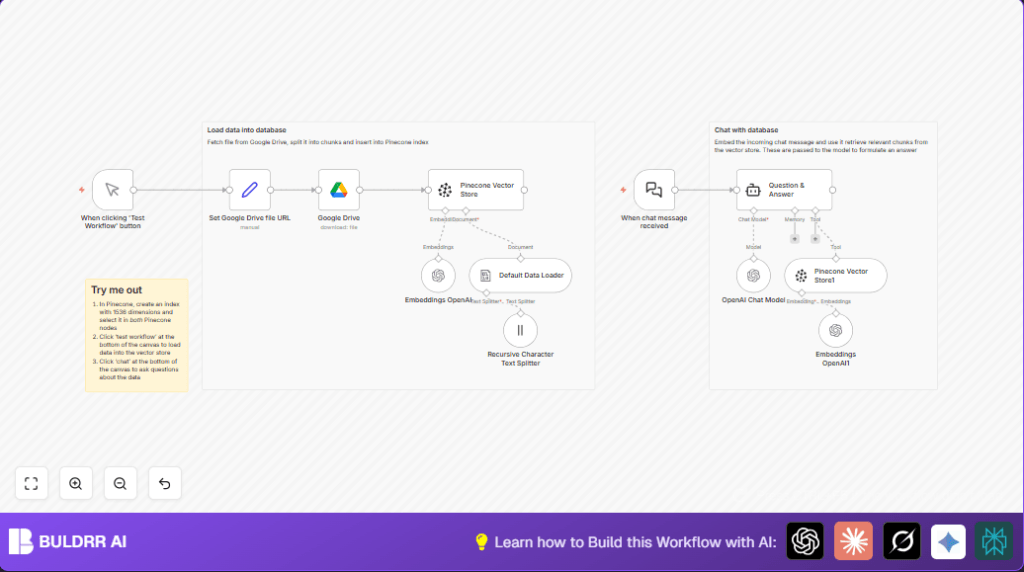
When this workflow runs, it starts by grabbing a chosen file from Google Drive once you click a manual trigger. Then, it breaks the document into smaller parts that work well for AI understanding. Each chunk is changed into a vector embedding using OpenAI’s models.
These embeddings are saved in a Pinecone vector database, which is cleared first to avoid old data. When someone asks a question, the workflow embeds the query, finds matching parts from Pinecone, and gives those to the AI chat model. The AI forms answers based on this relevant content, letting the user get smart and accurate responses fast.
This process cuts down hours of manual searching each week. Everyone on your team can now ask questions and get answers from complex documents right away. It makes decisions faster and reduces mistakes caused by missing information.
Tools and Services Used
- n8n: Runs and connects all the automation steps.
- Google Drive: Stores original documents to load and process.
- Pinecone Vector Database: Saves and searches document embeddings.
- OpenAI API: Generates text embeddings and chat answers.
Inputs, Processing, and Outputs
Inputs
- A Google Drive file URL for the document to process.
- User chat messages sent to the webhook to ask questions.
Processing Steps
- Download file content from Google Drive.
- Convert file content into plain text for splitting.
- Split text into chunks of 3000 characters with 200 overlap.
- Create vector embeddings for each chunk using OpenAI.
- Clear existing Pinecone namespace and upsert new embeddings.
- When chat messages arrive, embed the question.
- Query Pinecone for similar text chunks based on the question embed.
- Send the retrieved chunks and user question to OpenAI chat for answer generation.
Output
- Accurate, context-based chat answers explaining the document content.
Who Should Use This Workflow
This workflow is helpful for knowledge managers or any team who works with large reports, whitepapers, or manuals stored on Google Drive. It suits users who don’t have technical coding skills but want fast, clear answers from long texts. It fits companies needing to save time spent on manual document searches and reduce errors from missed info.
People who want to improve business decisions by getting reliable data insights fast should try this workflow.
Beginner Step-by-Step: How to Use This Workflow in n8n
Step 1: Download and Import
- Click the Download button on this page to get the workflow JSON file.
- Open your n8n editor. You must already have an account or have self-host n8n set up.
- Choose Import from File and select the downloaded JSON file.
Step 2: Update Credentials
- Add your Google Drive account credentials under n8n settings.
- Add your Pinecone API Key and index details.
- Add your OpenAI API Key for embeddings and chat completions.
Step 3: Configure Variables
- In the Set Google Drive file URL node, replace the example file link with your own document’s sharing URL.
- If needed, update the Pinecone index name in the Pinecone nodes.
Step 4: Test the Workflow
- Click the Manual Trigger node and press the “Execute Workflow” button.
- Check if the file downloads and the Pinecone index updates without errors.
Step 5: Activate for Production
- Once testing works well, enable the workflow so it listens to chat messages in real-time.
- Share the chatbot webhook URL with your team or integrate into your chat platform.
Customizations ✏️
- Change the document URL in the Set Google Drive file URL node to ingest other files.
- Adjust chunk size or overlap in the Recursive Character Text Splitter node for more or less text per embedding.
- Swap the OpenAI chat model to others like GPT-4 or GPT-3.5 for faster or more nuanced answers.
- Switch Pinecone index or namespace names if multiple projects run side-by-side.
Troubleshooting ????
- Invalid Pinecone index dimensions: Make sure Pinecone index has 1536 dimensions matching OpenAI embeddings.
- Google Drive file download fails: Confirm the sharing URL is correct and OAuth permissions allow access.
- Chat webhook not responding: Use the exact webhook URL from n8n Webhook node and double-check payload format.
Pre-Production Checklist ✅
- Confirm Pinecone index exists with 1536 dimensions.
- Validate the Google Drive file URL is correct and shared properly.
- Verify all API Keys and OAuth credentials in n8n are active and connected.
- Run a manual trigger test to check file download and data indexing.
- Send test messages to the chat webhook to see live answers.
- Save a backup of your workflow JSON before making major changes.
Deployment Guide
After tests pass, turn on the workflow in n8n to keep it running continuously. Monitor executions for errors through n8n logs.
Share the chat webhook URL with your team or add it to chat apps for easy question asking.
For better stability or control, consider self-host n8n on your own server.
Summary
✓ Fast answers from big Google Drive documents.
✓ Saves hours of manual search every week.
✓ Uses OpenAI and Pinecone for smart AI-based Q&A.
✓ Easy to use with no coding needed after setup.
✓ Works in real-time via chat webhook.
