
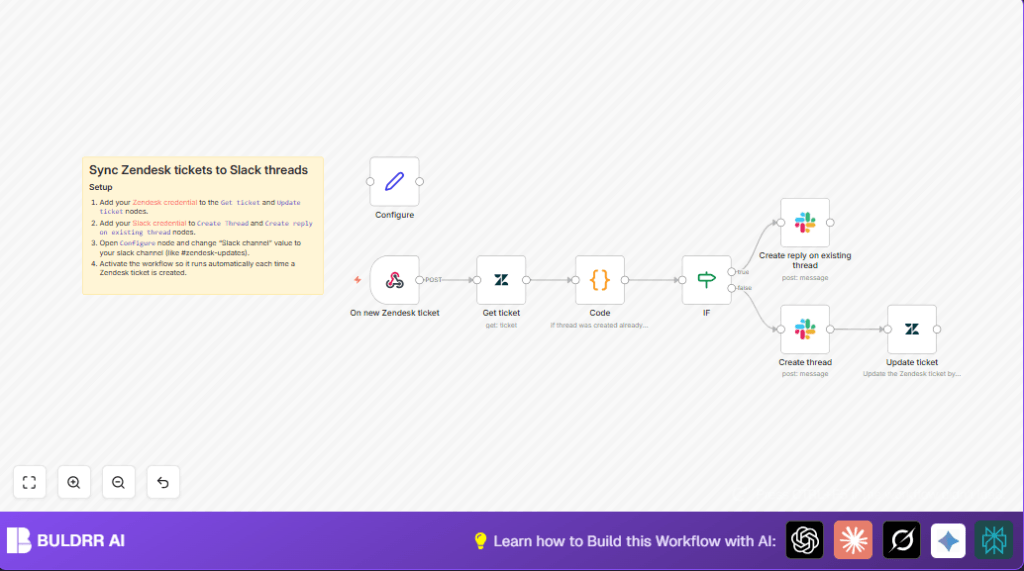

What This Workflow Does
This workflow helps you send Zendesk ticket updates to Slack automatically. It solves the problem of copying updates by hand. The workflow creates new Slack threads for tickets and posts new comments as replies. It keeps ticket and Slack messages linked so your team sees all updates fast.
It starts when a new ticket is made in Zendesk. Then it gets full ticket details. Next, it looks if a Slack thread exists already using a custom field in Zendesk. If no thread is found, it makes a new Slack thread with the ticket subject. If a thread exists, it posts new comments as replies in that thread. Finally, it saves the Slack thread ID back into the Zendesk ticket for future use.
Who Should Use This Workflow
This workflow is for team managers or support staff who handle many Zendesk tickets. It is great if your team uses Slack to communicate and wants faster updates. It fits those who spend too much time copying Zendesk comments to Slack and need clear conversation threads tied to tickets.
Tools and Services Used
- Zendesk API: To get ticket creation events and fetch full ticket data.
- Slack API: To post messages and replies to Slack channels and threads.
- n8n Automation: To connect Zendesk to Slack and run the workflow.
Inputs, Processing, and Outputs
Inputs
- Webhook trigger from Zendesk when a new ticket is created.
- Zendesk custom field holding Slack thread IDs.
Processing Steps
- Fetch full Zendesk ticket details including subject and comments.
- Extract Slack Thread ID from Zendesk custom field via Code node.
- Check if Slack thread ID exists using an If node.
- If thread exists, post new comments as replies in existing Slack thread.
- If no thread exists, create new Slack message and thread with ticket subject.
- Update Zendesk ticket custom field with Slack thread timestamp.
Outputs
- New Slack threads for new Zendesk tickets.
- New Slack replies in existing threads for ticket comments.
- Zendesk ticket custom fields updated with Slack thread IDs.
Beginner step-by-step: How to Use This Workflow in n8n
Step 1: Download and Import Workflow
- Click the Download button on this page to get the workflow file.
- In the n8n editor, choose “Import from File” and upload the downloaded file.
- The workflow will appear in the editor.
Step 2: Add Credentials
- Add Zendesk API credentials in the Zendesk node settings.
- Add Slack OAuth credentials in the Slack nodes settings.
Step 3: Update IDs and Channel
- Update the Zendesk custom field ID in the Code node if different from
7022397804317. - In the Configure set node, change the Slack channel name if needed, e.g.
#zendesk-updates.
Step 4: Test Workflow
- Create a test ticket in Zendesk to verify Slack thread creation.
- Check Slack for new thread and reply messages.
Step 5: Activate Workflow
- In n8n editor, click the Activate toggle to enable the workflow.
- Make sure Zendesk webhook is pointing to the n8n webhook URL.
You now have the workflow ready to use in production.
Common Issues and How to Fix Them
Issue: Slack Thread ID is Empty in Zendesk
Check if the Zendesk custom field ID in the Code node matches the real ID used.
Make sure the workflow is correctly writing the Slack timestamp back to Zendesk.
Issue: Slack Messages Not Posting
Verify Slack OAuth credentials are correct.
Confirm the Slack channel name in the Configure node is correct.
Customization Ideas
- Change Slack channel by editing the channel name in the Configure node.
- Add more Zendesk custom fields to the data fetched and sent.
- Post ticket status updates by extending Zendesk webhook and adding conditional Slack messages.
- Improve Slack messages with formatting or attachments for more details.
- Support multiple Slack threads per ticket by changing how thread IDs are stored.
Additional Notes
Remember to keep your API keys safe and use self-host n8n or securely hosted instances.
Slack and Zendesk API limits may affect high volume use.
Test fully before using in live support team environment.
Summary of Outcome
✓ Saves hours by automating Zendesk to Slack updates.
✓ Reduces errors by removing manual copy-paste.
✓ Maintains clear Slack threads linked to Zendesk tickets.
→ Faster communication for support teams.
→ Improved customer satisfaction from timely info.
