

What This Workflow Does
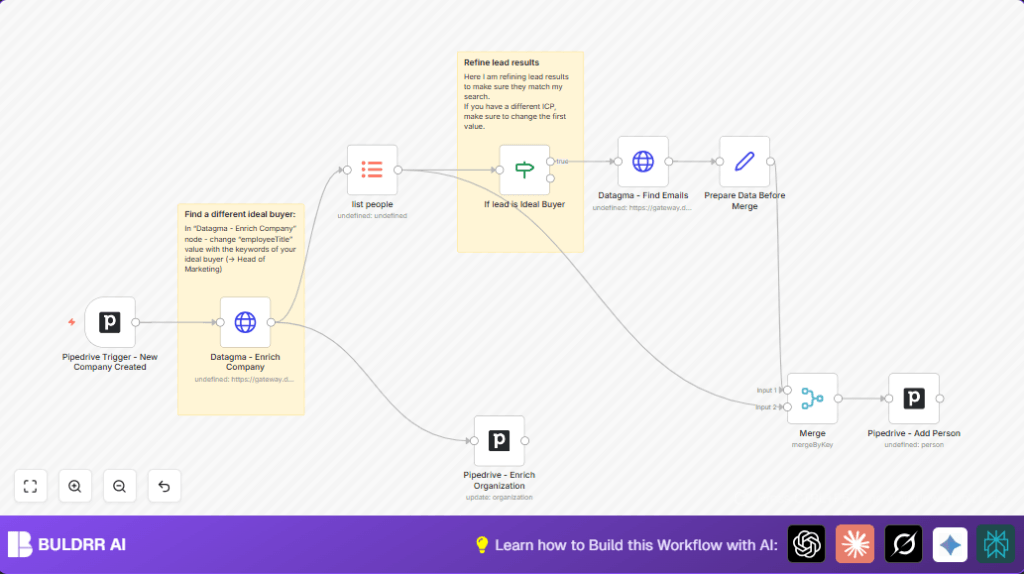
This workflow finds new company records in Pipedrive, adds company details from Datagma, searches employees who might be buyers, finds their emails, and then saves all this information back to Pipedrive. It solves the problem of wasting time on manual lead enrichment and missing accurate contacts.
It works by first catching new companies added in Pipedrive, then calling Datagma’s API to get company info and employee data. After that, it filters employees based on job titles and company scores to find ideal buyers. It looks up their business emails, cleans the data, merges it properly, and creates new contacts in Pipedrive with full details.
The result is saving many hours every week, avoiding errors from wrong or missing data, and having better leads ready for sales teams to contact.
Who Should Use This Workflow
This is good for sales directors or teams who spend hours manually enriching new company leads in Pipedrive.
Also useful for anyone who needs more accurate company info and decision-maker contacts without doing manual research daily.
If the sales team loses deals because of bad or incomplete lead data, this automation helps fix that.
Tools and Services Used
- n8n: Automation platform that runs the workflow.
- Pipedrive API: To watch for new organization records and add or update contacts and companies.
- Datagma API: To get detailed company data and find professional email addresses.
- HTTP Request node: To call Datagma API.
- Item Lists node: To split employee data for individual processing.
- If node: To filter employees based on job title and company score.
- Merge node: To combine new data with existing Pipedrive contacts and avoid duplicates.
Optionally, use self-host n8n for reliable workflow running if not using n8n cloud.
Inputs, Processing, and Outputs
Inputs: New company records added in Pipedrive.
Processing Steps:
- Trigger on new organization in Pipedrive.
- Call Datagma API to get full company info and employee list.
- Split employees into items for evaluation.
- Filter employees with job titles containing “sales” and company score > 0.1.
- Find emails of filtered employees using Datagma email API.
- Format data to prepare for matching existing records.
- Merge new data with existing Pipedrive contacts by LinkedIn URL.
- Add filtered employees as new people in Pipedrive with enriched data.
- Update the company record in Pipedrive with enriched company details from Datagma.
Output: New, enriched people and updated company records in Pipedrive ready for sales outreach.
Beginner Step-by-Step: How to Use This Workflow in n8n
1. Download and Import the Workflow
- Use the Download button on this page to save the workflow file.
- Open your n8n editor.
- Go to File → Import → Import from File and select the downloaded file.
2. Configure Credentials
- Add your Pipedrive API Key in the Pipedrive Trigger and any other Pipedrive nodes.
- Enter your Datagma API Key in the HTTP Request nodes used for company and email enrichment.
3. Update IDs or Custom Fields if Needed
- Check if organization IDs or other IDs from Pipedrive are correct.
- Adjust custom property fields in the Pipedrive – Add Person node if you use different names or IDs.
4. Test the Workflow
- Manually add a test company in Pipedrive to trigger the workflow.
- Watch execution in n8n to confirm data flows correctly and enriched data appears.
5. Activate the Workflow
- Turn the workflow toggle to active inside n8n to make it listen for new companies live.
- Monitor the executions regularly to catch any errors early.
Following these steps will get the workflow working in production without needing to build from scratch.
Customization Ideas
- Change keywords in the If node to find different buyer roles, like “Head of Marketing”.
- Adjust the company score threshold to include more or fewer leads.
- Add extra contact fields like phone numbers if those exist in Datagma results.
- Enable
continueOnFailin the HTTP Request nodes to keep the workflow running if Datagma API calls temporarily fail.
Handling Common Errors
Workflow not triggering on new companies: Check that the Pipedrive Trigger is set to action “added” and object “organization”. Verify Pipedrive webhook permission and API keys.
Datagma API returns incomplete data: Make sure the API keys have enough quota and the parameters like company name are correct.
Merge node fails due to missing keys: Ensure both data sets have the linkedInUrl field before merging. Use Set nodes to rename fields if needed.
Summary of Results
✓ Saves over 10 hours per week by automating lead enrichment.
✓ Produces more accurate contacts and company data.
✓ Reduces manual errors like wrong emails or incomplete profiles.
✓ Prepares enriched, ready-to-contact leads directly in Pipedrive.
✓ Helps sales teams focus on outreach instead of data research.
