
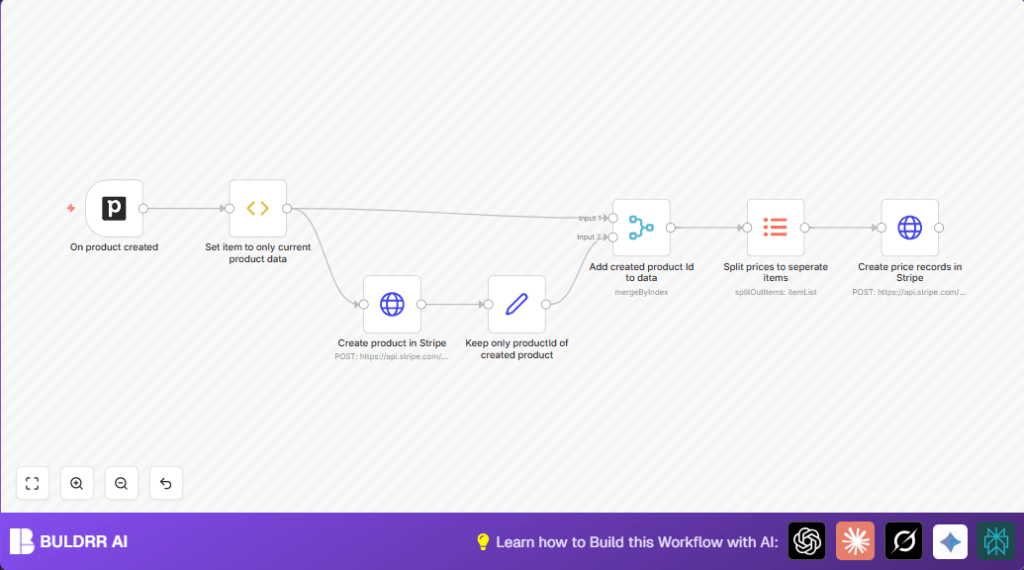

What This Automation Does
This workflow watches for new products added in Pipedrive CRM.
It then creates matching products and prices in Stripe automatically.
This stops you from typing data twice and cuts error chances.
The workflow grabs product details, sends them to Stripe, gets back Stripe’s product ID, and uses that ID to create price records for the product.
Each price is handled one by one if there are many.
In the end, your Stripe account always has the up-to-date product and pricing info from Pipedrive without extra typing.
Inputs, Processing Steps, and Outputs
Inputs
- Pipedrive product data: name, description, prices array.
- API keys: for Pipedrive and Stripe access.
Processing Steps
- Detect new product added in Pipedrive via a trigger.
- Extract the current product details only.
- Create the product in Stripe using product name and description.
- Save the Stripe product ID returned.
- Merge this Stripe ID with the original product data.
- Split the prices array into single price items.
- Create each price record in Stripe with currency, amount (converted to cents), and product ID.
Outputs
- New products in Stripe matching Pipedrive products.
- Price records linked to Stripe products.
Who Should Use This Workflow
This automation is good for salespeople or managers who use Pipedrive to track products but sell via Stripe.
If manually copying product data from Pipedrive to Stripe wastes time or causes mistakes, this workflow helps.
It works for users who want real-time syncing without technical effort after setup.
Tools and Services Used
- n8n Automation Tool: Runs the workflow.
- Pipedrive API: Detects when products are added.
- Stripe API: Creates products and prices.
Beginner Step-by-Step: How to Use This Workflow in n8n
1. Import the Workflow File
- Click the Download button on this page to get the workflow file.
- Open your n8n editor where you want to run the workflow.
- Use the Import from File option to load the workflow you downloaded.
2. Configure Credentials and Details
- Add your Pipedrive API Key in n8n credentials.
- Add your Stripe API Key as credentials for HTTP Request nodes.
- Check if there are any IDs, email addresses, or other variables you need to update in the nodes.
3. Test the Workflow
- Create a new product in Pipedrive to trigger the workflow.
- Watch the n8n execution to see if products and prices create successfully in Stripe.
4. Activate for Production
- Use the toggle switch to activate the workflow in n8n.
- Make sure error logging or alerting is set if needed.
- If you use self-host n8n, verify the server and webhook connections.
Customization Ideas
- Add more product fields from Pipedrive by changing the code in the Function Item node.
- Allow different currencies by updating the value sent to Stripe in the price creation node.
- Change the trigger from real-time Pipedrive to scheduled batch mode by replacing the trigger node.
Common Problems and Causes
- Stripe API 400 Error: Usually missing product name or wrongly formatted parameters.
- Workflow Not Triggering: Often the Pipedrive webhook is missing or wrong event selected.
- Prices Not Linked: The Stripe product ID is not properly passed or merged.
Pre-Production Checklist
- Check Pipedrive API Key works with test calls.
- Verify Stripe API Key with manual requests.
- Test product creation triggers in n8n.
- Watch data flow step-by-step in debug mode.
- Save a backup of workflow JSON before changes.
Summary
✓ Stops manual product and price copying between Pipedrive and Stripe.
✓ Cuts errors and saves time.
→ When a new product is added to Pipedrive, that product and its prices get created in Stripe automatically.
→ Workflow merges and manages product IDs to keep data linked and accurate.
