
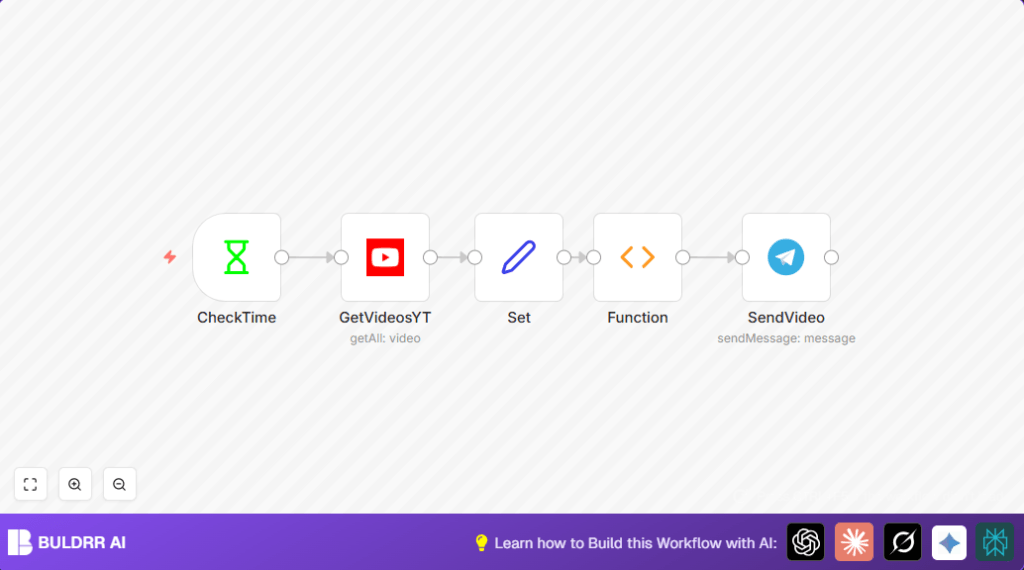

What This Workflow Does
This workflow checks a YouTube channel every 30 minutes for up to 4 new videos.
It makes sure only videos not already announced get sent to a Telegram group.
The workflow formats video titles and links nicely and sends them as messages.
This saves time and avoids missing video updates for the Telegram members.
The main problem it solves is removing the manual work of checking and typing new video info.
After setting up, it runs on its own, keeping the community informed fast.
Who Should Use This Workflow
Anyone managing YouTube updates for a group or team can use this.
This is helpful for content managers, social media people, or community admins.
It is made for those who want to automate routine video announcements without extra effort.
Tools and Services Used
- n8n Automation Platform: Runs the workflow and connects services.
- YouTube API with OAuth2 Credentials: Accesses channel video data securely.
- Telegram Bot API: Sends messages to Telegram group chat.
Input → Process → Output
Inputs
- Channel ID of the YouTube channel to monitor.
- YouTube API credentials with proper permissions.
- Telegram bot token and target group chat ID.
Processing Steps
- The Interval node triggers workflow every 30 minutes.
- The YouTube node fetches latest 4 videos from channel.
- Set node extracts video ID, title, and URL for clear data.
- Function node filters out previously sent video IDs using stored static data.
- Telegram node sends formatted messages with HTML markup about new videos.
- The static data stores sent video IDs to avoid duplicates in future runs.
Output
- Telegram group chat automatically receives new video announcements.
- Only the newest unseen videos generate notifications per interval.
Beginner Step-by-Step: How to Use This Workflow in n8n
Step 1: Import the Workflow
- Download the workflow file using the Download button on this page.
- Open your n8n editor where you usually create workflows.
- Click “Import from File” and select the downloaded workflow file.
Step 2: Configure Credentials and IDs
- Add your YouTube OAuth2 credentials under the YouTube node.
- Add your Telegram bot API key and set the correct group chat ID in the Telegram node.
- Check the channel ID in the YouTube node to match your chosen channel.
Step 3: Test the Workflow
- Run the workflow manually once to see if new video messages post in Telegram.
- Review execution logs for any errors or issues.
Step 4: Activate for Production Use
- Toggle the workflow ON in n8n to let it run automatically every 30 minutes.
- Monitor the results on first few scheduled runs for smooth operation.
- If self hosting n8n, check permissions and uptime. (self-host n8n)
Step-by-Step How This Workflow Works
Inputs
- The channel ID tells the workflow where to look for new videos.
- YouTube API credentials allow safe use of the YouTube data.
- Telegram bot details let the workflow send messages to the right chat.
Processing
- The Interval node starts the process every 30 minutes.
- The YouTube node fetches the latest 4 videos from the specified channel.
- The Set node extracts the video ID, title, and constructs the video URL.
- The Function node compares current videos with stored IDs and filters out duplicates.
- The Telegram node sends a message for each new video to the Telegram group.
- Static data storage gets updated with new video IDs to avoid repeats next time.
Output
- Fresh, formatted video notification messages posted in Telegram.
- No repeats from old videos during later checks.
Customization Ideas
- Change the channel ID inside the YouTube node to watch another YouTube channel.
- Adjust the video limit to fetch more or fewer recent videos per interval.
- Modify the Telegram message template to add hashtags or personalized text.
- Change the Interval node timing for more or less frequent checks.
- Add more video details like publish date or video duration in the Set node to enrich messages.
Troubleshooting
Issue: No new video notifications get sent.
Check: Verify that the Function node static data holds stored IDs correctly.
Clear or reset stored IDs if no videos flow through.
Issue: Telegram messages do not appear or formatting is wrong.
Check: Confirm the Telegram chat ID is accurate.
Make sure the Telegram node has HTML parse mode enabled.
Pre-Production Checklist
- Confirm YouTube OAuth2 credentials are valid and authorized.
- Ensure Telegram bot token is set and bot is allowed in the group.
- Test Interval trigger executes correctly.
- Run the workflow manually to verify message delivery.
- Confirm duplicates are filtered correctly in the Function node by testing repeated video IDs.
Deployment Guide
Switch the workflow toggle ON inside n8n to start running automatically.
Watch initial few runs for smooth message posting to Telegram.
If running on a private server, ensure stable internet and n8n uptime.
Consider self-host n8n for full control.
Summary of Benefits and Outcome
✓ Saves user over 15 minutes daily by automating video check and notification.
✓ Ensures no duplicate messages about the same video are sent.
✓ Keeps Telegram community updated fast with latest videos.
✓ Easy to adjust frequency, channel, and message style.
✓ Works in background freeing user from manual posts.
