
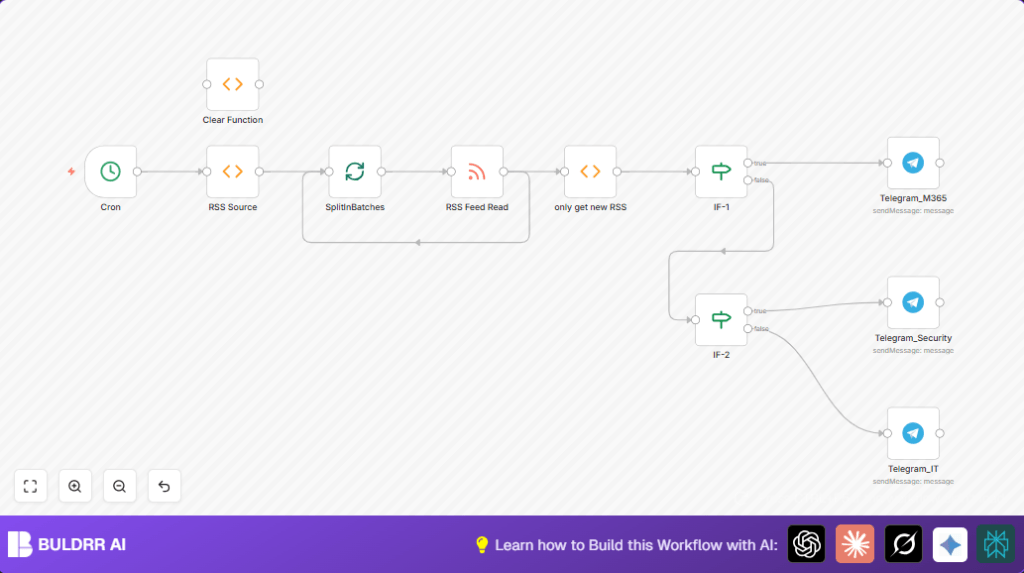

What this workflow does
This n8n workflow automatically fetches news from several RSS feeds every 10 minutes.
It filters out old or duplicate items and sorts news by topics like Microsoft 365 and security.
Then, it sends the filtered news to specific Telegram groups for IT, Security, and Microsoft 365 teams.
This saves time and keeps teams updated without manual work.
Who should use this workflow
This workflow is for people who often read many tech and security news feeds.
IT analysts, security teams, or Microsoft 365 users who share news with groups can use it to save effort.
It stops duplicate messages and organizes news automatically.
Tools and services used
- n8n: for creating and running the automation workflow.
- Telegram Bot API: sends messages to Telegram groups.
- RSS Feeds: sources of technology and security news.
Inputs, Processing, and Outputs
Inputs:
- List of RSS feed URLs created inside a Function node.
Processing steps:
- Cron node triggers workflow every 10 minutes.
- SplitInBatches node processes one RSS URL at a time to prevent overload.
- RSS Feed Read node fetches news items from each URL.
- Function (only get new RSS) node filters out previously seen news by storing their dates in global static data.
- IF nodes check URLs and titles to classify news:
- Microsoft 365 news go to the Telegram_M365 node.
- Security-related news based on keywords go to Telegram_Security node.
- Others go to Telegram_IT node for general tech updates.
- Telegram nodes send messages with news title and link to proper Telegram groups.
Outputs:
- Real-time categorized news messages appear in IT, Security, and Microsoft 365 Telegram chats.
Beginner step-by-step: How to use this workflow in n8n
This workflow takes under 5 minutes to set up — just import, add your bot token, and activate.
Step 1: Import the workflow
- Download the workflow file using the Download button on this page.
- Inside the n8n editor, choose “Import from File” and select the downloaded file.
Step 2: Set Up Your Telegram Bot Credentials
- Add your Telegram Bot API credentials in the relevant Telegram nodes.
- Update Telegram group chat IDs if needed to match your target chats.
- If you want to add or update RSS feed URLs, edit the Function node named “RSS Source” and paste your feed URLs in the JSON array.
Step 3: Test and activate
- Manually run the workflow once to check it fetches and sends news correctly.
- If tests are successful, activate the Cron trigger node to run every 10 minutes.
- Monitor the workflow in n8n’s execution history and logs for any errors.
For better uptime, consider self-host n8n on a reliable server.
Edge cases and failures
- If the RSS Feed Read node returns no items, check if feed URLs are correct and reachable.
- When Telegram messages fail, verify the bot token and chat IDs are correct and the bot has permissions.
- Duplicate news may appear if the static cache resets or the filtering code is changed improperly.
- News may get misclassified if keyword filters or URL checks in the IF nodes have typos or incorrect expressions.
Customization ideas
- Add more RSS sources by editing the JSON array inside the RSS Source Function node.
- Change SplitInBatches node batch size to control how many feeds process at once.
- Edit the security keywords regex in the second IF node to adjust filtering sensitivity.
- Personalize Telegram message text with HTML formatting or add extra feed details.
- Adjust Cron node schedule to fetch news more or less often as needed.
Summary of results
✓ Save hours by automating news fetching and distribution.
✓ Avoid duplicate or old news reaching Telegram groups.
✓ Get clear category-based news in IT, Security, and Microsoft 365 channels.
✓ Run fully automatically every 10 minutes without manual work.
✓ Easy to extend and customize feeds and filters.
