

What this workflow does
This workflow updates crypto prices from CoinGecko to your Airtable portfolio every hour.
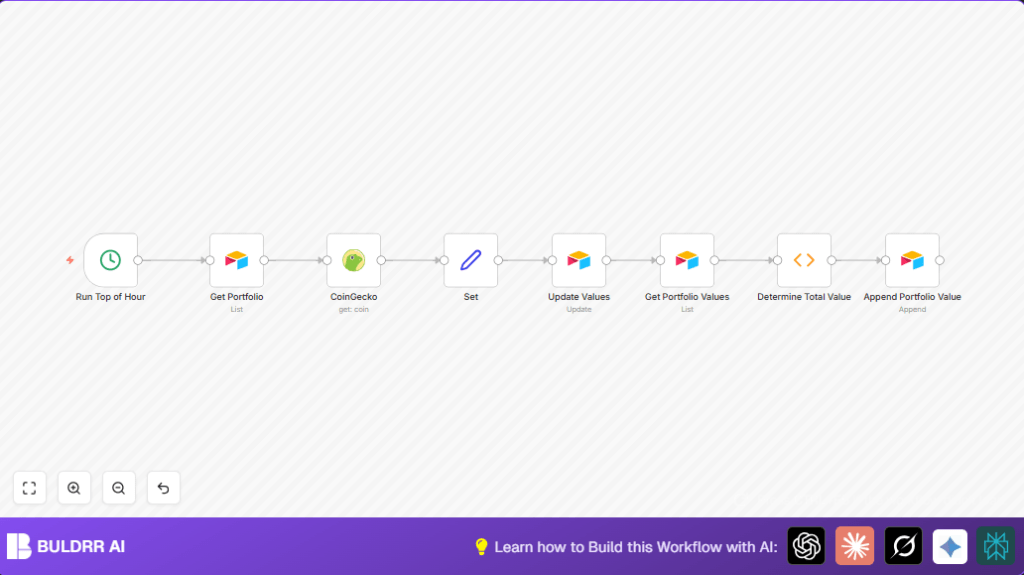
It pulls coin symbols from Airtable, fetches current USD prices, updates each coin’s price, sums total portfolio value, and records this total in Airtable.
This stops manual price checks and ensures your portfolio data is fresh and accurate.
Who should use this workflow
This workflow is for people tracking crypto investments using Airtable tables.
It helps if you update prices often and want to save time and avoid errors.
It suits users with an Airtable portfolio table and a history table for total portfolio values.
Tools and services used
- n8n platform: To create and run the workflow.
- Airtable API: To read and write portfolio data.
- CoinGecko API: To get real-time crypto prices without needing an API key.
How this workflow works: Inputs, Processing, and Outputs
Inputs
- Cryptocurrency symbols listed in Airtable ‘Portfolio’ table.
- API credentials for Airtable access.
- Market price data for crypto symbols from CoinGecko.
Processing Steps
- A Cron node triggers the workflow every hour.
- A Get Portfolio Airtable node collects coin symbols.
- A CoinGecko node fetches current USD prices for each symbol.
- A Set node formats price and record ID for updates.
- An Update Values Airtable node updates prices in Airtable.
- A Get Portfolio Values Airtable node retrieves current ‘Present Value’ fields.
- A Determine Total Value Function node sums all portfolio values.
- An Append Portfolio Value Airtable node adds the total to a historical tracking table.
Outputs
- Hourly updated coin prices in Airtable.
- Total portfolio value saved over time in a separate Airtable table.
- Reliable, up-to-date valuation data without manual updates.
Beginner step-by-step: How to use this workflow in n8n
Import and setup
- Download the workflow file from this page.
- Open n8n editor and choose “Import from File” to load the workflow.
- Add your Airtable API key in the credentials section.
- Set your Airtable application ID and table names if different from defaults.
- No API key is needed for the CoinGecko node.
- Check and update any specific field names if your Airtable differs.
Test and activate
- Run the workflow manually once to confirm price fetching and updates.
- Look at the execution logs to spot any errors like missing IDs.
- If all works, toggle the workflow ON to enable hourly auto updates.
- If self hosting n8n, ensure your instance has internet access to reach APIs.
Learn more about self-host n8n
Customization ideas
- Change the Cron node to run updates every 30 minutes or daily.
- Add more data in the CoinGecko node, like 24h volume or change percentages.
- Include filters after ‘Get Portfolio’ to update only coins above a value limit.
- Save prices in different Airtable fields by changing the Set node.
Troubleshooting common problems
- If the workflow shows “Invalid CoinGecko coin ID”, check that the Airtable symbols use CoinGecko IDs like “bitcoin” or “ethereum”.
- If Airtable update fails with “Record not found”, confirm the Set node sends correct record IDs.
- If total portfolio value is zero, verify that ‘Present Value’ fields in Airtable are filled and the names exactly match.
Pre-production checklist
- Check Airtable API key has read/write permissions.
- Make sure CoinGecko coin IDs in Airtable match API format.
- Test workflow with few coins before full use.
- Review outputs of Set node to confirm format.
- Run full test and watch logs for errors.
Summary of results
✓ Stops manual price entry for crypto portfolios.
✓ Keeps portfolio prices updated hourly.
✓ Shows total portfolio worth automatically.
✓ Saves the total value over time for tracking.
