
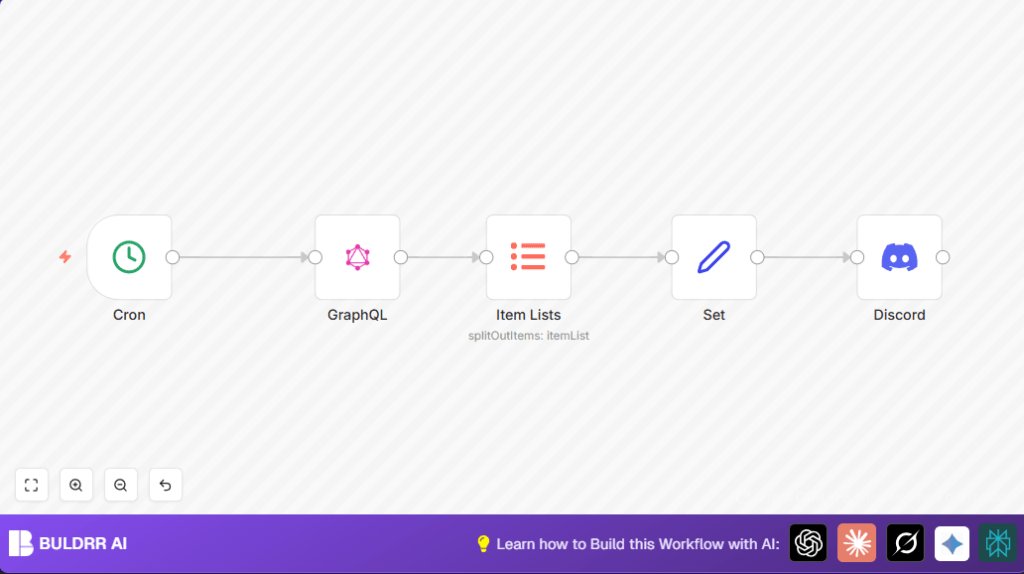

What This Workflow Does
This workflow automatically fetches the top 5 trending projects from ProductHunt every hour and posts them on a Discord channel. It saves time by removing manual steps and keeps a community updated with fresh startup info regularly.
It uses ProductHunt API data, processes project details, and sends formatted messages to Discord without human help.
Who Should Use This Workflow
Community managers who want to share the latest ProductHunt projects easily.
People who run Discord servers or other groups interested in startups and tech products.
No detailed coding knowledge is needed, just basic setup with n8n.
Tools and Services Used
- n8n: To build and run the automation workflow.
- ProductHunt API: Supplies data about trending projects.
- Discord Webhook: Allows posting messages into a Discord channel.
Inputs, Processing, and Output
Inputs
- A valid ProductHunt API key with permission to fetch posts.
- A Discord webhook URL from the target channel.
Processing Steps
- The Cron node triggers the workflow every hour.
- The GraphQL node sends a query to the ProductHunt API to get the latest 5 projects ranked by votes.
- The Item Lists node extracts each project from the API response.
- The Set node formats project details into simple fields: name, description, and vote count.
- The Discord node posts a message listing the top projects with their info to the Discord channel.
Output
An hourly Discord message showing the freshest top 5 trending ProductHunt projects.
Beginner Step-by-Step: How to Use This Workflow in n8n
Importing the Workflow
- Download the workflow JSON file using the Download button on this page.
- In the n8n editor, use the Import from File option to load the workflow.
Configuring Necessary Settings
- Add your ProductHunt API key in the GraphQL node Authorization header. Replace
YOUR-TOKENwith your API key. - Paste your Discord webhook URL into the Discord node‘s Webhook URL field.
- Update any other IDs or channel settings if needed.
Testing and Activating
- Run the workflow manually once to ensure it works and posts to Discord.
- If the test is successful, activate the workflow using the toggle switch in the top right of n8n.
- The workflow will now run every hour without manual help.
For users running self-host n8n, visit self-host n8n for hosting options.
Common Issues and How to Fix Them
- Problem: “Authorization failed” or no data from ProductHunt.
Fix: Check and update the ProductHunt API key in the GraphQL node. - Problem: Discord messages do not appear.
Fix: Verify Discord webhook URL and channel permissions. - Problem: Empty or wrong data in Discord messages.
Fix: Confirm JSON paths and expressions in the Set node.
Customization Ideas
- Change number of projects by editing
first: 5in the GraphQL query. - Adjust posting frequency in the Cron node to every 30 minutes or daily.
- Add extra data fields like project ratings in the Set node.
- Edit Discord messages with emojis or markdown for different styles.
- Filter projects by custom date ranges by changing the GraphQL query.
Summary of Results
✓ Saves about 30 minutes of daily manual work.
✓ Reduces mistakes in sharing project info.
✓ Keeps Discord community updated hourly.
✓ Posts clear messages with top trending startups.
