

What This Automation Does
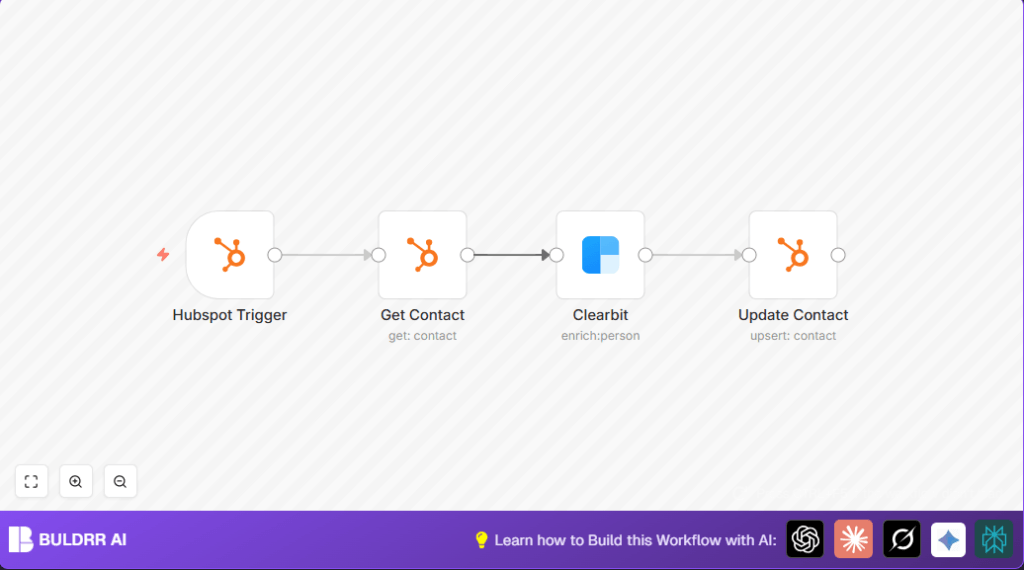
This workflow automatically updates contact details in HubSpot by getting data from Clearbit using email addresses.
It solves the problem of manual data entry by saving time and reducing errors.
When a contact is added or changed, the workflow enriches the contact info with job title, company, and city.
This helps keep the CRM up to date and improves communication.
How This Workflow Works (Input → Process → Output)
Input
- HubSpot contact creation or update event triggers the workflow.
- Contact ID from HubSpot event is used as input.
Processing Steps
- The workflow gets the full HubSpot contact details by contact ID using HubSpot API.
- It extracts the email address from the contact details.
- The email is sent to Clearbit Person API to get enriched data about the person.
- Enriched details like city, job title, and company name are extracted from Clearbit response.
- Contact in HubSpot is updated with this fresh data using HubSpot Update Contact API.
Output
- HubSpot contacts have updated fields with accurate and current data.
- Manual research and entry tasks are eliminated for these contacts.
Beginner Step-By-Step: How to Use This Workflow in n8n
Step 1: Download and Import Workflow
- Click the Download button on this page.
- Open your n8n Editor.
- Use the “Import from File” option and select the downloaded workflow file.
Step 2: Configure Credentials and Settings
- Add your HubSpot OAuth2 credentials in the HubSpot nodes.
- Add your Clearbit API Key in the Clearbit node.
- Check if any contact IDs, emails, or other dynamic settings need updating (usually not needed if using triggers).
Step 3: Test the Workflow
- Add or update a contact in HubSpot to trigger the workflow.
- Check the workflow run in n8n to see if data is retrieved and updated correctly.
Step 4: Activate Workflow
- Enable the workflow to run automatically on new or changed contacts.
- Ensure that the HubSpot Trigger node webhook URL is set up correctly in HubSpot’s webhook settings.
Now the workflow will enrich contact info automatically every time a contact is added or edited.
Tools and Services Used
- HubSpot API: Detect contact changes and update contact details.
- Clearbit Person API: Provide enriched person details based on email.
- n8n Automation: Connects HubSpot and Clearbit with automated workflow.
Common Issues and How to Fix
- Clearbit 400 Bad Request: Check that email is correctly extracted with expression
{{$json["properties"]["email"]["value"]}} - HubSpot OAuth2 Failure: Refresh or re-enter OAuth2 credentials in n8n.
- Empty Updates: Map fields correctly from Clearbit response in the Update Contact node.
Customization Ideas
- Add more fields like LinkedIn URL, Twitter handle in Clearbit settings.
- Use an IF node to only update contacts missing info and save API calls.
- Trigger workflow only on specific property changes like company or email.
Deployment and Hosting Notes
Turn on the workflow after setup for live production use.
Watch workflow executions in n8n to fix errors fast.
This can run on cloud n8n or on your own server.
For running n8n on your own server or VPS, see self-host n8n for help.
Summary / Key Results
✓ The workflow updates HubSpot contacts automatically with new job, company, and city info.
✓ It removes hours of manual work for sales and marketing teams.
✓ Data quality in HubSpot improves, helping personalized outreach.
→ The user saves time, reduces errors, and keeps CRM info fresh.
→ Deployment is simple with clear steps and minimal coding.
