
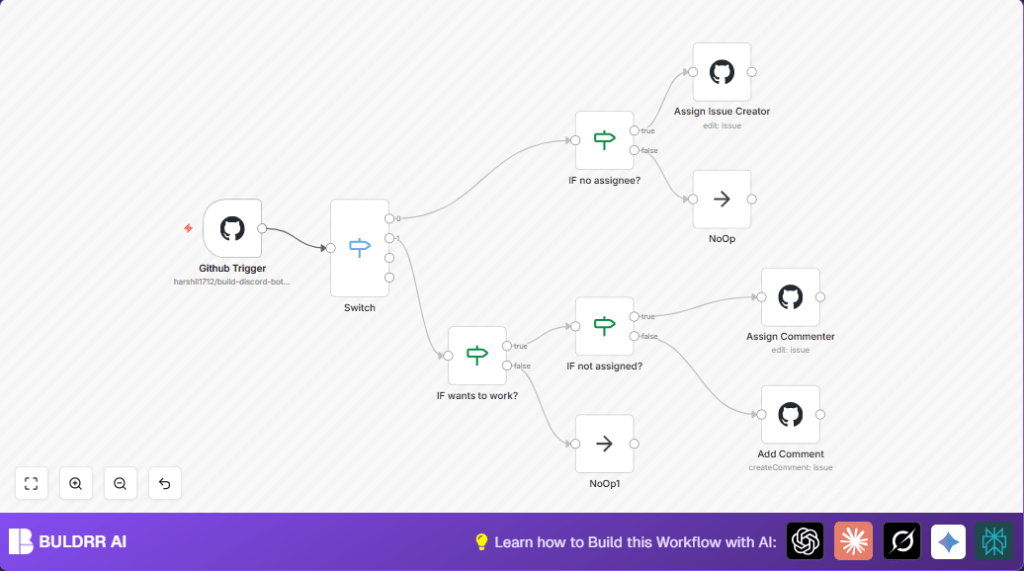

What this workflow does
This n8n workflow helps to assign GitHub issues automatically.
This stops delays in fixing problems and confusion about who is working on what.
It assigns the person who made the new issue or a user who comments “assign me”.
It also adds a label “assigned” to mark issues that were given someone.
The workflow watches for new issues and comments.
It then checks if the issue is unassigned and assigns the right person.
Inputs, Processing Steps, and Outputs
Inputs
- GitHub Issue Event: Trigger when a new issue is opened.
- GitHub Issue Comment Event: Trigger when someone comments on an issue.
Processing Steps
- The workflow checks if the event is a new issue or a comment.
- If it is a new issue with no assignee, it assigns the issue creator.
- When a comment says “assign me” (in any case or spacing), the workflow checks if the issue has no assignee.
- If unassigned, it assigns the commenter.
- If the issue has an assignee already, the workflow comments back telling who is assigned.
- Whenever an assignment happens, the issue is labeled as “assigned”.
Outputs
- GitHub Issue Assigned: Issue assigned to the correct user.
- GitHub Comment Added: Comment informs users if assignment is taken.
- GitHub Label Added: “assigned” label marks assigned issues.
Who should use this workflow
Users managing busy GitHub repositories with many issues.
Anyone who wants to save time and avoid confusion in assigning issues.
This suits open source maintainers, small dev teams, and community managers.
Tools and services used
- GitHub API: Receives issue and comment events, updates issues.
- n8n Platform: Runs the workflow and connects GitHub nodes.
- GitHub OAuth2 Credentials: Authenticates API calls.
Beginner step-by-step: How to use this workflow in n8n
Step 1: Download and import the workflow
- Click the “Download” button on this page.
- Open n8n editor already logged in.
- Choose “Import from File” in the workflow menu.
- Select the downloaded workflow JSON.
Step 2: Configure credentials and settings
- Add GitHub OAuth2 credentials linked to your account.
- Update the owner and repository names if different.
- Set any other required IDs, emails, or labels mentioned.
Step 3: Test the workflow
- Trigger by opening a test issue or making a test comment.
- Check if the issue assigns correctly or comment gets added.
- Fix any errors shown in the n8n execution panel.
Step 4: Activate for production
- Enable the workflow by toggling “Active” at the top.
- Make sure the GitHub webhook matches the GitHub Trigger node URL.
- Observe issues and comments to confirm automation works.
If self hosting n8n, consider useful self-host n8n options.
Customization ideas
- Change the phrase to trigger assignment from “assign me” to anything like “count me in”.
- Add more GitHub events such as pull requests for wider automation.
- Assign based on labels using extra logic nodes.
- Modify comments to include links to contribution rules or thank-you messages.
- Integrate Slack or Discord notifications on new assignments.
Troubleshooting tips
- Problem: No workflow runs on issues or comments.
Fix: Check webhook URL and selected GitHub events match in GitHub settings. - Problem: Issue assignments not updating.
Fix: Ensure GitHub OAuth2 token has repo permissions.
Verify expressions for owner, repo, and issue number in nodes. - Problem: Assignment triggers not matching comment text.
Fix: Test and adjust regex pattern for “assign me” phrase.
Pre-production checklist
- Confirm GitHub OAuth2 credentials work and have permissions.
- Test webhook URL by creating a test issue or comment.
- Review all node configurations and connections in n8n.
- Verify GitHub repository webhook is active and receiving events.
Deployment guide
After testing, set the workflow to active.
Monitor executions regularly in the n8n dashboard.
Optionally add logging or alert nodes for record keeping or notifications.
Summary of benefits and results
✓ Saves over 3 hours a week by automating GitHub issue assignments.
✓ Prevents delays and confusion about who’s working on issues.
✓ Makes collaboration faster and clearer by labeling assigned issues.
→ Creates a smooth, automatic way for assigning GitHub issues.
→ Reduces manual work for maintainers and teams.
