

Automate Slack Status & Philips Hue from Google Calendar

Discover how to automatically update your Slack status and Philips Hue lights based on Google Calendar events. This workflow streamlines presence indication by color-coding meetings and availability, saving time and reducing miscommunication.
googleCalendarTrigger
slack
httpRequest
+4
Workflow Identifier: 1385
NODES in Use: manualTrigger, googleCalendarTrigger, googleCalendar, function, slack, switch, httpRequest
Automate Slack status with n8n and Google Calendar

Press CTRL+F5 if the workflow didn't load.

Learn how to Build this Workflow with AI:

What this workflow does

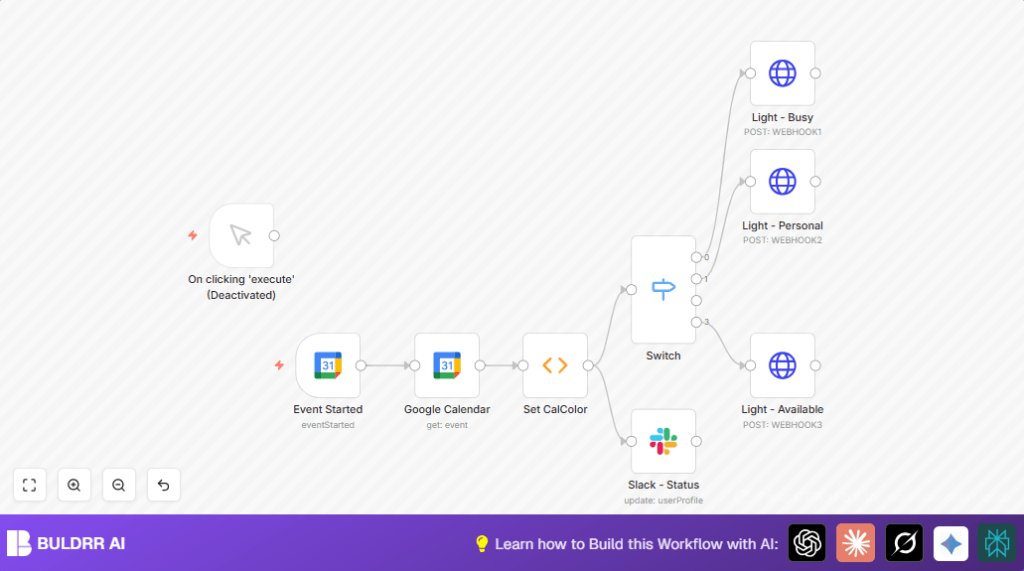
This workflow automatically updates Slack status and Philips Hue lights based on your Google Calendar events.

It solves the problem of forgetting to change availability status manually when meetings start.

The outcome is that your Slack status shows meeting info and your lights change color without any manual steps.


Who should use this workflow

Anyone with busy calendars who wants clear availability signals without extra work.

This is useful for professionals who use Slack, Google Calendar, and Philips Hue lights.


Tools and services used

  • Google Calendar: Source of meeting events and color categories.
  • Slack API: Updates user profile status with event details and emojis.
  • Philips Hue: Smart lights controlled via webhook HTTP POST requests to show availability.
  • n8n automation platform: Runs the workflow, connects services, and handles logic.

Inputs, processing steps, and outputs

Inputs

  • Google Calendar event start trigger firing every 5 minutes.
  • Event ID and details including event summary and color ID.

Processing steps

  • Retrieve full event details using event ID.
  • Map calendar color IDs to custom status tags with a JavaScript Function node.
  • Update Slack status text with event summary and status emoji based on mapped tags.
  • Use a Switch node to decide Philips Hue light state from status tags.
  • Send HTTP POST requests to Philips Hue webhooks for specific lighting scenes.

Outputs

  • Your Slack profile status shows your current event and status emoji.
  • Your Philips Hue lights change color to indicate Busy, Personal, or Available.

Beginner step-by-step: How to use this workflow in n8n

1. Import the workflow

  1. Click the Download button on this page to get the workflow file.
  2. Open n8n editor and choose Import from File.
  3. Select the downloaded file to import the workflow.

2. Configure credentials and details

  1. Add Google Calendar OAuth2 credentials in n8n.
  2. Add Slack API token with profile update permission.
  3. Add Philips Hue webhook URLs in the HTTP Request nodes.
  4. Update calendar ID, event and user email IDs if needed.

3. Test the workflow

  1. Manually run or simulate a calendar event start in Google Calendar.
  2. Check Slack status updates with event info and emoji.
  3. Check Philips Hue lights change accordingly.

4. Activate for production

  1. Enable the Google Calendar Trigger node.
  2. Save and activate the workflow.
  3. Keep n8n running (use self-host n8n if not using cloud).

Customization ideas

  • Change Slack status emojis by editing the emoji expression in the Slack node.
  • Add new lighting states by extending the Switch node and adding HTTP Request nodes for other Philips Hue scenes.
  • Update the Function node mapping to match any new or custom Google Calendar color IDs.
  • Add event duration info into Slack status text to show meeting length.
  • Add logging nodes to track event data and Philips Hue responses for troubleshooting.

Automate Slack status with n8n and Google Calendar

Visit through Desktop to Interact with the Workflow.

Frequently Asked Questions

Check if the Google Calendar ID is correct and OAuth2 credentials are set up properly in the Google Calendar Trigger node.
Slack API token may lack permissions to update user profiles or the token may have expired. Reauthorize Slack credentials with correct scopes.
Incorrect webhook URLs or HTTP method errors in the HTTP Request nodes can stop lights from responding.
No. This workflow uses Google Calendar nodes and event ID syntax specific to Google Calendar. Other services require changing nodes and logic.
Author
Written By
Ritu Sanjali

Related Workflows

Automate Twist Channel Creation and Messaging with n8n

This workflow automates creating and updating a channel in Twist and sending a personalized message to specific users. It eliminates manual setup errors and saves time managing Twist communications.

Automate Ideogram Image Generation with Google Sheets & Gmail

This workflow automates graphic design image generation via Ideogram AI, storing image data in Google Sheets and Google Drive, with email alerts via Gmail. It saves designers hours by automating image creation, remixing, review, and record-keeping.

Automate IT Support with Slack and OpenAI in n8n

Streamline IT support by automating Slack message handling using n8n and OpenAI. This workflow handles Slack DMs, filters bots, queries a Confluence knowledge base, and delivers AI-generated responses, improving support efficiency and response time.

Automate Crypto Analysis with CoinMarketCap & n8n AI Agent

Discover how this unique n8n workflow leverages CoinMarketCap’s multi-agent AI to deliver precise, real-time cryptocurrency insights directly via Telegram. Manage crypto data analysis efficiently with automated multi-source API integration.

Automate Gumroad to Beehiiv Subscriber Sync with n8n

Learn how to automatically add new Gumroad sales customers as Beehiiv newsletter subscribers using n8n automation. This workflow saves time by syncing sales data to Google Sheets CRM and notifying your Telegram channel instantly.

Generate On-Brand Blog Articles Using n8n and OpenAI

This workflow automates the creation of on-brand blog articles by analyzing existing company content using n8n and OpenAI. It extracts article structures and brand voice to produce consistent draft articles, saving significant content creation time.
1:1 Free Strategy Session
Your competitors are already automating. Are you still paying for it manually?

Do you want to adopt AI Automation?

Every hour your team does repetitive work, you're burning real money.
While you wait, faster businesses are cutting costs and moving quicker.
AI and automations aren't the future anymore — they're the present.

Book a live 1-on-1 session where we show you exactly which of your daily tasks can be automated — and what it’s costing you not to.